Home
This wiki has developer-facing notes for working on the codebase.
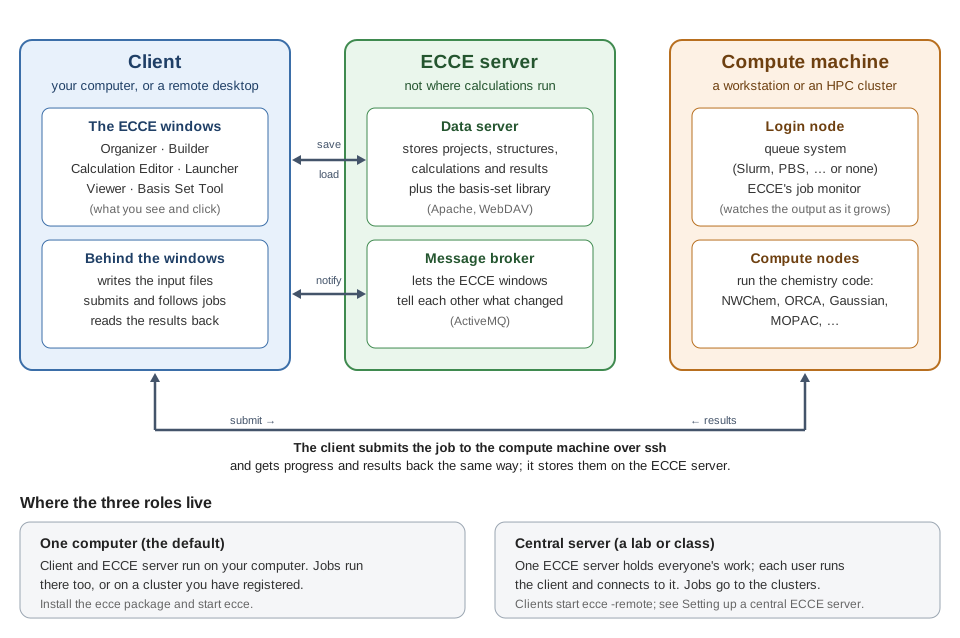
The "ECCE server" is the data server (Apache/WebDAV: projects, calculations, results, basis sets) plus the message broker (ActiveMQ) the ECCE windows use to notify each other. It is not the compute machine: calculations run on a workstation or cluster that the client reaches over ssh.
Start here: GETTING_STARTED.md in the repo — build dependencies, build, package, install, start the background services, create your account, and log in, step by step, for this fork's CMake/CPack build on Debian 13. The README has the same steps plus screenshots and an overview of what the app actually does. Both live in the repo (not the wiki) so they stay in sync with the code they describe as it changes — the wiki won't duplicate them.
As of the v8.0.0 "Phoenix" release, this is an actively maintained, modernized fork: current build system (CMake/CPack), current wxWidgets (3.2, GTK3), current C++ (17), current Python (3), targeting Debian 13. See the latest release for what changed.
Platforms: CI builds this clean on Debian, Ubuntu, Fedora, and Rocky Linux (RHEL family) on every push. On Windows, use WSL2 — it's a real Linux kernel/userland, so the normal Linux instructions apply directly; Cygwin and native Windows are both out of scope (see #18). macOS isn't supported yet (#3).
- Where to find things in the code — codebase orientation for anyone adding a feature or a new computational code
- Branches and releases
- Setting up a central ECCE server — one server for a group or a class, with many clients connecting to it, instead of a data server per user
- Connecting to a cluster that requires 2FA — authenticate once yourself and let ECCE submit and monitor jobs over that connection
-
Something not working? Run the session that goes wrong with
ecce --bug, reproduce the problem, and close the Organizer. It turns diagnostic logging on and collects ECCE's logs, the service logs andecce-diagnoseoutput into one archive,~/ecce-bug-<time>.zip(.tar.gzwithoutzip). The archive holds no passwords, but it does contain host names, user names and paths, so look through it before you attach it. If ECCE won't start at all, runecce-diagnoseinstead; for a job that didn't start or never finished, give it the job's run directory:ecce-diagnose /path/to/run/dir. - Bugs, build failures, and feature requests: open an issue on the
issue tracker. Attach
the
ecce --bugarchive to a bug report; it usually saves several rounds of questions.ecce --versiongives the version. - Contributions welcome — see the issue tracker for open items, or just open a PR.
We're a small volunteer effort, and what helps most now is using ECCE
and telling us what breaks: run your real calculations with it — on
your own machine, a cluster, or a teaching lab's central server — and
report anything that fails, looks wrong or is confusing, with an
ecce --bug archive attached.
A note on AI use: a lot of this modernization effort — including many commits, and many of the comments you'll see on issues and pull requests — was done with heavy use of Claude (Anthropic's AI assistant), under the maintainer's direction and review. This isn't hidden per-comment; this note is the disclosure. Treat AI-authored analysis the same as you would any other contributor's: useful, but verify anything you're relying on, especially root-cause claims in older issue threads.