


Download Voidworks


Voidworks is Voidcrew's mapping toolkit, based on StrongDMM, a map editor for BYOND.
Open Voidcrew projects, browse maps, and access project tools from the Voidcrew menu. Ship Workshop adds assembled modular ship editing and new ship creation, with edits saved to the hull and module source files. The normal mapping tools, undo/redo, and visibility shortcuts remain available.
The editor offers a range of new features:
- TGM support with built-in map merger (no need to use external scripts and pre-commit hooks);
- Almost instant environment open;
- Custom layers filter;
- Built-in screenshot tool;
- Smooth zoom-in/zoom-out;
- Robust "Search";
- Improved shortcuts;
- Robust variables editor and variables preview;
- Optional sanitization of variables;
- Open with CLI.
...and a lot more...
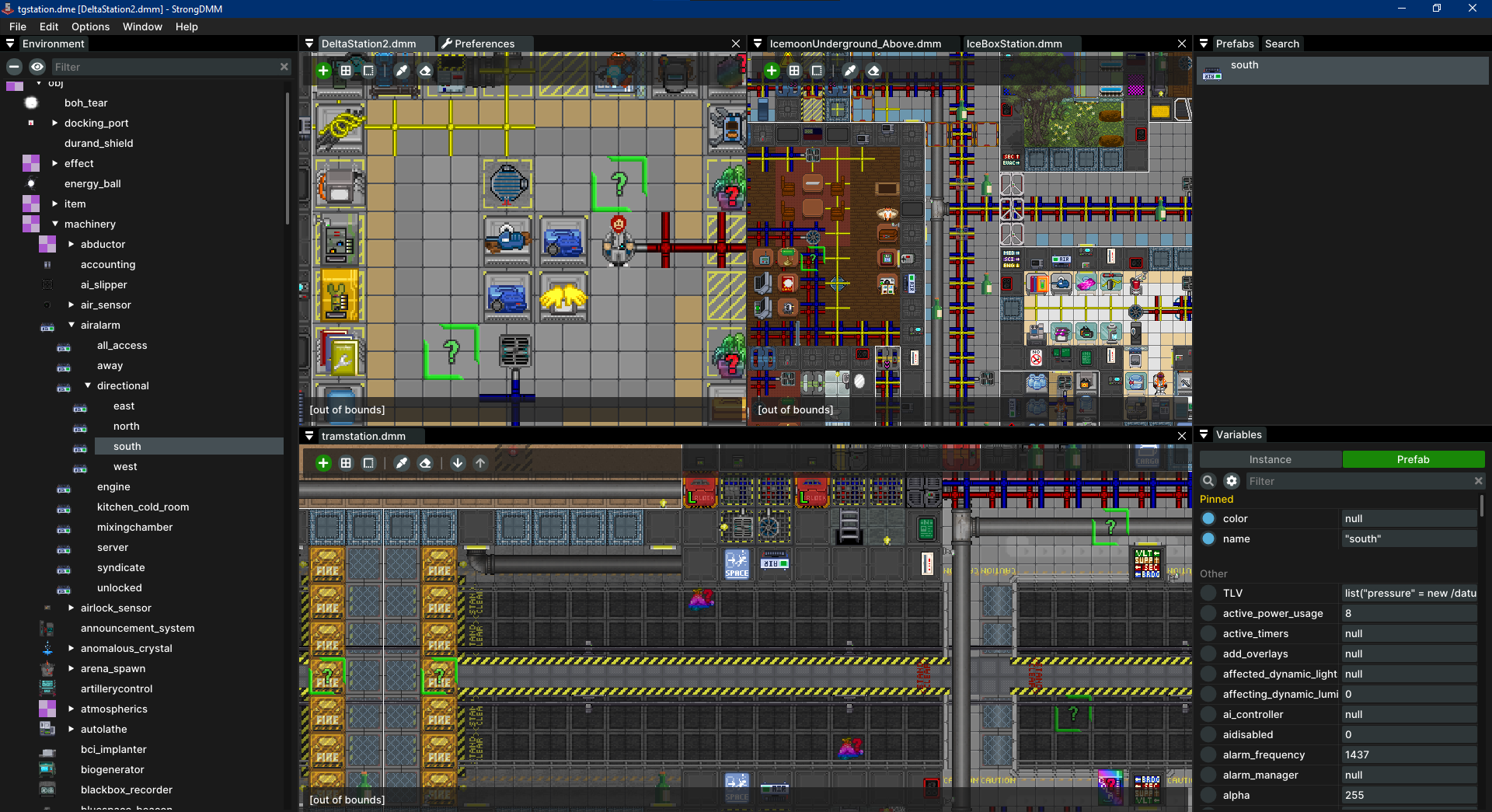
Extract the Windows x64 ZIP and run Voidworks.exe. Choose Open Project and select your Voidcrew checkout's tgstation.dme. The project page offers map browsing, Ship Workshop, and new ship creation; project tools also live in the Voidcrew menu. See START-HERE.txt for details. Use Help → Updates & Release Channel to switch between Stable and Beta.
Older StrongDMM builds need one manual download after the repository rename. Run Voidworks.exe; future updates use the Voidworks release channels.
Download Links:
Release page contains all distributed files. It also has sha256 hashes info for every executable for validation purposes.
Voidworks supports the command line to quickly open maps. Provide .dme or .dmm files as program arguments:
Voidworks.exe path/to/environment.dme ./map1.dmm ../path/map2.dmm
Voidworks.exe ./map1.dmm ../path/map2.dmm
When providing .dmm files without .dme, a proper environment file will be found automatically.

StrongDMM was developed without any monetization in mind. The main motivation is the enthusiasm for creating cool stuff.
Your support can demonstrate your appreciation and will motivate further development of the project.
Additionally, if you have specific features in mind that you'd like implemented in the editor, we can focus on your needs.
Report Voidcrew editor bugs in this fork's issues.
Q. My antivirus software detects something suspicious in the editor binaries. Is it ok?
A. Yes, it's a false positive reaction to the way Golang, the development language, creates binaries. Read more: Golang FAQ
Q. How do I verify my executables?
A. Verify them using sha256 hashes, available on the releases page.
Q. But how can I trust executables on the release page?
A. Release ZIPs include the matching source, dependencies, and BUILDING.txt instructions so you can rebuild them.
Q. How to uninstall the editor?
A. Voidworks doesn't require installation, so no specific uninstallation process is needed. Simply delete the executable and, if desired, its directory on your OS to remove editor data.
Q. Where do I find editor data?
A. For Windows: %APPDATA%\Voidworks, for Linux/macOS: ~/.voidworks. Existing Voidcrew editor settings and backups are copied on first launch; the original profile is preserved.
Q. How to move the map?
A. Drag the map using the middle mouse button, or by holding the space key. Alternatively, you can use the arrow keys.
Q. How to zoom?
A. Zoom using your mouse scroll wheel or the +/- keys on the keyboard.
Q. How to change the save format?
A. Go to File -> Preferences... in the menu bar and select the desired format.
Q. The editor crashed. Where can I find logs?
A. Access logs via the menu: Help -> Open Logs Folder.
Building the application involves two steps:
- Build the sdmmparser library;
- Build the editor.
sdmmparser is a Rust library based on the SpacemanDMM parser and is compiled to a staticlib.
It can be found at /third_party/sdmmparser/src.
- Go: version 1.23 or higher.
- Rust: version 1.82.0 or higher.
- Task: for running build scripts. (Optional, but recommended)
MinGW can be installed through package managers like choco (Chocolatey) or downloaded and installed directly from the MinGW website. After installation, make sure the bin directory of MinGW (which contains gcc.exe) is in your system's PATH.
MinGW, short for Minimalist GNU for Windows, is a lightweight development environment providing essential tools like a C compiler for Windows.
It is required as the application uses cgo to integrate C libraries, enabling the build and compilation of cgo code and ensuring all dependencies are handled properly.
Unlike MSVC (Microsoft Visual C++), which uses different conventions and linkers incompatible with cgo,
MinGW is designed to work seamlessly with Go's build system, making it the preferred choice for compiling cgo code on Windows.
Alternatively, you can use WSL (Windows Subsystem for Linux) to provide a Linux-like environment that supports cgo and C compilers compatible with Go. In that case look for linux dependencies.
You may need to install dependencies for building GUI apps:
apt(Debian, Ubuntu):sudo apt install xorg-dev libgtk-3-devyum(Red Hat, CentOS, Fedora):sudo yum install xorg-x11-server-devel gtk3-develdnf(Fedora, newer Red Hat and CentOS):sudo dnf install xorg-x11-server-devel gtk3-develpacman(Arch Linux):sudo pacman -S xorg-server-devel gtk3zypper(openSUSE):sudo zypper install xorg-x11-server-devel gtk3-develdnforyum(Amazon Linux):sudo dnf install xorg-x11-server-devel gtk3-develapk(Alpine Linux):sudo apk add xorg-server-dev gtk+3.0-dev
Task is a cross-platform Make alternative with scripts in Taskfile.yml.
With Task installed:
task build: Builds sdmmparser and the editor (output indstdirectory).task run: Runs the editor (compiles first if needed).
- Build the sdmmparser library:
- Navigate to
third_party/sdmmparser/src - Run command:
- Windows:
set RUSTUP_TOOLCHAIN=stable-x86_64-pc-windows-gnu && cargo build --release - Linux / macOS:
cargo build --release
- Windows:
- Navigate to
- In the root directory:
go build -o Voidworks.exe .: Builds the editor on Windows (use-o Voidworkson Linux/macOS).go run .: Runs the editor.
Step #1 is required only when the sdmmparser is modified.
The sdmmparser library is compiled into a staticlib that is linked into the final Go binary.
The MSVC toolchain is not compatible with Go, as Go relies on the GNU toolchain for CGO (the mechanism that compiles C code natively within Go).
Using a custom RUSTUP_TOOLCHAIN ensures that the Rust library is compiled in a way that aligns with Go's requirements,
avoiding compatibility issues and ensuring smooth integration.
Voidworks uses SpacemanDMM parser made
by SpaceManiac.
The original StrongDMM icon was designed by Clément "Topy".
See the LICENSE file for license rights and limitations (GPL-3.0).