Claude and Codex usage calendar for your terminal. Compare accounts, inspect quota windows, and follow forecasts and history from your own usage.


Website · Install · Calendar · Data contract · Changelog · For agents
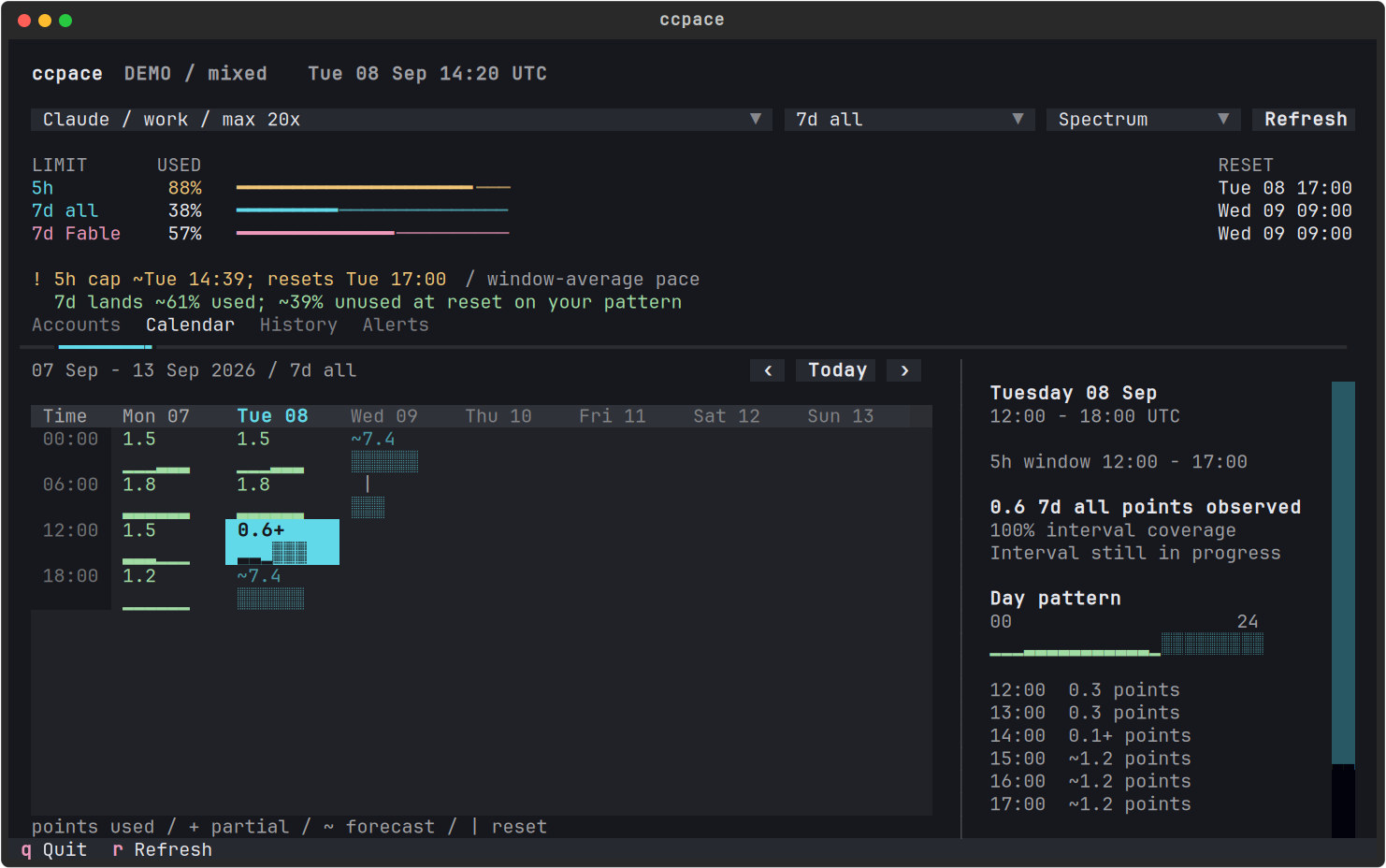
Synthetic demo: the 5h allowance is 88% used while the weekly forecast
leaves about 39% unused. The calendar keeps both conditions visible.
Run the same scenario with uvx ccpace --calendar --demo.
Requires uv, macOS or Linux, and a terminal. Python 3.11 or later is resolved by uv.
uvx ccpace --demo             # synthetic accounts; no login needed
uvx ccpace                    # your accounts and calendar
uvx ccpace --once             # one snapshot, then exit
uvx ccpace --json             # provider-aware JSON for scripts
Upgrade an existing uv installation with uv tool upgrade ccpace, or run
uvx --refresh ccpace. The calendar is the interactive default;
--watch and --calendar open the same experience. Piped output stays
noninteractive. --raw retains the legacy Claude JSON response;
--json now returns schema 1 with an accounts array.
Claude Code credentials are discovered from ~/.claude/.credentials*.json.
Both .credentials.work.json and work.credentials.json name an account;
-f PATH selects explicit Claude credential files.
Codex OAuth files are discovered from CODEX_HOME/auth*.json (default
~/.codex), including auth.json and named auth.work.json files. Use
--codex-file PATH for explicit sources and --provider claude or
--provider codex to filter collection. Subscription logins are required;
API keys do not expose the same included usage allowances.
ccpace --provider codex --codex-file ~/.codex/auth.work.json
ccpace --provider claude
Codex collection uses account-scoped, read-only usage requests. It does not switch the active Codex account, rewrite auth files, redeem resets, or buy credits. Expired tokens require signing in through the CLI or account manager that owns the auth file. Banked-reset counts and expiries are shown separately from paid credit balances when available.
Several accounts open in a comparison table; one account opens directly in its calendar. Each row shows the provider, short-window usage, weekly usage, and, on wide terminals, the next reset. Selection changes only what ccpace displays. It does not change any agent's login.
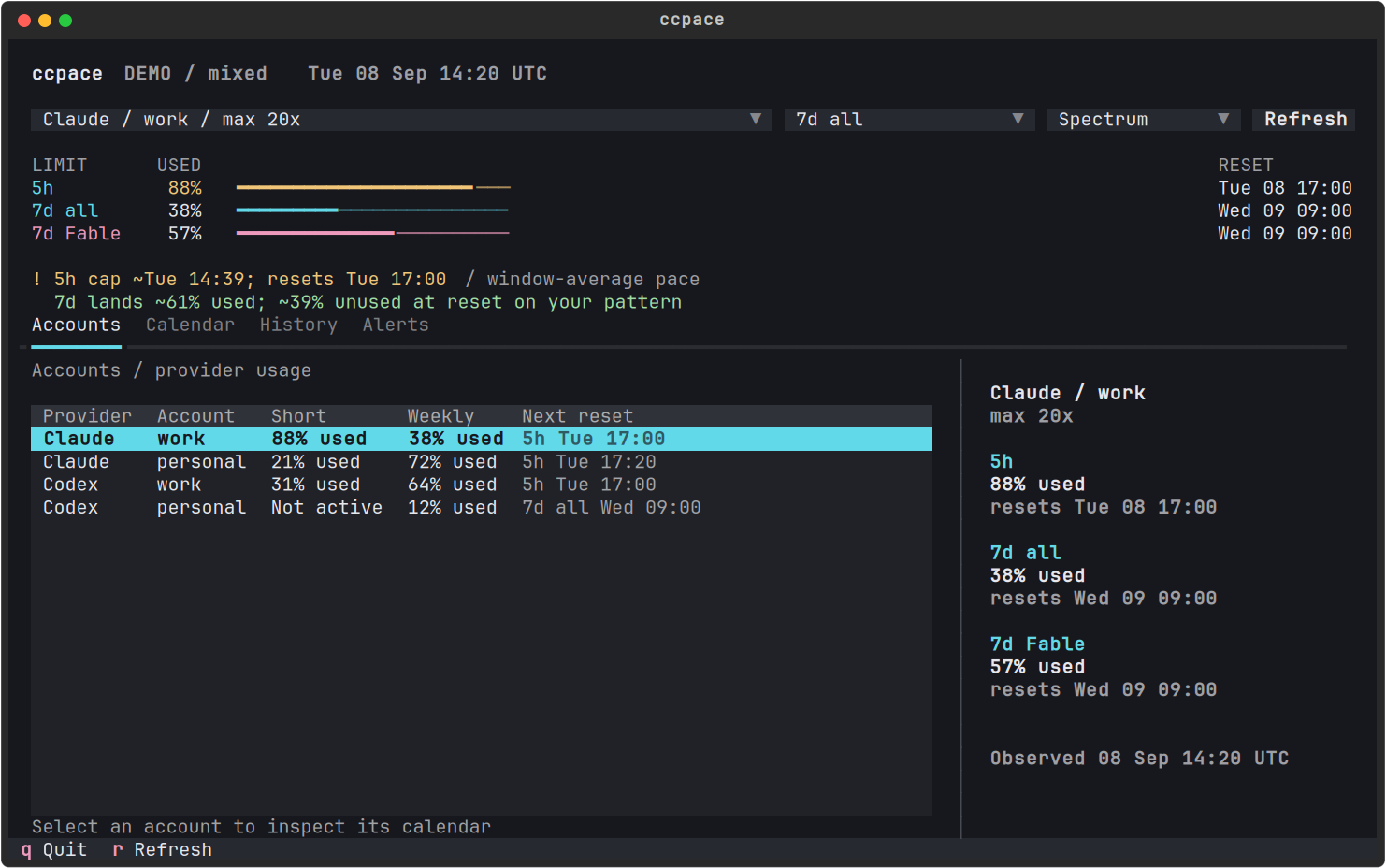
Stable provider/account identity keeps same-named accounts separate. Verified duplicate sources for the same account share a row. Failed refreshes retain only that account's prior observations and timestamp.
- Current limits stay visible. 5h, aggregate 7d, and scoped weekly allowances are separate counters with their own reset times.
- Inactive is explicit. A reported window without an active reset is
shown as
No active windoworUnavailable. Calendar clock ticks stay independent of it; a missing reset never implies unlimited usage. - Browse the week. Interval totals and hourly patterns show where usage accumulated. Enter opens hourly detail; History lists quota periods.
- Forecast from your history. The same model as claude-code-statusline learns weekday and hourly burn. A short history uses a labeled linear fallback; the learned forecast requires at least 14 days of history.
- Warnings without execution control. Alerts record condition changes, and existing notification channels can carry them elsewhere. ccpace never pauses, launches, switches models, or steers an agent.
Unavailable cells stay blank. Selecting one explains whether observations
are missing, a forecast is unavailable, or the next quota period has yet
to begin. Observed zero is 0.0; + means a partial observed amount;
~ marks a forecast; | marks a quota reset. Long gaps are not assigned
to individual hours, and forecasts end at the current pool or access boundary.
Spectrum uses mint for usage, cyan for forecasts, and rose for model
identity. Amber and red remain pressure signals. Quiet and Paper are also
available; NO_COLOR is honored.
ccpace --calendar --theme spectrum
ccpace --calendar --theme quiet
ccpace --calendar --theme paper
The theme picker and Ctrl+t change palettes during a run.
CCPACE_THEME sets the default. Light terminal backgrounds are detected
through COLORFGBG when it is available.
| Action | Key |
|---|---|
| Select an interval | Arrow keys |
| Accounts | 0 |
| Hourly detail / back | Enter / Escape |
| Previous / next week | [ / ] |
| Today | t |
| Calendar / History / Alerts | 1 / 2 / 3 |
| Previous / next view | Ctrl+PageUp / Ctrl+PageDown |
| Next account / meter | a / m |
| Acknowledge selected alert | x |
| Refresh / quit | r / q |
Single click selects; double-click opens hourly detail. Date headings select a whole day. Vertical scrolling stays within the pane under the pointer; horizontal wheel events or Shift+wheel pan weeks with momentum coalescing. Gesture availability depends on the terminal. Compact terminals keep the calendar and move details below it; narrow terminals use a daily agenda.
Demo scenarios: mixed, weekly, scoped, stale, cold, reset,
credits, rebase, and weekly-only. d cycles scenarios; r advances
the synthetic clock five minutes. Demo mode reads no credentials, makes
no provider requests, writes no usage or alert state, and sends no notifications.
ccpace --calendar --ntfy https://ntfy.sh/your-topic
ccpace --calendar --bark https://api.day.app/YOUR_KEY
ccpace --calendar --notifier ./notify-usage.sh
These options also work with --watch. Bare --bark uses BARK_KEY and
BARK_SERVER. Environment equivalents: CCPACE_NTFY, CCPACE_BARK,
CCPACE_NOTIFIER, CCPACE_INTERVAL, CCPACE_THRESHOLD, and CCPACE_TZ.
Custom notifiers receive JSON on stdin with id, event, account, and
data. Calendar events add stable condition and transition IDs, provider,
meter, observation time, and forecast provenance. Forecast notices require
two distinct observations; cap notices are immediate. A reset clock passing
does not establish recovery: a fresh observation must confirm it.
Calendar alert state is bounded to 200 events in calendar-alerts.json.
Acknowledgement marks a reviewed event without clearing its condition.
Delivery marked attempted does not prove receipt by an agent or device.
Weekly underuse thresholds are experimental: 20 points to enter, 15 to clear.
Usage comes from the same undocumented OAuth endpoints Claude Code uses,
not transcript token estimates. Samples and fetch caches are shared with
claude-code-statusline
under ~/.claude/statusline. Claude history is partitioned by account UUID;
directory placement alone is not identity. The calendar requires a known
account UUID before displaying history.
Codex observations use providers/codex/accounts/<opaque-id>/ beneath the
same data root, with separate usage caches and history. The key includes
workspace and user identity when supplied, otherwise the configured source
identity. Tokens, email addresses, and raw auth payloads are not written
to these files. Codex forecasts train only on that account's quota samples;
transcript cost is not converted to subscription usage.
CCPACE_DATA_DIR relocates the store; --no-log disables usage-sample
logging. Derived caches and calendar alert state still update. Fetching
uses the shared cache, activity gating, and reset boundaries; errors retain
the last observation with its age. The default interval is 15 minutes,
with jitter and a 60-second minimum.
Subscription percentages are not interchangeable credit balances. A model can consume both its scoped allowance and the shared limits. A 5h cap does not imply a depleted week, and a scoped cap does not imply every model is blocked. Paid continuation and session-specific modes require their own evidence. ccpace does not promise capacity or a particular continuation path.
Provider endpoints can change. Forecasts are estimates. API requests are read-only except expired-token refresh, which writes the refreshed OAuth token back to the credentials file. Local usage data stays local; enabled notifications send messages to the destinations you configure.
/plugin marketplace add thevibeworks/ccpace
/plugin install ccpace@ccpace
The /ccpace skill uses --once or --json in a conversation. Interactive calendar
and watch views run in a separate terminal. Use the full package or checkout
for the account/provider experience.
git clone https://github.com/thevibeworks/ccpace
cd ccpace
make check
make demo
make build
Tests cover quota accounting, forecast boundaries, account isolation, notification transitions, and calendar navigation at 50, 80, 120, and 160 columns. Test data is synthetic and isolated from the real usage store. These checks validate behavior, not forecast accuracy on every workload.
The terminal UI uses Textual. Collection uses HTTPX. The shared store and forecast contract are developed alongside claude-code-statusline.
CodexBar provided a useful reference for Codex OAuth sources, window normalization, account isolation, and read-only reset inventory. Its MIT source was studied; this provider adapter is implemented in Python for ccpace.
Contributing · Calendar design · Theme previews · Data contract
MIT. Unofficial; not affiliated with Anthropic.