


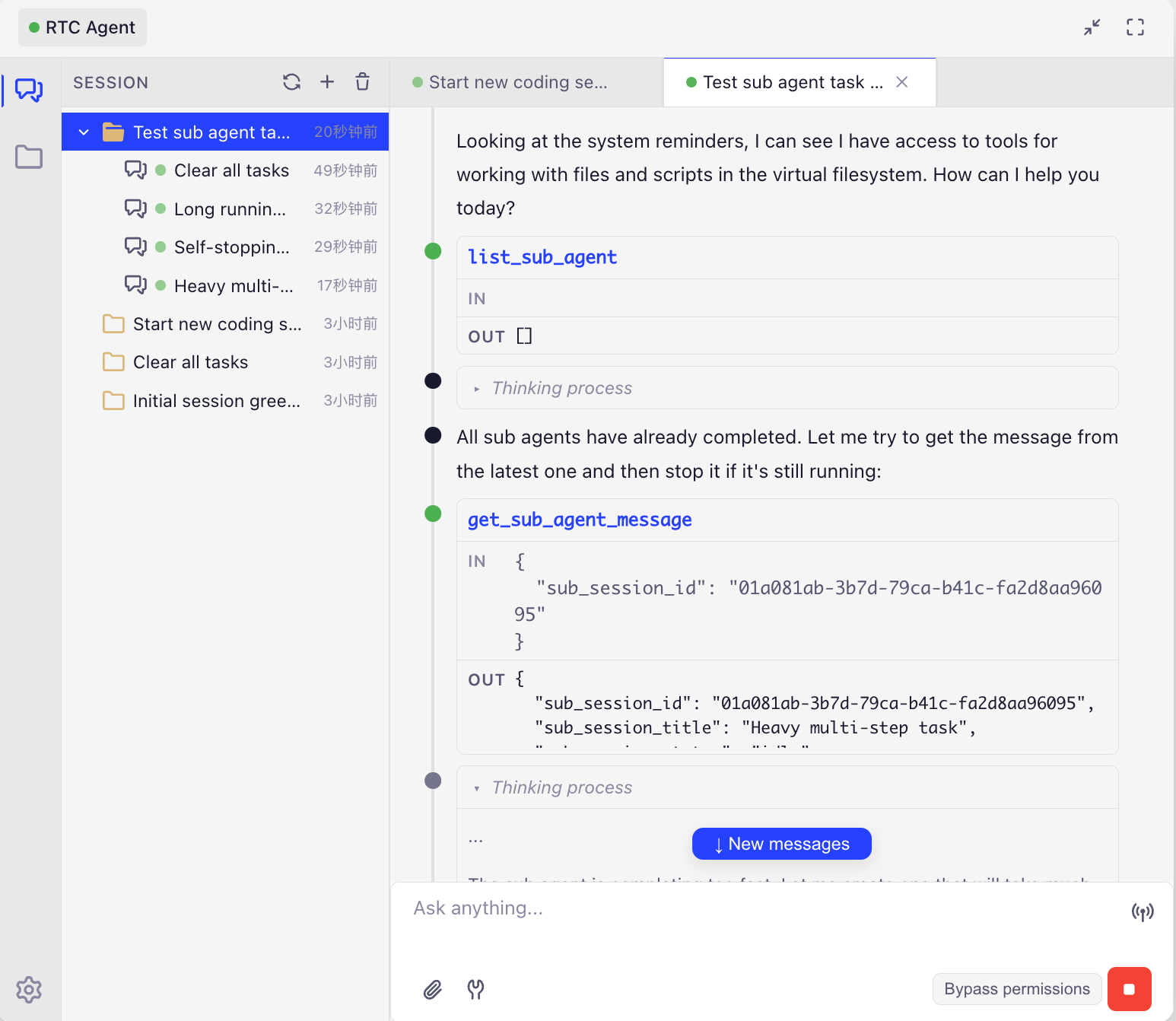
Not screenshot recognition, not DOM crawling. AI operates websites directly through frontend tools — every step transparent and observable.
One-liner: An open-source website AI assistant backend. Integrate a transparent, efficient, and cost-effective AI assistant into your website with just a few lines of code via the standardized Remote Tool Calling protocol.
RTC Agent lets AI reason on the server while tools execute on the frontend — reading page content, operating a virtual file system, calling business APIs — all synchronized in real-time over WebSocket, fully visible to your users.
- SaaS product teams: Want to add an AI assistant to their product without restructuring the backend
- Frontend developers: Want to quickly integrate AI capabilities, focusing on business logic rather than AI infrastructure
- Privacy-sensitive applications: Healthcare, finance, enterprise internal tools — where data cannot leave the user's device
Built on IndexedDB, AI tools (read / write / ls / grep) operate directly on frontend files. Data never leaves the user's browser.
Developers only need to maintain their own Function library. The Agent executes them on the frontend via the script tool and can freely combine multiple Functions to accomplish complex tasks — no predefined workflows needed.
💡 Developer's perspective: You just define your business atomic capabilities (Functions), and the Agent learns how to combine them on its own. It's like giving AI a set of LEGO bricks — it figures out how to build what you want.
Built on Centrifuge WebSocket, with bidirectional message pushing, supporting streaming output, tool call progress, and state synchronization.
Dual-layer memory: Session Memory (conversation context compression) + User Memory (cross-session long-term memory with vector retrieval). AI truly "remembers" your users.
Automatically compresses long conversations, keeping token consumption under control. Say goodbye to "context length exceeded" errors.
Complex tasks are automatically decomposed, with multiple specialized sub-agents working in parallel. AI sets, tracks, and completes multi-step goals, with turn-boundary checkpoints ensuring no task is lost.
flowchart LR
    subgraph BROWSER["🖥️ Browser / Frontend"]
        direction TB
        UI["👤 Web Component"]
        WS["🔌 WebSocket Client"]
        SCRIPT["🔑 script tool"]
        TOOLS["⚙️ Basic Tools"]
        VFS[("💾 Virtual File System<br/>IndexedDB")]
        FX["📦 Function Library"]
    end

    subgraph SERVER["⚙️ RTC Agent Server"]
        direction TB
        GW["🌐 WebSocket Gateway"]
        AUTH["🔐 Auth"]
        CTX["🗜️ Context Manager"]
        MEM["🧠 Memory System"]
        AGENT["🤖 Agent Engine"]
    end

    LLM["🧠 LLM Provider"]

    UI -->|User message| GW
    GW --> AUTH --> CTX
    CTX -.->|Inject memory| MEM
    CTX --> AGENT
    AGENT -->|Inference request| LLM
    LLM -->|tool_calls| AGENT
    AGENT -->|script call| GW
    GW <-->|WebSocket| WS
    WS --> SCRIPT
    WS --> TOOLS
    SCRIPT -->|Compose calls| FX
    SCRIPT -->|Read/Write| VFS
    TOOLS -->|Read/Write| VFS
    SCRIPT -->|Results| WS
    AGENT -->|Response| GW
    GW -->|Streaming output| UI

    style BROWSER fill:#e1f5fe,stroke:#0288d1,stroke-width:3px
    style SERVER fill:#f3e5f5,stroke:#7b1fa2,stroke-width:3px
    style LLM fill:#fff3e0,stroke:#f57c00,stroke-width:2px
    style VFS fill:#c8e6c9,stroke:#388e3c,stroke-width:2px
    style SCRIPT fill:#ffeb3b,stroke:#f9a825,stroke-width:2px,color:#000
Core data flow:
- All Function and file data live in the browser's IndexedDB — the server never touches business data
- The Agent Engine sends tool calls to the browser via the RTC protocol; the browser executes and returns results
- Memory and context management run on the server, optimizing conversation quality
sequenceDiagram
    participant U as User
    participant FE as Frontend
    participant S as Server
    participant LLM as LLM Provider

    U->>FE: Send message
    FE->>S: WebSocket push
    S->>S: Inject memory, compress context, load Function manifest
    S->>LLM: Inference request
    LLM-->>S: tool_calls (request to call Functions)
    S->>FE: RTC event (tool call request)
    FE->>FE: script tool executes Function
    FE->>S: Submit execution result
    S->>LLM: Continue reasoning with result
    LLM-->>S: Final response
    S->>FE: Streaming output
    FE->>U: Display result
| Traditional Approach | RTC | RTC + Function | |
|---|---|---|---|
| Tool execution location | Server-side ❌ | Frontend ✅ | Frontend ✅ |
| Data flow | Uploaded to cloud 🔒 | Stays on user device 🔐 | Stays on user device 🔐 |
| Extension method | Modify server code | Define frontend tools | Just define Functions; the Agent learns to compose them |
| Solution | Integration Cost | Observability | Token Cost | Error Rate | Privacy & Security |
|---|---|---|---|---|---|
| RTC Agent | Low — a few lines of code | Fully transparent | Low | Low | Data stays on frontend |
| Visual Parsing (Screenshot + OCR) | Medium | Black box | Very high | Relatively high | Requires uploading screenshots |
| DOM Crawling (Server-side parsing) | Complex | Partially visible | Medium | Medium | Data uploaded to cloud |
| Browser Extension | Requires installation | Good | Medium | Medium | Runs locally |
Every solution has its place: visual parsing works well for legacy systems with zero modification, and browser extensions suit offline scenarios. RTC Agent's advantage is — no installation, no screenshots, no server-side changes — just a few lines of code to let AI understand and operate your website in a structured way.
This is a pnpm monorepo with the following packages:
| Package | Description | Tech Stack |
|---|---|---|
@rtc-agent/component |
Core Web Components | Lit, Vite |
@rtc-agent/client |
Communication layer | Centrifuge WebSocket |
@rtc-agent/protocol |
Protocol type definitions | TypeScript |
@rtc-agent/worker |
SharedWorker layer | Comlink |
@rtc-agent/persistence |
Local persistence layer | IndexedDB, Dexie.js |
@rtc-agent/admin-ui |
Admin console | React, Ant Design Pro, Umi Max |
component (main package)
├── client (communication)
├── protocol (types)
├── worker (background thread)
│   ├── client
│   ├── protocol
│   └── persistence
└── persistence (IndexedDB)
    ├── client
    └── protocol

admin-ui (standalone React app)
├── component
├── client
└── protocol
- Node.js: >= 22.0.0 (recommended: 24.21.0)
- pnpm: >= 8.0.0
We recommend using nvm to manage Node.js versions:
# Install the correct Node.js version
nvm install

# Use the correct Node.js version
nvm use
The recommended version is specified in the .nvmrc file.
# Install pnpm if you haven't already
npm install -g pnpm

# Install project dependencies
pnpm install# Build all packages (with turbo cache)
pnpm build
# Development mode (component only)
pnpm dev
# Type check all packages
pnpm typecheck
# Lint all packages
pnpm lint
# Run tests
pnpm test
# Format code
pnpm formatcd packages/<package-name>
# Build
pnpm run build
# Development
pnpm run dev
# Type check
pnpm run typecheck
# Lint
pnpm run lint
# Test
pnpm run testThe admin-ui package uses Umi Max instead of turbo:
cd packages/admin-ui

# Development server
pnpm run dev

# Build (Umi Max)
pnpm run build

# Lint (Biome + tsc)
pnpm run lint- Unit Tests: Vitest for all packages
- Integration Tests: Some packages have
*.integration.test.tsfiles - E2E Tests: Playwright for
componentandadmin-ui
Run all tests:
pnpm testRun E2E tests:
pnpm test:e2eThe build process is orchestrated by Turborepo with the following characteristics:
- Dependency-aware: Packages are built in topological order
- Cached: Turborepo caches build outputs (
.turbodirectory) - Parallel: Independent packages build in parallel
Build outputs:
- Most packages:
dist/directory with TypeScript declarations component: Vite bundle + TypeScript declarationsadmin-ui: Umi Max production build
- Use Biome for formatting and linting (
pnpm format,pnpm lint) - TypeScript strict mode enabled
- No
anytypes allowed
We use Conventional Commits:
<type>(<scope>): <subject>

<body>

<footer>
Examples:
feat(component): add dark mode support

Implement theme switching with CSS variables.

Co-Authored-By: Claude Code <noreply@anthropic.com>
fix(client): reconnect on WebSocket timeout
- Create a feature branch from
dev - Make your changes
- Run
pnpm lintandpnpm testto ensure quality - Commit with conventional commit message
- Push and create PR to
devbranch - Wait for review
# Clean cache and reinstall
rm -rf node_modules .turbo
pnpm install

# Rebuild
pnpm buildcd packages/admin-ui
# Remove Umi cache
rm -rf src/.umi src/.umi-production
# Restart
pnpm run dev# Check specific errors
pnpm typecheck
# Or run tsc directly
pnpm tsc --noEmit- Getting Started — Integrate RTC Agent in 5 minutes
- Core Concepts — Deep dive into the RTC protocol and virtual file system
- Integration Guide — Learn how to register Functions and write Scenarios
- Workspace Guide — Detailed monorepo structure and toolchain
- Package Documentation — Individual package READMEs
- Getting Started — Integrate RTC Agent in 5 minutes
- Core Concepts — Deep dive into the RTC protocol and virtual file system
- Integration Guide — Learn how to register Functions and write Scenarios
Made with ❤️ by RTC Agent Team