


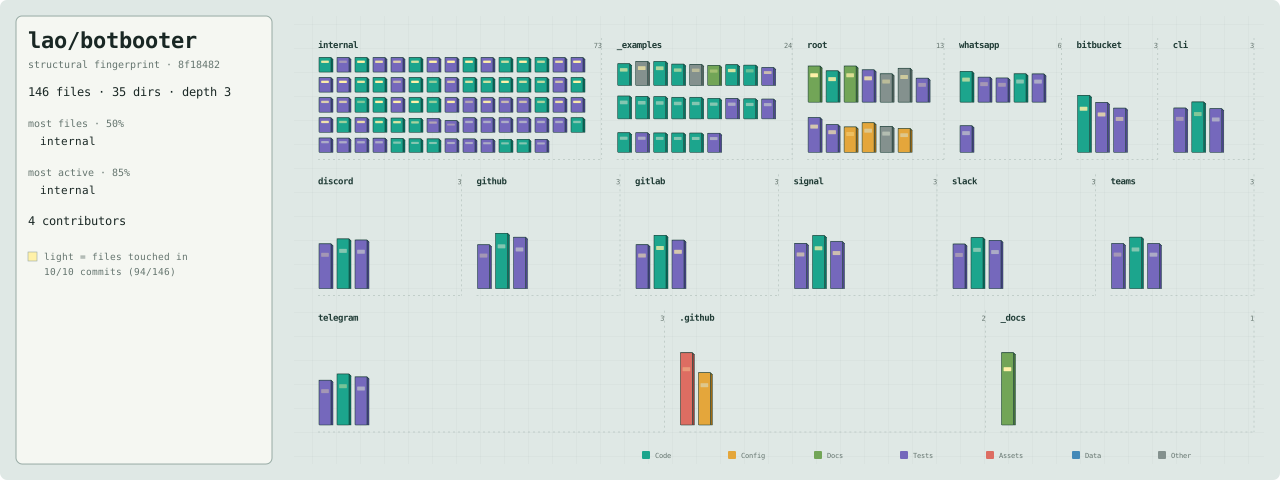
Interactive map — open the SVG directly to hover, focus, and click files (GitHub renders it statically inline).
A small, framework-style toolkit for writing chat bots once and running them on Slack, Discord, Telegram, WhatsApp, Microsoft Teams, GitHub, GitLab, Bitbucket, Signal, or a local CLI — with the same handlers, middleware, and attachment access on every platform.
Inspired by Gin: you register pattern-matched command handlers and optional middleware, then run the bot. botbooter abstracts the platform behind a single Bot type so your business logic does not care whether a message came from Slack, Discord, Telegram, WhatsApp, Microsoft Teams, a GitHub issue or PR comment, a GitLab issue or merge-request note, a Bitbucket pull-request or issue comment, Signal, or stdin.
⚠️ Not production ready. botbooter is pre-1.0 and under active development. The public API may change without notice, and it has not been hardened or battle-tested for production workloads. Use it for experiments and side projects; pin a specific version and review changes before depending on it for anything critical.
- One API, multiple platforms — Slack (Socket Mode), Discord (Gateway), Telegram (long polling), WhatsApp (two flavors: Cloud API webhook, or WhatsApp Web via whatsmeow — QR-linked, no Meta account), Microsoft Teams (Azure Bot Framework webhook), GitHub (
issue_commentwebhook — reply to issue and PR comments), GitLab (Note Hook webhook — reply to issue and merge-request comments), Bitbucket (Cloud + Data Center webhook — reply to pull-request comments on both flavors, plus issue comments on Cloud), Signal (signal-cli-rest-api container), and a built-in CLI adapter for local development and testing with no credentials. - Regex command routing — patterns are compiled once and matched against message content; first match wins.
- Middleware chain — wrap every message (logging, auth, metrics, …) with
next-style composition. - Emoji reactions — register
bot.OnReactiononce and reply to reactions uniformly across Slack, Discord, Telegram, WhatsApp and GitHub (see Reactions). - Platform-agnostic attachments — read image/file attachments uniformly across platforms.
- Context-first & graceful shutdown — handlers receive a
context.Context;Run(ctx)/Start()connect and shut down cleanly on cancellation orSIGINT/SIGTERM. - Resilient dispatch — a panicking handler is recovered and logged instead of taking down the bot.
go get github.com/lao/botbooterRequires Go 1.25+.
The fastest way to try it — the CLI adapter needs no tokens:
package main

import (
	"context"
	"os"
	"strings"

	"github.com/lao/botbooter"
	"github.com/lao/botbooter/cli"
)

func main() {
	bot := cli.New(os.Stdin, os.Stdout)

	bot.HandleFunc("^echo ", func(ctx context.Context, b *botbooter.Bot, m *botbooter.Message) {
		_ = b.SendMessageContext(ctx, m.ChannelID, strings.TrimPrefix(m.Content, "echo "))
	})

	ctx, stop := context.WithCancel(context.Background())
	defer stop()
	_ = bot.Run(ctx) // type "echo hi", press enter; Ctrl-D to quit
}
Or run the bundled example directly:
go run ./_examples/basic            # CLI mode (default, no credentials)
go run ./_examples/basic slack      # uses SLACK_APP_TOKEN / SLACK_BOT_TOKEN
go run ./_examples/basic discord    # uses DISCORD_BOT_TOKEN
go run ./_examples/basic telegram   # uses TELEGRAM_BOT_TOKEN
go run ./_examples/basic whatsapp   # WhatsApp Cloud API flavor: uses WA_TOKEN / WA_PHONE_ID / WA_APP_SECRET / WA_VERIFY_TOKEN / WA_ADDR (+ optional WA_PATH)
go run ./_examples/basic whatsmeow  # WhatsApp Web flavor: no credentials — scan the QR on first run (+ optional WA_MEOW_DB)
go run ./_examples/basic teams      # uses TEAMS_APP_ID / TEAMS_APP_PASSWORD / TEAMS_ADDR (+ optional TEAMS_APP_TENANT_ID / TEAMS_PATH)
go run ./_examples/basic github     # uses GITHUB_TOKEN / GITHUB_WEBHOOK_SECRET / GITHUB_ADDR (+ optional GITHUB_PATH)
go run ./_examples/basic gitlab     # uses GITLAB_TOKEN / GITLAB_SECRET / GITLAB_ADDR (+ optional GITLAB_PATH / GITLAB_BASE_URL)
go run ./_examples/basic bitbucket  # uses BITBUCKET_EMAIL+BITBUCKET_API_TOKEN (or BITBUCKET_ACCESS_TOKEN) / BITBUCKET_SECRET / BITBUCKET_ADDR (+ optional BITBUCKET_SELF / BITBUCKET_PATH / BITBUCKET_BASE_URL)
go run ./_examples/basic signal     # uses SIGNAL_API_URL / SIGNAL_NUMBER

go run ./_examples/reactions slack # same platform args; replies when someone adds an emoji reaction (see Reactions below)Import botbooter for the shared types plus the one botbooter/<platform> package you deploy — each constructor lives in its platform package, so a bot that uses one platform never compiles the others' SDKs into its binary:
| Constructor | Signature | Notes |
|---|---|---|
cli.New(in io.Reader, out io.Writer) |
*Bot |
Local adapter; nil defaults to stdin/stdout. |
slack.New(cfg slack.Config) |
(*Bot, error) |
Socket Mode (AppToken xapp-… + BotToken xoxb-…). |
discord.New(token string) |
(*Bot, error) |
Enables the message-content intent (see below). |
telegram.New(token string) |
(*Bot, error) |
Long polling via getUpdates; BotFather token. |
cloud.New(cfg cloud.Config) |
(*Bot, error) |
WhatsApp, Meta Cloud API flavor (botbooter/whatsapp/cloud); runs an inbound webhook HTTP server. |
whatsmeow.New(cfg whatsmeow.Config) |
(*Bot, error) |
WhatsApp, Web-protocol flavor (botbooter/whatsapp/whatsmeow); QR-links to a phone, no Meta account needed. |
teams.New(cfg teams.Config) |
(*Bot, error) |
Azure Bot Framework; runs an inbound webhook HTTP server. |
github.New(cfg github.Config) |
(*Bot, error) |
Issue/PR comments via issue_comment webhook; PAT or GitHub App auth. |
gitlab.New(cfg gitlab.Config) |
(*Bot, error) |
Issue/MR comments via Note Hook webhook; access-token auth. |
bitbucket.New(cfg bitbucket.Config) |
(*Bot, error) |
PR comments (both flavors) + issue comments (Cloud only) via webhook; Cloud + Data Center in one package; API-token or access-token auth. |
signal.New(cfg signal.Config) |
(*Bot, error) |
REST + receive WebSocket to a signal-cli-rest-api container; no keys. |
WhatsApp comes in two flavors selected by import path — whatsapp/cloud (official Meta Cloud API: Business account, webhook + public HTTPS URL, no third-party deps) and whatsapp/whatsmeow (unofficial WhatsApp Web multidevice protocol via whatsmeow: pair by QR code like WhatsApp Web, session persisted in a local SQLite file — Config.DBPath, default botbooter-whatsapp-meow.db in the working directory — no Meta account or webhook). Only the flavor you import is compiled into your binary.
// A command routes messages whose content matches a regular expression.
bot.AddHandler(botbooter.Command{
	Pattern: "^ping$",
	Handler: func(ctx context.Context, b *botbooter.Bot, m *botbooter.Message) {
		_ = b.SendMessageContext(ctx, m.ChannelID, "pong")
	},
})

// HandleFunc is a shorthand for the common case.
bot.HandleFunc("^hello", greetHandler)

// Fallback when nothing matches.
bot.SetUnknownCommandHandler(func(ctx context.Context, b *botbooter.Bot, m *botbooter.Message) {
	_ = b.SendMessageContext(ctx, m.ChannelID, "unknown command")
})

// Middleware wraps dispatch; call next to continue the chain.
bot.AddMiddleware(func(ctx context.Context, b *botbooter.Bot, m *botbooter.Message, next botbooter.CommandHandler) {
	log.Printf("%s in %s: %s", m.UserID, m.ChannelID, m.Content)
	next(ctx, b, m)
})
AddHandler / HandleFunc return nothing. If a pattern is not a valid regular expression the error is recorded and Connect/Run refuse to start, reporting every invalid pattern in one joined error.
A send is plain by default and threads only when you pass a send option:
b.SendMessageContext(ctx, m.ChannelID, text)— plain message in the channel root. It ignores where the triggering message lives, so a reply to a message inside a thread lands back in the channel, detached.b.SendMessageContext(ctx, m.ChannelID, text, botbooter.InReplyTo(m))— posts into the thread or reply-chain ofm. Each adapter derives its own correct anchor fromm— you don't compute one.b.Reply(ctx, m, text)— convenience sugar for exactly theInReplyTo(m)call above. Prefer it in handlers.
bot.HandleFunc("^echo ", func(ctx context.Context, b *botbooter.Bot, m *botbooter.Message) {
	// Threads the answer onto the triggering message instead of the channel root.
	_ = b.Reply(ctx, m, "You said: "+strings.TrimPrefix(m.Content, "echo "))
})
"Thread" means something different on each platform, so InReplyTo(m) hands the whole Message to the adapter and it picks the anchor. Two scenarios spell out the behavior:
- A comment already inside a thread → the reply continues that same thread. On Slack the reply is posted with
thread_ts = m.ReplyToID(the thread root the inbound message carried); on Discord/Telegram/WhatsApp it quotes / referencesm.ID. - A top-level comment in a channel → the reply is a direct reply to that comment, anchored on it, not forced into the channel root. On Slack a top-level message has no thread root, so it gets a plain top-level reply (Slack does not open a brand-new thread off it — that would only bury the reply under an empty thread); on Discord it becomes an inline reply referencing the message, on Telegram a
reply_to_message_id, and on WhatsApp (Cloud API) a quoted reply. On Bitbucket (Cloud and Data Center) it is a comment whoseparent.idis the target comment id. The WhatsApp Web (whatsmeow) flavor currently ignores the threading anchor and sends a plain message.
For a raw, platform-specific anchor there's botbooter.WithThreadID(id) — the adapter uses the string verbatim (a Slack thread_ts, or a reply/quote message id elsewhere) and it wins over InReplyTo. You own platform-correctness with it. Per-platform anchor semantics, the precedence and fallback rules, and how ReplyToID vs ID are chosen are documented in _docs/platforms.md.
Fallback is automatic and safe: Teams, GitHub (issue comment threads are flat — a reply already lands in the conversation), GitLab (a note already lands in the conversation; threading it into a GitLab discussion is a deliberate v1 omission), Signal, WhatsApp Web (whatsmeow) and CLI ignore the options (every send is plain), and an anchor that resolves to nothing degrades to a plain send. Threading never adds a failure mode — it can only make a send that would have succeeded land in a thread; the send can still fail for the ordinary reasons any send can (no adapter, a nil message to Reply, or a platform/transport error the underlying send surfaces).
A Flow runs a multi-step, context-aware dialog — ask a question, wait for that
user's reply, optionally validate it, advance to the next — without hand-writing a
per-user state machine. Register it like a command; a matching message starts it,
and each later message from that conversation is routed to the active flow.
signup := botbooter.NewFlow("signup"). // id must be stable (in-flight state keys by it)
	Ask("name", "What's your name?").
	Ask("email", "What's your email?", botbooter.Validate(validEmail)).
	Ask("password", "Choose a password.", botbooter.Secret()).
	OnComplete(func(ctx context.Context, b *botbooter.Bot, m *botbooter.Message, a botbooter.Answers) {
		createUser(a.Get("name"), a.Get("email"), a.Get("password"))
		_ = b.SendMessageContext(ctx, m.ChannelID, "You're all set 🎉")
	})

if err := bot.HandleFlow("^sign ?up$", signup); err != nil {
	log.Fatal(err)
}
HandleFlow validates the flow and returns an errors.Is-checkable sentinel
(ErrFlowNil, ErrFlowEmptyID, ErrFlowNoSteps, ErrFlowEmptyStepKey,
ErrFlowEmptyStepPrompt, ErrFlowDuplicateKey, ErrFlowNoOnComplete,
ErrFlowAlreadyRegistered) — plus the pattern error from a bad regexp.
Validate(fn) re-prompts the same step on a non-nil error (using err.Error() as
the nudge); an empty/whitespace reply is a non-answer and also re-prompts. Ordinary
answers are trimmed of surrounding whitespace before storage; a Secret() step
keeps its exact bytes (leading/trailing whitespace can matter in a password).
Things to know (v1):
- DM-intended. While a flow is active it shadows the command table, so every
message in that conversation becomes an answer until it completes, the user types
the cancel word (default
"cancel", set withCancelWord, disable with""), or it times out (idle TTL, default 10m viaTimeout; any reply the flow receives — even a rejected or empty one — slides the deadline, so only going silent expires it). In a public channel this shadows only the flow-starting user's own messages there — not everyone's — so that user can't run other commands until it ends; run flows in DMs. RegisterOnCancel(fn)/OnTimeout(fn)on the flow to react to those two exits; note the timeout callback fires only if the user's next message arrives before the background sweeper reclaims the expired state (see theFlow.OnTimeoutgodoc for the exact contract). The message that discovers the expiry is consumed either way: it runsOnTimeoutif set, otherwise it is dropped rather than falling through to the command table (a late reply is likelier a stale flow answer than a fresh command), so a post-timeouthelpgets no reply — the message after it is handled normally. - Attachment-less "service" messages don't reach a flow on some platforms. Slack, Telegram and the whatsmeow flavor drop messages with no text, caption or attachment (stickers, locations, member joins, …) before dispatch, mirroring their ordinary message handling. Mid-flow this means such a message neither answers a step (no empty-answer re-prompt) nor slides the idle TTL — a text reply does both.
Secret()keeps an answer out of framework logs. It is not encryption, does not police your own middleware, and does not hide the answer from other members of a public channel.- In-memory only. In-flight flows live in memory and are lost on restart; v1 is single-instance.
- Best-effort ordering. State is never corrupted under concurrent delivery, but a user who sends faster than prompts arrive may have an answer matched to a later step.
- Restart needs cancel. Re-triggering a flow while it is active is consumed as an answer; cancel first to start over.
Emoji reactions are a second ingress path alongside messages. Register a
handler with bot.OnReaction and reply to the reacted message with
bot.ReplyToMessage — the same handler runs on Slack, Discord, Telegram,
WhatsApp (both flavors) and GitHub:
bot.OnReaction(func(ctx context.Context, b *botbooter.Bot, r *botbooter.Reaction) {
	// r.Emoji renders as-is on its origin platform: a unicode char on most
	// platforms, ":thumbsup:" on Slack, "<:name:id>" for a Discord custom emoji.
	_ = b.ReplyToMessage(ctx, r.ChannelID, r.MessageID, "Thanks for the "+r.Emoji+" reaction!")
})
Unlike commands, reaction handlers are not regex-matched (branch on
r.Emoji yourself), run all registered handlers (each recovered
independently), and bypass the middleware chain. ReplyToMessage threads
its reply under the reacted message where the platform supports it and otherwise
falls back to a plain send.
Things to know (v1):
- Added-only. Removed reactions are dropped; there is no reaction egress (you can't add a reaction, only reply with a message).
r.Emojiis not normalized across platforms — it is whatever renders as-is on the platform it came from. Readr.Rawvia the typed accessor (slack.RawReaction,discord.RawReaction, …) for the platform's original values.- Per-platform delivery differs. Slack needs the
reaction_addedevent +reactions:readscope; Discord needs the reaction intents enabled; Telegram delivers group reactions only when the bot is an admin; GitHub has no reaction webhook and instead polls opted-in repos (Config.ReactionPollRepos); Teams, GitLab, Bitbucket and Signal surface no reaction events (Bitbucket has none to surface — no comment reactions on either flavor). See _docs/platforms.md and_examples/reactions/main.go. - Slack can't filter other bots' reactions (the event carries no bot flag), so guard reply-emitting handlers against cross-bot loops.
attachments, err := b.GetAttachments(m)
for _, a := range attachments {
	fmt.Println(a.URL, a.IsImage) // a.ExtraData holds the raw platform payload
}
Attachment.URL is empty on platforms that deliver media by id (Telegram, WhatsApp Cloud API). Call b.ResolveAttachmentURL(ctx, a) for a downloadable link on any platform — Discord/Teams/Signal/CLI return a.URL as-is, while Slack/Telegram/WhatsApp Cloud API resolve one on demand. The Telegram link embeds the bot token (a one-line warning logs on each resolve, suppressible via BOTBOOTER_TELEGRAM_SUPPRESS_URL_WARNING); see _docs/platforms.md. Signal's URL points at the signal-cli-rest-api container's /v1/attachments/{id} endpoint, so it is only as reachable (and as private) as the container (see _docs/platforms.md). GitHub, GitLab and Bitbucket comments carry markdown rather than an upload channel, so GetAttachments returns none there.
WhatsApp Web (whatsmeow) media is end-to-end encrypted and has no URL at all — fetch and decrypt the bytes with whatsmeow.Download(ctx, bot, a).
A terminal has no real upload channel, so the CLI adapter treats any local file path in the message as an attachment — "uploading" means referencing the path. Image files are detected by content sniffing:
echo here is my screenshot /tmp/cat.png
  → attachment (image): /tmp/cat.png
Every Message carries normalized, platform-agnostic fields so handlers rarely
need the raw event. UserID, ChannelID and Content are always set; the rest
are best-effort and stay at their zero value when a platform cannot supply them:
| Field | Meaning |
|---|---|
ID |
Platform message id ("" for CLI). |
AuthorName |
Display/username (empty on Slack, which delivers only an id). |
Timestamp |
Message time as a time.Time (zero on CLI). |
ReplyToID |
Id of the replied-to/thread message ("" when not a reply). |
MentionedUserIDs |
Mentioned user ids; Telegram contributes only text_mention ids. |
When you need something the normalized fields don't carry, reach the originating
event or the underlying SDK client through typed accessors on each platform
package — botbooter and internal/core stay free of every platform SDK, so
these live on botbooter/<platform>:
if ev, ok := slack.RawEvent(m); ok {
	_ = ev.ThreadTimeStamp // anything on the raw *slackevents.MessageEvent
}

// Raw event per platform: discord.RawEvent, slack.RawEvent, telegram.RawUpdate, cloud.RawMessage (WhatsApp Cloud API), whatsmeow.RawMessage (WhatsApp Web), teams.RawMessage, github.RawEvent, gitlab.RawEvent, bitbucket.RawEvent, signal.RawMessage, cli.RawData.
// Underlying client per platform (WhatsApp Cloud API, Teams, Bitbucket Data Center and Signal have none — they speak REST over plain HTTP, plus a receive WebSocket for Signal):
client := slack.Client(bot)        // *slack.Client (nil if not a Slack bot)
sock := slack.SocketClient(bot)    // *socketmode.Client (nil if not a Slack bot)
session := discord.Session(bot)    // *discordgo.Session
tg := telegram.Client(bot)         // *bot.Bot
wa := whatsmeow.Client(bot)        // *whatsmeow.Client (WhatsApp Web flavor)
gh := github.Client(bot)           // *go-github Client — labels, reactions, checks, anything beyond replies
gl := gitlab.Client(bot)           // *client-go Client — labels, awards, pipelines, anything beyond replies
bb := bitbucket.CloudClient(bot)   // *ktrysmt Cloud client — nil on a Data Center bot (which replies over plain net/http)

// Webhook adapters bound with ":0" report their actual listen address:
addr := github.Addr(bot)           // also cloud.Addr, teams.Addr, gitlab.Addr, bitbucket.Addr — the resolved host:port

// Route the framework's own logs (panic recovery, poll errors, …) to your logger:
bot.SetLogger(slog.Default()) // any *slog.Logger; a method on the Bot itself, platform-agnosticctx, stop := signal.NotifyContext(context.Background(), os.Interrupt, syscall.SIGTERM)
defer stop()
if err := bot.Run(ctx); err != nil { // connect, serve, and shut down on cancel
log.Fatal(err)
}Run(ctx)— connect, block untilctxis canceled (or the event loop ends), then disconnect cleanly.Start()— shorthand forRunwith a context bound toSIGINT/SIGTERM.Connect(ctx)/Disconnect()— non-blocking control if you want to manage the loop yourself.Disconnectis idempotent.
Each platform takes different credentials. Full step-by-step setup, troubleshooting, and the official documentation for each live in _docs/platforms.md.
| Platform | What you need | Setup |
|---|---|---|
| Slack | xapp-… app-level token + xoxb-… bot token |
_docs/platforms.md |
| Discord | bot token + Message Content Intent | _docs/platforms.md |
| Telegram | BotFather bot token | _docs/platforms.md |
| WhatsApp (Cloud API) | Cloud API token + phone-number id + app secret + verify token + bind addr | _docs/platforms.md |
| WhatsApp (Web / whatsmeow) | nothing — scan a QR code from WhatsApp > Linked devices on first run | _docs/platforms.md |
| Microsoft Teams | Azure Bot app id + password (+ optional tenant id) + bind addr | _docs/platforms.md |
| GitHub | PAT or App (id + installation id + private key) + webhook secret + bind addr | _docs/platforms.md |
| GitLab | access token (personal/project/group) + webhook secret token + bind addr | _docs/platforms.md |
| Bitbucket | API token (email+token) or access token + webhook secret + bind addr (+ Self for access-token/Data Center) |
_docs/platforms.md |
| Signal | no keys — a running signal-cli-rest-api container (registered number) + its URL | _docs/platforms.md |
| CLI | nothing (local stdin/stdout) | _docs/platforms.md |
make all        # fmt + vet (both incl. _examples) + lint + test-race
make test-race  # race detector
make cover      # coverage report
make run-cli    # run the example bot in CLI mode
The suite runs under the race detector and is hermetic by default. The single test that touches the Slack network is opt-in, enabled by setting the BOTBOOTER_SLACK_NETWORK_TEST environment variable (see botbooter_test.go).
for slack and discord:
botbooter-demo.mov
Alternatives:
- no support for Discord
- no generic access for attachments in messages
- no support for Discord
- no generic access for attachments in messages
- Slack, Discord, Telegram, WhatsApp, Microsoft Teams, GitHub, GitLab, Bitbucket, Signal and CLI adapters
- Middleware and attachment abstraction
- Unify attachment URL retrieval for all implementations
- WeChat, Mastodon adapters
- Richer message types (blocks, embeds)
- Conversational flows — multi-step forms via
HandleFlow(linear, in-memory, single-instance) - Emoji reactions — reply to reactions via
OnReaction/ReplyToMessage(Slack, Discord, Telegram, WhatsApp, GitHub-polled) - Pluggable
Storemodule (persistent key-value brain), composed viabotbooter.New(adapter, opts...)— in-memory default, optional Redis backend
v1 flows are linear, plain-text, in-memory and single-instance (see the caveats under Conversational flows). The following deferred items each reuse the v1 engine with no state migration:
- Branching. Add via
Next func(Answers) string(step id → next step id) orAskIf(cond, …). The state already storesAnswers, so branching needs no migration. - DM-only / mention-gated flows. Requires a cross-platform
Message.IsDirect(and/or "addressed to bot") signal thatMessagelacks today. Until then, channel scoping is documented, not enforced. - Command allowlist during a flow. An opt-in set of global commands (e.g.
help) that pierce an active flow, instead of cancel/expiry being the only exits. Store-backed persistence and blockingAsk(with non-blocking delivery + atomic-clear requirements).- Multi-instance / horizontal scaling. Gated on the shared
Store(item 4) plus a concurrency redesign — the in-process striped locks must be replaced by store-level atomicity, because the validator is user Go code and cannot run inside a Redis transaction. Plan: optimistic compare-and-swap on theVersionfield — read(state, version)→ run validator in Go → write only ifversionis unchanged; on conflict the other replica already advanced, so drop (or re-read) the message. One CAS wins → no double-advance. Residual issues to handle then: (a) the prompt send happens outside the CAS, so two replicas can both validate-and-send before either writes → duplicate prompt; make sends idempotent (key by inbound message id) or accept the rare dup. (b) Platform delivery constraints remain even with a shared store — Discord needs gateway sharding (one replica owns a conversation) to stop duplicate event delivery; Telegram must switch from getUpdates to webhook mode (getUpdates is single-consumer). Until all of this lands, v1 is single-instance. - Normalized validators.
Validate(func(string) (string, error))storing the parsed value, soOnCompletedoes not re-parse (e.g.ageto int). v1 keeps the simplerfunc(string) errorplusAnswers.Lookup. - Replace-active-flow. v1 decision: a
HandleFlowtrigger received during an active flow is consumed as input (the command table is shadowed); to restart, the user cancels first. Documented. A future reserved "restart" word or replace-on-retrigger can layer on.
Issues and PRs are welcome. Please run make all (format, vet, lint, race tests) before opening a PR.
MIT © Lucas Abreu Oliveira