Graphics is an open-source, Bun-first CLI and Agent Skill for small, clear
diagrams, measured raster-to-SVG conversion, and bounded hosted image
generation. Its executable is graphics.
A checked .diagram.json file is the source of truth for a diagram. One render
produces consistent light and dark SVG/PNG images plus editable .tldr
interchange—without a browser, tldraw Desktop, or the tldraw SDK at runtime.
graphics vectorize turns caller-owned raster artwork into bounded, inert SVG
paths with an inspectable quality receipt. graphics generate uses one of two
explicit hosted models to write a validated WebP. A fixed semantic operation
registry exposes the same capabilities to code and MCP without accepting
arbitrary source text.
The project site is hraness.graphics.
The defaults favor rounded peer shapes, short labels, long connectors, bare icons, a system sans-serif font, and visual differences that correspond to real semantic differences. A coordinate-free stack layout owns ordinary placement when a diagram is a single horizontal or vertical sequence.
An agent can place shapes quickly, but it can also invent hierarchy, grouping, and emphasis. A small set of rules keeps the picture faithful and readable.
A diagram made by an agent often looks finished before it is clear. The boxes align, the icons match, and the arrows connect. Yet the model may have added a hierarchy that the prompt never described, made two peers different sizes, or wrapped one concept in several borders because the empty space seemed unfinished.
Those choices are not neutral decoration. A reader assumes that size, position, color, shape, and enclosure mean something. A useful visual grammar gives the agent restrained defaults for decisions the prompt leaves open. The open-source Graphics CLI and Agent Skill turns those defaults into a checked workflow: an authored .diagram.json file produces light and dark SVG and PNG images plus editable .tldr interchange. The rules remain useful without the tool; the tool makes them repeatable.
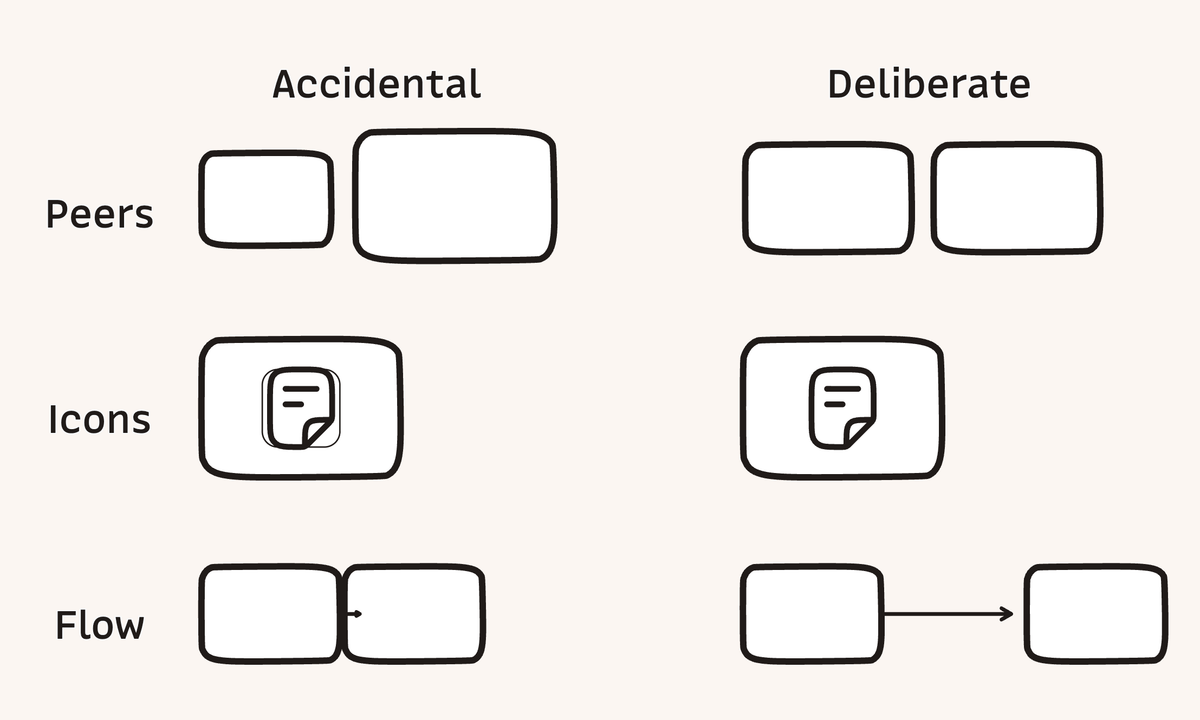
Equal peers, one border, and enough connector space keep a small diagram from implying more than it means.
The prompt should define the diagram’s content. An agent can arrange supplied concepts and choose neutral mechanics, but it should not add a sequence, category, legend, callout, or conclusion unless the request calls for one. This constraint matters because a plausible invented relationship is difficult to distinguish from an authored claim once it becomes a clean arrow.
Give semantic peers the same container size, corner treatment, icon scale, stroke, fill, and alignment. A larger box looks more important. A different color looks like a category. A thicker border looks selected. When the ideas are equal, their visual treatment should be equal. When one idea is more important, use one deliberate cue instead of changing every available property.
Choose one primary reading direction, then place each next step where the eye already expects to continue. Long arrows make the relationship visible as a relationship; cramped arrows look like gap markers or stray arrowheads. In Hraness PUB’s 1200 by 720 article frame, 120 canvas units of clear space between connected cards is a useful target. Gaps below 96 units usually look crowded. These are house measurements for this format, not universal perceptual constants.
Larkin and Simon’s work on diagrammatic representations explains how spatial arrangement can reduce search and keep the next inference nearby. Purchase’s graph-layout experiment found edge crossings to have the strongest effect among the tested aesthetics, with bends and symmetry carrying smaller effects. The practical order follows: remove crossings first, reduce bends second, and keep the remaining path easy to trace.
An outlined icon badge inside an outlined card creates two enclosed regions. If the diagram contains only one concept, the second boundary suggests a grouping that does not exist. Use a bare icon inside the card by default. When the glyph needs contrast, a fill-only plate preserves one outline for one semantic region.
Stephen Palmer’s research on common regions found enclosure to be a strong perceptual grouping cue. That makes whitespace and alignment the first tools for organizing a small diagram. Add another box only when the content contains another group.
A familiar icon helps a new reader scan, but the short label carries the exact meaning. The paperclip can suggest a source, the book can suggest memory, and the chain can suggest links. None of those glyphs can state the article’s claim by itself. Research on icon identification by Isherwood, McDougall, and Curry found familiarity and semantic distance to be strong factors in recognition.
Use one semantically close icon at a consistent scale and keep the label to a word or short phrase. A shared set such as Hugeicons gives the drawing a coherent stroke language. It does not justify adding icon badges, decorative color families, or different icon sizes to fill the canvas.
Daniel Moody’s Physics of Notations argues for semiotic clarity, perceptual discriminability, graphic economy, and visual expressiveness. In practical terms, different meanings need distinguishable representations, while repeated meanings should reuse a small visual vocabulary. A diagram spends clarity whenever it introduces a visual exception.
Rounded rectangles are Hraness PUB’s default for bounded concepts because they fit the publication’s visual language and are easy to recognize as peers. Bar and Neta found that people preferred curved contours, but aesthetic preference is not proof of better comprehension. A conventional flowchart symbol or an explicitly requested hard corner should override the house style.
graphics keeps authored content in a checked .diagram.json source. graphics check --strict reports objective layout findings; graphics render replaces five same-stem outputs: editable .tldr interchange plus light and dark SVG and PNG images. Each file is published through a same-directory temporary file, but the five-file family is not a transaction. Headless rendering needs neither tldraw Offline nor the tldraw SDK at runtime. The desktop app remains an optional editor for direct canvas work.
The project does not bundle MonoLisa or a large icon library. It defaults to the system sans-serif stack and a small built-in icon set. A local export config can point at font files you have licensed and adapt project-owned SVG geometry from Hugeicons or another set. Font bytes stay out of SVG unless embedding is explicit, so a custom visual language does not have to make the package large.
graphics check can test rules with objective local evidence: equal peer geometry, rounded default containers, sufficient connector runway, and no outlined badge inside an outlined card. The bundled skill carries the judgment a geometry check cannot: follow the prompt without enrichment, use icons as cues rather than claims, and review both themes at reading size. Meaning still needs human review. When a prompt intentionally breaks a default, record a rule-specific reason instead of weakening the check for every future diagram. This is the same scoping discipline described in Hraness PUB’s guide to agent documentation hygiene.
A canvas can look orderly at full zoom and fail inside an article column. Check the exported image at the size and theme a reader will use. The review can stay short:
- Does the picture say only what the prompt supplied?
- Do equal ideas look equal?
- Is the first relationship easy to find and follow?
- Does every border create a real group?
- Do the labels and icons remain legible in light and dark?
When these decisions should survive the current task, keep the visual grammar in the Agent Skill, preserve the .diagram.json source beside its replaceable exports, and pair a knowledge-base diagram with a note. A durable knowledge base for coding agents gives those rules a place to be reviewed, linked, and improved instead of rediscovered in the next prompt.
Copy this prompt into Codex, Claude Code, or another coding agent:
Install the Graphics CLI and bundled Agent Skill from
https://github.com/hraness/graphics at the immutable v0.4.0 tag. Follow the
repository README, install the skill in this agent runner's configured skills
directory, run `graphics doctor`, and verify the installation by rendering the
included example. Do not install tldraw Offline unless I ask to edit the canvas
in the desktop app.
The repository URL is enough for an agent to inspect the current instructions; the tag keeps the installed CLI and skill on the same contract.
Bun 1.3.14 is the supported runtime.
Install the immutable release and then place the bundled skill where your agent runner discovers skills:
bun add --global github:hraness/graphics#v0.4.0
graphics skill install --target codex --scope user
graphics doctorv0.2 replaced the former Diagram package, diagram executable, and diagram
skill. Remove any old global Diagram package and the user-level Codex skill
before installing the current release:
rm -rf -- "$HOME/.codex/skills/diagram"
bun add --global github:hraness/graphics#v0.4.0
graphics skill install --target codex --scope user
If v0.1 was installed for another runner or at project scope, run only the matching cleanup command before installing the new skill:
rm -rf -- "$HOME/.claude/skills/diagram"
rm -rf -- "$HOME/.agents/skills/diagram"
rm -rf -- ".codex/skills/diagram"
rm -rf -- ".claude/skills/diagram"
rm -rf -- ".agents/skills/diagram"
Rename any local diagram.config.* to the matching graphics.config.*.
Graphics rejects a legacy-only config instead of silently rendering with
defaults.
Other supported discovery targets are claude and the runner-neutral
.agents/skills convention:
graphics skill install --target claude --scope user
graphics skill install --target agents --scope project
An existing skill is never replaced unless --force is explicit. To let a
runner handle installation itself, graphics skill path prints the directory
shipped inside the installed package.
Contributors can install from a checkout:
git clone https://github.com/hraness/graphics.git
cd graphics
bun install --frozen-lockfile
bun run check
bun linkCreate a starter or author the JSON directly:
graphics init diagrams/example-flow.diagram.json
graphics check diagrams/example-flow.diagram.json --strict
graphics render diagrams/example-flow.diagram.json
Every successful render replaces the same five derivatives. Each individual file uses a same-directory temporary file; consumers that require a generation-level transaction should render into a new directory and switch their own pointer only after all five files exist.
example-flow.tldr
example-flow.light.svg
example-flow.dark.svg
example-flow.light.png
example-flow.dark.png
The source stays readable and reviewable:
{
  "$schema": "https://raw.githubusercontent.com/hraness/graphics/v0.4.0/schema/diagram.schema.json",
  "version": 1,
  "name": "example-flow",
  "canvas": { "width": 960, "height": 540, "padding": 64 },
  "layout": {
    "type": "stack",
    "direction": "horizontal",
    "gap": 160,
    "align": "center"
  },
  "shapes": [
    {
      "id": "source",
      "type": "rect",
      "width": 240,
      "height": 160,
      "label": "Source",
      "icon": "document",
      "tone": "blue"
    },
    {
      "id": "result",
      "type": "rect",
      "width": 240,
      "height": 160,
      "label": "Result",
      "icon": "check",
      "tone": "green"
    }
  ],
  "edges": [{ "id": "source-result", "from": "source", "to": "result" }]
}
In stack mode, array order controls placement but does not invent a relationship. Edges remain explicit. Graphics centers one to nine coordinate-free rectangles or ellipses, preserves the requested gap, stamps straight axis-aware anchors between adjacent items, and fails when the sequence cannot fit. It never shrinks shapes or silently shortens an arrow runway.
Positioned sources remain available for charts and compositions that need
rect, ellipse, text, or line primitives at explicit x and y
coordinates. The public JSON Schema checks both
source forms. See the
semantic stack example for the smallest
coordinate-free flow.
The included CAPEX/OPEX example shows a
literal stacked comparison with one-stroke axes, no visible title, and only $
on the vertical axis:
graphics render examples/capex-opex.diagram.json --out-dir /tmp/graphics-exampleAuthenticated features use OAuth 2.1 authorization-code flow with S256 PKCE:
graphics login
graphics auth status
graphics generate \
  'A restrained monochrome paper texture' \
  --output texture.webp
graphics logout
The browser returns to the fixed
http://127.0.0.1:49671/oauth/callback loopback address. Graphics stores access
and refresh tokens only in the operating system credential store through
Bun.secrets; it does not create a plaintext credential file or print token
material. Logout attempts standards-based revocation and removes the local
credential.
graphics generate defaults to recraft/recraft-v4.1-utility; --model may
select exactly that model or openai/gpt-image-1.5. It discovers one pinned production endpoint,
sends one authenticated POST with a required Idempotency-Key, and never
retries an ambiguous request. The CLI accepts an optional caller key of 16–128
safe characters; otherwise it creates a UUID. A successful response is bounded
to 3 MiB raw, must contain canonical base64 and valid RIFF/WebP magic, and is
atomically renamed to the required .webp output path.
Discovery is not a general remote configuration mechanism. The CLI fetches
only https://hraness.graphics/.well-known/graphics-cli.json, forbids
redirects, bounds the body, and requires the exact production authorities,
client, resource, endpoints, models, limits, and free-local vectorization
policy before using a token.
graphics vectorize accepts PNG, JPEG, WebP, AVIF/HEIF, GIF, or TIFF input and
normalizes one still image to a safe SVG:
graphics vectorize input.png --output input.svg --json
graphics vectorize input.png --output input.duotone.svg --duotone '#171717,#7c3aed'
Vectorization requires a valid Graphics login but remains free and runs locally. The discovery and token requests contain neither the source path nor its bytes; only the checksum-pinned local VTracer process receives the raster.
The adaptive policy tries a balanced trace first, measures a rasterized result, and spends more work on detailed or photo profiles only when the first result misses its gates. Material low-alpha pixels cause an alpha-preserving candidate to be compared. Continuous transparency can add a vector-only internal mask. The result contains no script, event handler, external URL, embedded image, font, or model payload.
--json prints a deterministic receipt with input and SVG hashes, original
dimensions, selected profile and representation, byte and path counts,
premultiplied-color and alpha RMSE, support metrics, the full sorted component
version map reported by Sharp/libvips, and the exact VTracer binary hash.
Duotone receipts measure the selected full-color trace before the requested
recoloring.
The default contract rejects inputs larger than 16 MiB, a dimension above 4096px, more than 16,777,216 decoded pixels, a conversion longer than 30 seconds, or output above 2,000,000 bytes or 12,000 paths. Programmatic callers may set lower bounds; package hard limits prevent them from making the operation unbounded.
Install the tagged package locally before importing its API:
bun add github:hraness/graphics#v0.4.0import { vectorizeImage, type VectorizeResult } from "@hraness/graphics"
const result: VectorizeResult = await vectorizeImage("./input.png", {
outputPath: "./input.svg",
limits: { maxDurationMs: 10_000, maxOutputBytes: 500_000 },
})
console.log(result.receipt)Bounded conversion is supported on macOS arm64/x64 and Linux arm64/x64.
Graphics also pins the Windows x64 release metadata, but v0.4 fails closed with
tool_platform on Windows before download or tracing: VTracer 0.6.4 writes
only to a file path there, so Graphics cannot enforce its output-byte limit
without a safe streaming boundary. The roughly 0.7–1.1 MiB archive downloads
from the
official VTracer release
on first use and is cached outside the package. Set
GRAPHICS_VTRACER_PATH=/absolute/path/to/vtracer to use an already installed
compatible 0.6.4 binary; its version and hash still appear in the receipt.
There is no Real-ESRGAN model, bundled font, or raster fallback.
Run the stdio MCP server, implemented without an MCP SDK dependency, with an explicit workspace root:
graphics mcp --root /absolute/path/to/workspaceThe server preserves the two original compatibility tools:
check_diagramparses and lints one root-relative.diagram.jsonsource.render_diagramoverwrites its.tldrand paired light/dark SVG and PNG derivatives, optionally in a root-relative output directory.
It also exposes:
search_graphicssearches a fixed four-operation semantic registry.execute_graphicsaccepts one exact operation code and typed JSON input.
The canonical codes are graphics.diagram.check, graphics.diagram.render,
graphics.image.vectorize, and graphics.image.generate. Search returns
descriptors and input schemas; execute dispatches only those owned adapters. It
does not accept JavaScript, shell text, dynamic imports, executable workspace
configuration, arbitrary model IDs, or caller-selected remote URLs.
Successful calls return structured findings and root-relative paths.
check_diagram is read-only; render_diagram is explicitly marked destructive
and idempotent because replacing generated assets is its purpose. The server
rejects absolute paths, traversal, symlink escapes, sources above 1 MiB,
diagrams above 64 shapes or 128 edges, scales above 4, and renders above
16,777,216 pixels. It returns at most 40 bounded findings with total and
truncation counts; tool failures use bounded text with a stable error code.
Render calls are serialized.
This is a trusted local-workspace boundary, not an operating-system sandbox. Paths are checked before use, but a separate same-user process that replaces a validated directory concurrently is outside the threat model. Do not point the server at a workspace controlled by a hostile local process.
MCP mode intentionally ignores graphics.config.*, including executable
configuration, and uses only built-in themes and icons. Semantic vectorization
requires a login, accepts only confined root-relative input/output paths, and
runs locally without uploading the source. Semantic generation uses the same
pinned discovery, token, model, body, media, and non-retry contract as the CLI;
it requires a root-relative .webp output path, atomically writes the bounded
image there, and returns only compact request/file metadata. MCP does not
expose shell execution, desktop installation, source writing, arbitrary code,
or arbitrary remote URLs.
A client configuration can point directly at the installed executable:
{
  "mcpServers": {
    "graphics": {
      "command": "graphics",
      "args": ["mcp", "--root", "/absolute/path/to/workspace"]
    }
  }
}The CLI provides the same registry without an MCP client:
graphics code search diagram --limit 4
graphics code execute graphics.diagram.check \
  --input '{"path":"diagrams/example-flow.diagram.json"}'
graphics code search returns bounded JSON descriptors. graphics code execute parses at most 64 KiB of JSON and passes it through the registry's
strict parser; it never treats the value as JavaScript or shell text. Diagram
operations use built-in assets and do not discover executable workspace
configuration. Vectorization and generation enforce the same login policy as
their direct CLI commands.
Programmatic consumers can import the registry from the package root or the
explicit @hraness/graphics/operations export:
import {
  executeGraphicsOperation,
  searchGraphicsOperations,
} from "@hraness/graphics/operations"

const matches = searchGraphicsOperations("diagram")
const checked = await executeGraphicsOperation("graphics.diagram.check", {
  path: "diagrams/example-flow.diagram.json",
})graphics does not redistribute or import the tldraw SDK at runtime. It writes
the official JSON .tldr interchange shape—document records, native shapes,
image assets, arrows, and real arrow bindings. The development test suite uses
the upstream parser only to prove compatibility.
The new tldraw Offline application uses a different native .tldraw bundle:
the canvas, SQLite-backed state, assets, and optional scripts are packaged
together. That app-owned format is not a stable headless interchange contract,
so graphics does not rewrite it. Instead:
- Render headlessly to
.tldr. - Open the file in tldraw Offline.
- Save the imported document as native
.tldrawwhen needed.
graphics open diagrams/example-flow.tldrtldraw Offline is optional and not open source. If it is absent,
graphics desktop url resolves the current platform asset from the
official latest release.
graphics desktop install asks before downloading, checks the SHA-256 digest
published by GitHub, and launches the installer. It uses the official
download page and release API rather than an
undocumented URL scheme:
graphics desktop url
graphics desktop install
On macOS the verified DMG is opened; on Windows the verified installer is
launched; on Linux the verified AppImage is installed at
~/.local/bin/tldraw-offline. Use --download-only to avoid launching it and
--yes for an intentional non-interactive install.
No MonoLisa files—or any other commercial font files—are included. The default is the local system sans-serif stack.
Place a graphics.config.ts beside a source to use your own local font:
import type { DiagramConfig } from "@hraness/graphics"

export default {
  font: {
    family: "Your Font",
    files: [
      { path: "./fonts/YourFont-Regular.ttf", weight: 400, embed: false },
      { path: "./fonts/YourFont-Semibold.ttf", weight: 600, embed: false },
    ],
  },
} satisfies DiagramConfig
PNG rendering reads those files locally. embed: false keeps font bytes out of
the output; serve the font through the consuming website if SVG must use it.
embed: true makes an SVG self-contained but increases every file and is
appropriate only when the font license permits redistribution. Typography is
an export concern: editable .tldr remains on tldraw's normal sans font.
Pass an explicit config when it does not live beside the source:
graphics render diagram.json --config ./brand/graphics.config.tsThe package carries only a tiny built-in set. A local config may add or replace icons with ordinary SVG geometry:
import type { DiagramConfig } from "@hraness/graphics"

export default {
  icons: {
    inbox: {
      viewBox: "0 0 24 24",
      body:
        '<path d="M4 5h16v14H4zM4 14h4l2 2h4l2-2h4" ' +
        'fill="none" stroke="currentColor" stroke-width="1.5" ' +
        'stroke-linecap="round" stroke-linejoin="round"/>',
    },
  },
} satisfies DiagramConfig
For Hugeicons, Lucide, or another design-system package, keep that dependency
in the consuming repository and write a small adapter from its icon data to
{ viewBox, body }. currentColor lets one icon follow both themes. The
renderer places icons bare inside their semantic shape—there is no redundant
bordered icon tile—and the tldraw adapter stores each icon as an editable image
asset beside the card and label.
Executable SVG content, event handlers, foreignObject, iframes, and
javascript: URLs are rejected. The complete pattern is in the bundled
customization reference.
Keep the explanatory alt text in the page or note, where it can describe the meaning in context. Use explicit dimensions to prevent layout shift and choose the dark source from the active color scheme:
<picture>
  <source
    media="(prefers-color-scheme: dark)"
    srcset="/diagrams/example-flow.dark.png"
  />
  <img
    src="/diagrams/example-flow.light.png"
    alt="A source flows to a result."
    width="960"
    height="540"
    loading="lazy"
    decoding="async"
  />
</picture>
The generated SVG includes a non-visible accessible title based on the source name, but it does not invent a visible title or explanatory copy. The consuming page remains responsible for a literal, useful alt description and nearby caption when one is needed.
| Command | Purpose |
|---|---|
graphics init [file] |
Create a starter source without overwriting an existing file. |
graphics check <file> |
Parse the source and report visual-communication lint findings. |
graphics render <file> |
Write light/dark SVG and PNG plus .tldr interchange. |
graphics login |
Authorize with S256 PKCE and store tokens in the operating-system credential store. |
graphics logout |
Revoke the current login when possible and remove its local credential. |
graphics auth status |
Report bounded login status without displaying token material. |
graphics generate <prompt> |
Generate one validated WebP with a supported hosted model and no ambiguous retry. |
graphics vectorize <image> |
After login, adaptively trace one local raster to a bounded safe SVG and optional JSON receipt. |
graphics code search [query] |
Search the fixed semantic operation registry and print bounded JSON descriptors. |
graphics code execute <operation> |
Execute one exact owned operation with strict JSON input; never evaluate source text. |
graphics mcp --root <workspace> |
Serve compatibility tools plus closed semantic search/execute over stdio for a trusted local workspace. |
graphics open <file> |
Open .tldr or .tldraw in an installed tldraw Offline app. |
graphics doctor |
Report the headless runtime and optional desktop integration. |
graphics desktop status |
Report app discovery and its optional local agent server without exposing its token. |
graphics desktop url |
Print the current official platform asset, size, URL, and digest. |
graphics desktop install |
Download, verify, and prepare the official desktop app. |
graphics skill path |
Print the packaged Agent Skill directory. |
graphics skill install |
Copy the skill into a supported user or project discovery path. |
The shipped skill encodes the visual rules rather than asking every agent to rediscover them:
- Follow the prompt without enrichment.
- Default to rounded rectangles for concepts.
- Keep connected shapes at least 96px apart, preferably 120–200px.
- Give peers the same size and treatment unless a supplied fact differs.
- Use three to seven high-level elements when the prompt permits.
- Keep labels short and icons supportive.
- Use one visible boundary per object and one stroke per axis.
- Use whitespace and alignment before nested containers.
- Use color for one semantic distinction at a time.
See the full visual-communication reference for the perceptual rationale and review checklist.
bun install --frozen-lockfile
bun run check
bun run example
The published project code and VTracer are MIT. Sharp is Apache-2.0 and its
prebuilt libvips dependency is LGPL-3.0-or-later. The runtime diagram renderer,
@resvg/resvg-js, is MPL-2.0. The upstream tldraw SDK appears only as a
development compatibility dependency and remains under its own license. See
NOTICE.md.