Owner-scoped GitOps for Nginx Proxy Manager
Validate desired-state YAML, plan safe owner-scoped changes, apply clean reconciles, and adopt existing NPM resources only when you ask for it.





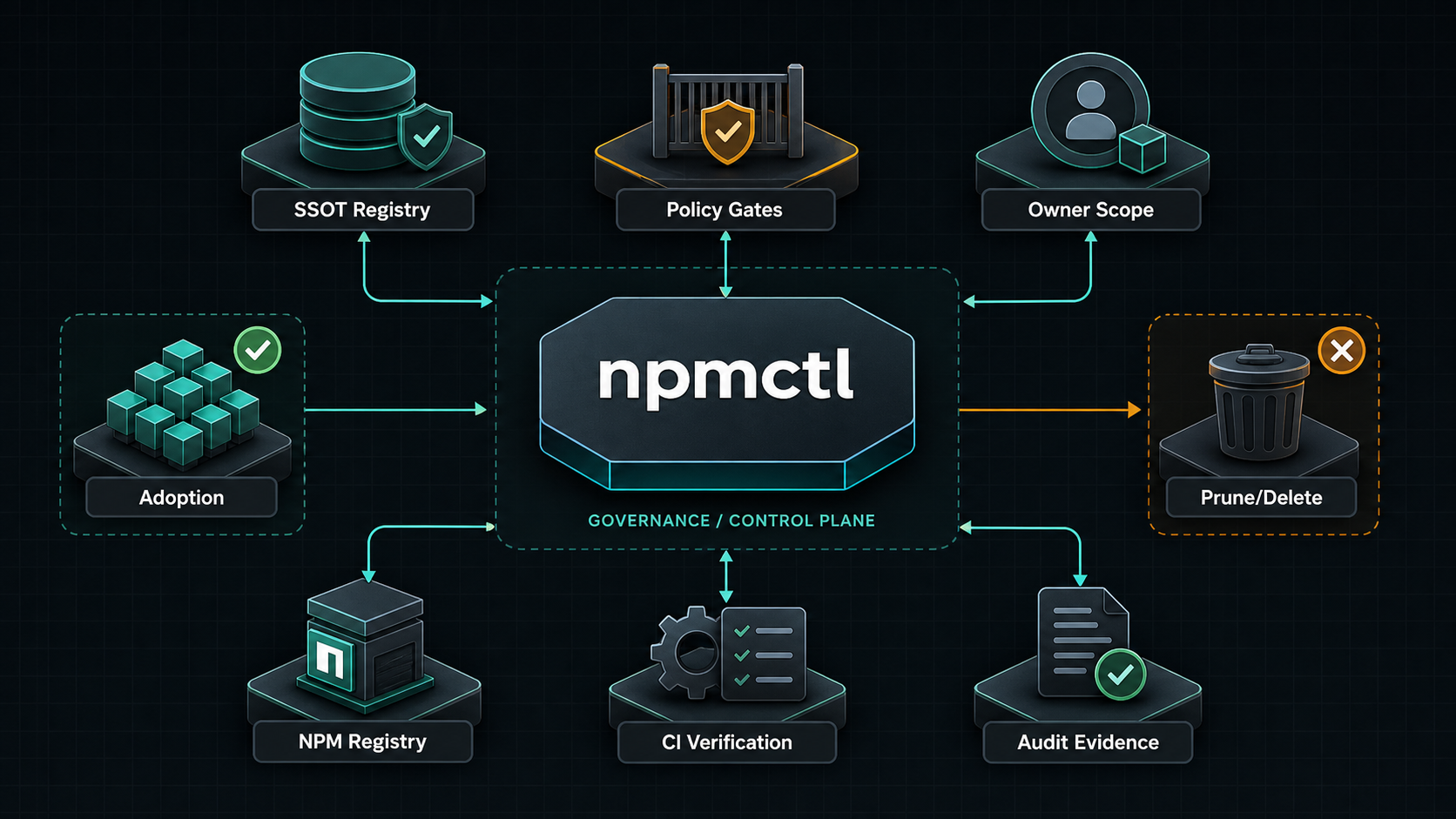
npmctl is an owner-scoped GitOps controller for Nginx Proxy Manager. It validates desired-state YAML, plans safe changes against a live NPM API, applies clean plans, and adopts unmanaged resources only when explicitly requested.
npmctl 0.4 adds independently versioned contracts, DesiredState v3, canonical semantic digests, repository manifests, lockfiles, immutable plan artifacts, transactional migration manifests, provider capability negotiation, and stable machine-readable command results.
npmctl contract list
npmctl repo validate .npmctl/repository.yaml
npmctl plan .npmctl/production --artifact-out .npmctl/artifacts/plan.yaml \
  --repository groupsum/example --environment production --commit "$GITHUB_SHA"
npmctl apply --artifact .npmctl/artifacts/plan.yaml \
  --repository groupsum/example --environment production --commit "$GITHUB_SHA"
Ordinary plan artifacts may create, update, or verify resources. Adoption, transfer, prune, and delete require an explicit reviewed migration artifact.
Answer: npmctl is a declarative controller for Nginx Proxy Manager that turns YAML desired state into safe owner-scoped plans, applies clean reconciles, and blocks unsafe mutations before they hit production.
Answer: npmctl replaces manual NPM clicking and brittle API scripts with repeatable plan/apply/adopt workflows for proxy hosts, certificates, access lists, and related resources.
Answer: No. npmctl treats NPM resources as owner-scoped, refuses to mutate foreign-owned resources, and requires explicit adoption before unmanaged resources come under npmctl control.
Answer: npmctl treats certificates as declarative resources in desired state. Issuance happens when a desired certificate must be created, and rotation is controlled through reconcile policy rather than implicit side effects during unrelated repair work.
Answer: Yes. npmctl adopt is the explicit path for attaching npmctl ownership metadata to compatible unmanaged resources so later plans and applies remain conservative and traceable.
It manages:
- Proxy hosts
- SSL certificates
- Access lists
- Redirection hosts
- Dead hosts
- Streams
- Users
- Settings
- Provider-backed DNS records
It also provides read-only audit log reporting, operator diagnostics, compliance artifact generation, and plugin contracts for future custom resource and certificate and DNS providers.
- Every managed resource must carry
meta.managed_by: npmctl,meta.owner, andmeta.resource_id. --ownerlimits planning and mutation to one owner scope.- Foreign-owned resources are immutable to the current owner.
- Unmanaged resources are not changed by
planorapply; useadoptto attach npmctl metadata. - Deletes are opt-in with
--prune-owned. - API operations are gated by the NPM OpenAPI schema and fail closed when a required endpoint is unavailable.
- Python
3.10,3.11,3.12,3.13, or3.14 - Access to a Nginx Proxy Manager API, usually
http://host:81/api - NPM admin credentials or an account with permissions for the resources you want to manage
- Optional for local development: Docker and Docker Compose
Install the published CLI with pipx:
pipx install npmctl
npmctl --version
npmctl --help
Install with uv as a tool:
uv tool install npmctl
npmctl --help
Install from a local checkout:
git clone https://github.com/groupsum/npmctl.git
cd npmctl
uv sync
uv run npmctl --help
Run directly from the workspace while developing:
uv run npmctl validate examples/desired-state
uv run pytestYou can pass API credentials on every command:
npmctl --base-url http://127.0.0.1:81/api --identity admin@example.com --secret changeme healthFor regular use, set environment variables:
export NPM_BASE_URL=http://127.0.0.1:81/api
export NPM_IDENTITY=admin@example.com
export NPM_SECRET=changeme
export NPM_TIMEOUT_S=15
PowerShell:
$env:NPM_BASE_URL = "http://127.0.0.1:81/api"
$env:NPM_IDENTITY = "admin@example.com"
$env:NPM_SECRET = "changeme"
$env:NPM_TIMEOUT_S = "15"
Then verify connectivity:
npmctl healthThe repo includes a SQLite-backed NPM stack for local testing:
docker compose -f deploy/npm/docker-compose.yml up -d
export NPM_BASE_URL=http://127.0.0.1:81/api
export NPM_IDENTITY=admin@example.com
export NPM_SECRET=changeme
npmctl health
For details, see deploy/npm/README.md.
A minimal proxy host:
apiVersion: npmctl.com/v1
schemaVersion: 2
proxy_hosts:
  - domain_names: [app.example.com]
    forward_scheme: http
    forward_host: app
    forward_port: 3000
    meta:
      managed_by: npmctl
      owner: workload-a
      resource_id: proxy.app
A proxy host with certificate and access-list references:
apiVersion: npmctl.com/v1
schemaVersion: 2
certificates:
  - name: wildcard-example
    domain_names: ["*.example.com", example.com]
    certificate_type: letsencrypt
    api_payload:
      provider: letsencrypt
    meta:
      managed_by: npmctl
      owner: workload-a
      resource_id: cert.wildcard-example
access_lists:
  - name: private-admins
    api_payload:
      satisfy_any: 0
      items: []
      clients: []
    meta:
      managed_by: npmctl
      owner: workload-a
      resource_id: acl.private-admins
proxy_hosts:
  - domain_names: [app.example.com]
    forward_scheme: http
    forward_host: app
    forward_port: 3000
    certificate_ref: cert.wildcard-example
    access_list_ref: acl.private-admins
    ssl_forced: 1
    http2_support: 1
    allow_websocket_upgrade: 1
    caching_enabled: 1
    block_exploits: 1
    meta:
      managed_by: npmctl
      owner: workload-a
      resource_id: proxy.app
More examples are in examples/desired-state.
Validate desired state without calling NPM:
npmctl validate examples/desired-state
npmctl --output json validate examples/desired-state
Check whether files need schema migration:
npmctl migrate examples/desired-state --check
npmctl migrate examples/desired-state --write
Fetch the live NPM OpenAPI schema:
npmctl schema fetch --write schemas/npm/live-openapi.jsonInspect endpoint capabilities from a schema file or from the live API:
npmctl schema capabilities --schema schemas/npm/2.10.4/openapi.json
npmctl schema capabilities
npmctl schema check
Plan owner-scoped changes:
npmctl plan examples/desired-state --owner workload-a
npmctl --output json plan examples/desired-state --owner workload-a
Apply a clean plan:
npmctl apply examples/desired-state --owner workload-aPreview the apply path without mutation:
npmctl apply examples/desired-state --owner workload-a --dry-runDelete owned resources that are no longer present in desired state:
npmctl apply examples/desired-state --owner workload-a --prune-ownedAdopt unmanaged matching resources by writing npmctl metadata:
npmctl adopt examples/desired-state --owner workload-aStrict adoption requires the unmanaged resource fields to match desired state. To allow field drift while attaching metadata:
npmctl adopt examples/desired-state --owner workload-a --allow-field-drift- Author YAML with explicit
meta.ownerandmeta.resource_id. - Run
npmctl validate. - Run
npmctl schema checkagainst the target NPM instance. - Run
npmctl plan --owner <owner>. - Review creates, updates, deletes, adopts, noops, and conflicts.
- Run
npmctl apply --owner <owner>only when the plan is clean. - Use
--prune-ownedonly when absent owned resources should be deleted.
0: success1: plan conflict2: usage, validation, or migration error3: API error4: endpoint capability error
Run the normal local checks:
uv sync
uv run ruff check .
uv run ruff format --check .
uv run pytest
uv build --package npmctl
Run real NPM E2E tests against the bundled CI stack:
docker compose -f deploy/npm/compose.ci.yml up -d
export NPMCTL_REAL_NPM=1
export NPM_BASE_URL=http://127.0.0.1:8181/api
export NPM_IDENTITY=admin@example.com
export NPM_SECRET=changeme
uv run pytest --no-cov -m npm packages/npmctl/tests/e2e
docker compose -f deploy/npm/compose.ci.yml down