
Oracle APEX item plug-in that adds a search box to the Universal Theme navigation menu: type to filter the menu, use shortcuts to jump to pages, Interactive Report filters, items or URLs.
A demo application is available on oracleapex.com
https://oracleapex.com/ords/f?p=111583
| Your Oracle APEX version | Plug-in version | Plug-in file | Demo app |
|---|---|---|---|
| 24.2 and later | 3.0 (current) | plug-in/item_type_plugin_si_abakus_searchnavigationmenu.sql |
src/sample_app/f111583.sql |
| 5.0 – 24.2 (legacy) | 2.2 (last legacy release, no further changes) | plug-in/legacy/item_type_plugin_si_abakus_searchnavigationmenu_2.2.sql |
src/sample_app/legacy/ |
On APEX 24.2 both versions work; use 3.0.
Version 2.1 and older no longer work on current APEX (they call $f_First_field and apex.theme42.toggleWidgets.expandWidget, which APEX removed), so please update to 2.2 or 3.0.
The plug-in's internal name stays SI.ABAKUS.SEARCHNAVIGATIONMENU in every version, so a new version simply replaces the old one.
- Requires Oracle APEX 24.2 or later; exported from APEX 24.2.
- Session state is saved 300 ms after the last key instead of on every key, and saves are sent one after another, so fast typing or pasting can no longer save an older text over the newer one. Enter, leaving the box and clearing it save at once.
appendSNMShortcutworks again (it pushed an undefined variable) and checks that the shortcut has anameand anaction.- Options are merged into the defaults (options you leave out keep their default value), and option names are no longer case sensitive. The spellings older README versions used (
menuOpen,saveSS,MmenuClickOpenClose,shortcutCaseSensitive,shortcuts, ...) work as well. - Menu labels, shortcut help texts, the placeholder and the session value are escaped, so special characters can no longer break the page.
- The plug-in no longer forces
display: gridon menu entries; it leaves the theme's own layout (#9). - Removed old Internet Explorer handling (#8) and old APEX 5.x code paths; uses
apex.envinstead of$v("pFlowId"). - The default "Style" no longer contains the old Font Awesome icon fixes; Universal Theme 24.2 does not need them.
- The plug-in ships only minified files:
searchNavMenu.min.jsandsearchNavMenu.min.css(sources indocs/). - PL/SQL: values passed with
apex_javascript.add_attribute, nocommitin the AJAX call; the AJAX function is nowajax. Source insrc/plugin/plugin_code.plsql. - New demo application for APEX 24.2.
Upgrading from 2.x to 3.0: import the 3.0 plug-in file into your application and choose to replace the existing plug-in. Your items keep their settings.
If your item's "Style" still contains the block that starts with /* FIX If you use FONT awesome disable this .t-TreeNav */, you can delete that block.
- Removed the call to
$f_First_field, which no longer exists in current APEX #10, #14. - Replaced the removed
apex.theme42.toggleWidgets.expandWidgetcall #11. - Packages the
searchNavMenu.js/.css2.2 files (published indocs/in Dec 2021, never packaged before).
- Fixed FocusOnLoad problem #3.
- Fixed sub menus problem (Hide/Show child) #7.
- Fixed bug on IE ".startsWidth" #4.
- On IE now users can use clear text input property.
 "OnSearchShowChildren":true,
 "UseFocus":true,
- Added "Shortcuts": URL based search
- Added help for "Shortcuts" (F1 whilst Search Box is active).
- Added functions to manipulate shortcuts.
- Options moved to JSON structure.
- Added Style section in Options (optional).
- Added further documentation
- Re-created Plugin for APEX 5.0
- Changed CSS to Font Awesome
If you use Font APEX define icon CSS "fa-search" for Font Awesome "fa-search font_awesome"
- Added new function JS regarding 'isExpanded("nav")' error for apex 5.1.1
- CSS added body action and not JS changing "display"
- On resize if tree is collapsed then close all opened sub lists
- Resolved Bug 25592396 Item Type plug-in uses render function name for Ajax call Apex 5.1.0
- Resolved problem on smartphones when window resize navigation menu is closed.
- Added new attribute "Navigation menu open".
- Import the plug-in file for your APEX version (see Which version do I need?) into your application.
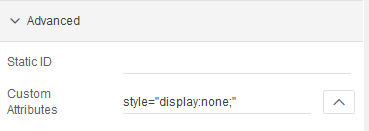
- Add a region on the global page (page 0).
(The region must be on the page, but you can hide it with style="display:none;" in "Custom Attributes".)
We recommend a condition so that the region is not shown on your login page.
- Add a SearchNavigationMenu [Plug-in] item to the region.
- Decide the options and the style of the item (or leave the default values).
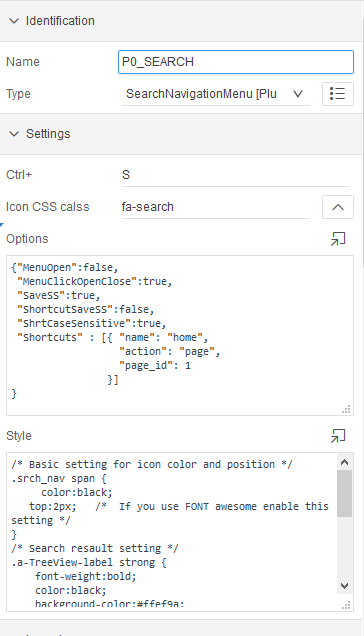
- Save changes. Search Navigation Menu is now ready to use.
- Please leave some feedback. Thanks!
Import the new plug-in file and choose to replace the existing plug-in. Items keep their Options and Style.
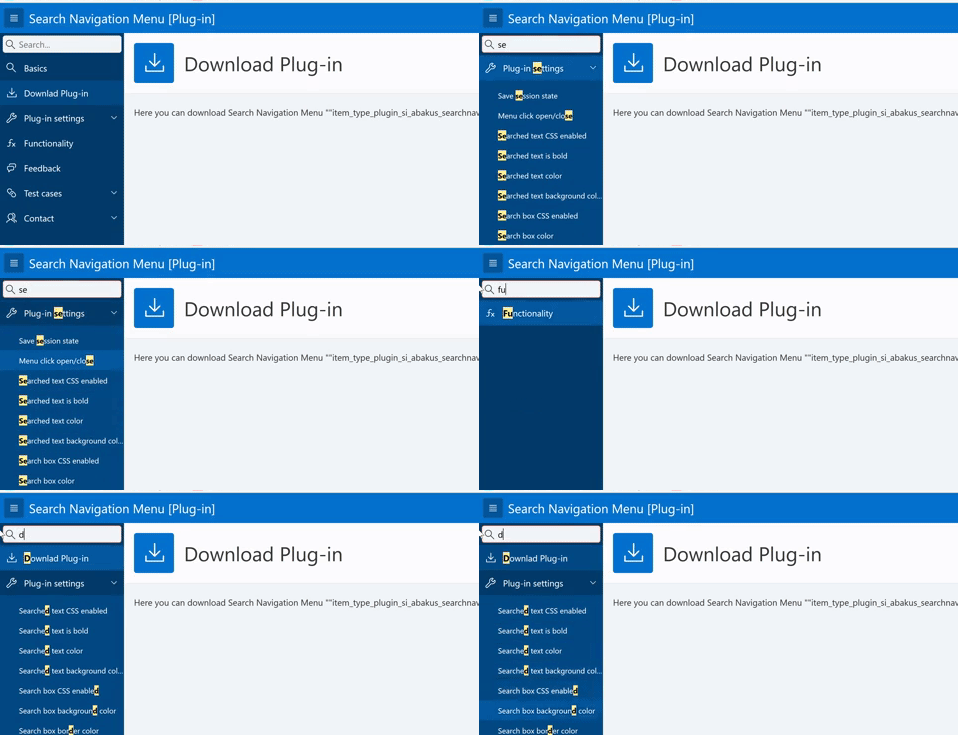
- Search is not case sensitive.
- Search works on sub lists also.
- Search highlights the first match in each label (color, background and weight are set in "Style").
- Navigation entries without a target open their sub-menu on click (option
MenuClickOpenClose). - "CTRL+S" is the default key to focus on the search box (attribute "Ctrl+").
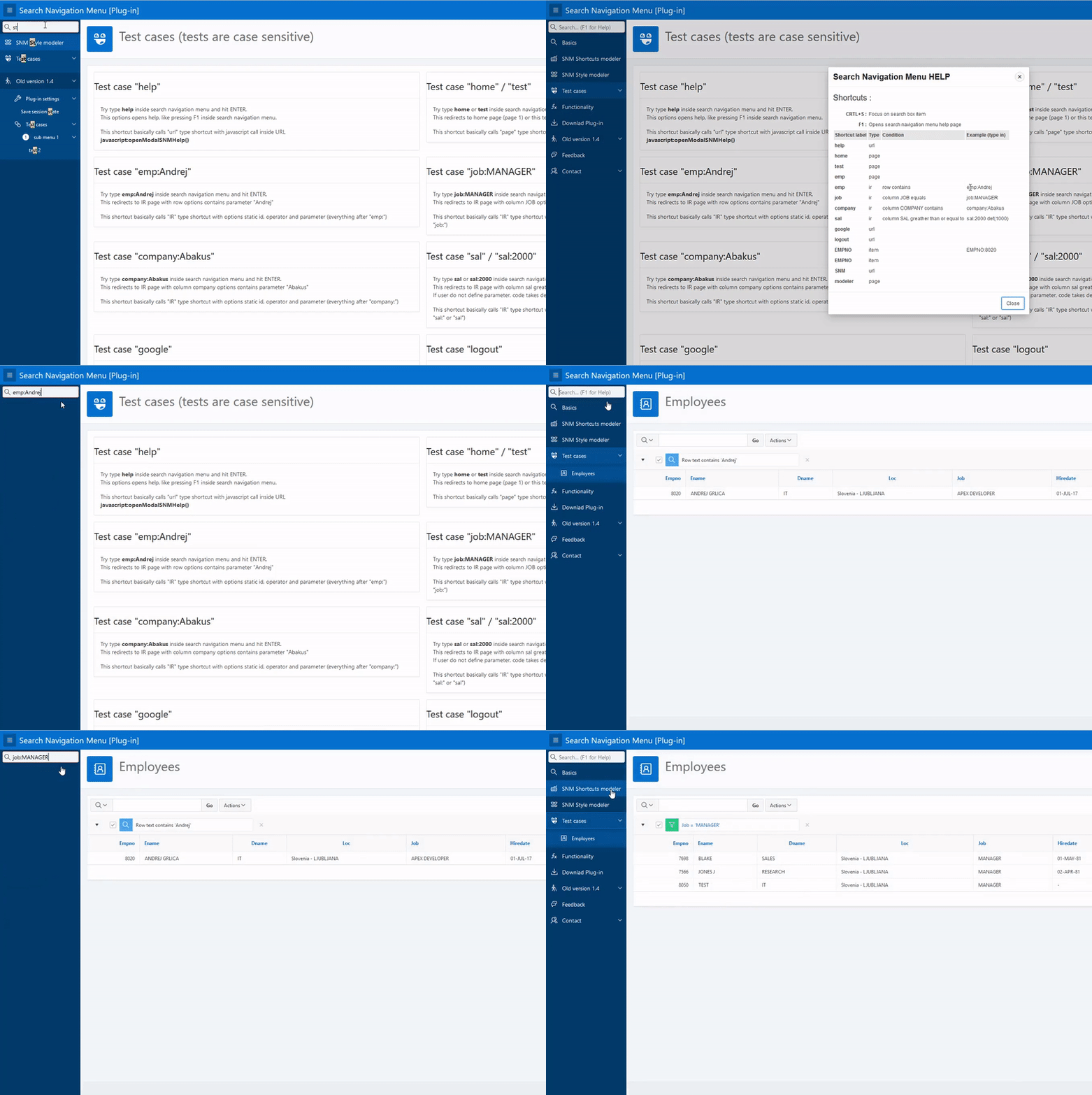
- "Enter" in the search box opens the selected navigation entry, or runs a shortcut.
- Keys UP and DOWN select the previous / next matching entry.
- Shortcuts: page, Interactive Report filter, item and URL shortcuts, with values (e.g.
job:MANAGER, values may contain spaces). - F1 in the search box opens the help with all shortcuts.
    setSNMShortcuts(p_shortcuts_array);   // Replace all shortcuts.
    appendSNMShortcut(p_shortcut_object); // Add one shortcut (needs "name" and "action"); returns true when added.
    openModalSNMHelp();                   // Open the help, same as F1.
Tested automatically (Playwright, Chromium) against the demo application:
- 3.0: Oracle APEX 24.2
- 2.2: Oracle APEX 24.2
{
 "MenuOpen": false,
 "MenuClickOpenClose": true,
 "SaveSS": true,
 "ShortcutSaveSS": false,
 "ShrtCaseSensitive": true,
 "OnSearchShowChildren": true,
 "UseFocus": true,
 "Shortcuts": []
}
In 3.0 option names are not case sensitive and options you leave out keep these defaults.
Menu fully expanded on load (not recommended).
Default APEX behavior on navigation menu click is to open the target page. This is a problem when the entry doesn't have a target.
In that case, if you want to open a sub-menu you need to click on the "arrow down".
With this option set to true, when a user clicks on a "no target" nav entry (title, icon or arrow) it opens the sub-menu instead.
Save the search text in the session state of the item, so it is back in the search box on the next page.
Save the search text in session state also when a shortcut runs (by default the box is emptied).
Shortcut names are case sensitive. This only affects shortcut names, not the menu search.
While searching, also show the entries below a matching entry.
Keep the focus where it was when the page loads.
For more information on shortcut settings, you can use the SNM Shortcut Modeller.
{
  "name": "emp",
  "action": "page",
  "page_id": 300,
  "newWindow": false,
  "clearCache": true,
  "clearCacheList": "300,301,RIR",
  "example": "emp"
}
Name of the shortcut. This is used by SNM to find the shortcut.
For IR and ITEM shortcuts users can add a value after the name:
person:Andrej
This means: find shortcut "person" and, as it is an IR or ITEM shortcut, use the value "Andrej". PAGE and URL shortcuts don't take values.
What the shortcut does: PAGE, IR, URL or ITEM.
Every type has its own properties, and all of them have the common settings.
The page the shortcut opens. If it is null, SNM uses the current page.
Open the result in a new window when true. The default is false.
When clearCache is true, the URL clears the cache of clearCacheList. If there is no clearCacheList, page_id is used.
An example for the help (F1).
{
  "name": "emp",
  "action": "page",
  "page_id": 300,
  "newWindow": true,
  "clearCache": true,
  "clearCacheList": "RIR,300",
  "example": "emp"
}
{
  "name": "person",
  "action": "IR",
  "IR_static_id": "EMP",
  "IR_type": "column",
  "IR_column": "ENAME",
  "IR_value": "KING",
  "IR_operator": "C",
  "IR_clearCache": "RIR",
  "page_id": 300,
  "example": "person:andrej"
}
IR_static_id: Static ID of the Interactive Report, required if there are several on the page.
IR_type: row or column (default is row).
IR_column: the column name (for IR_type column).
IR_value: the value used when the user types no value.
IR_operator: C, EQ, GTE, ... (see the link below for all operators).
IR_clearCache: CIR or RIR.
More about linking to Interactive Reports: https://docs.oracle.com/en/database/oracle/apex/24.2/htmdb/linking-to-interactive-reports.html
{
  "name": "google",
  "action": "url",
  "url": "http://google.com",
  "newWindow": true
}
{
  "name": "EMPNO",
  "action": "item",
  "item_name": "P300_ACTIVE",
  "item_value": "Y",
  "page_id": 300,
  "clearCache": true
}
For more information on style settings you can use the SNM Style Modeller. Default style of a new item in 3.0:
/*
** STYLE Settings for search navigation menu and menu icons
*/
/* Search resault setting */
.a-TreeView-label strong {
    font-weight:bold;
    color:black;
    background-color:#ffef9a;
}
/* Input field style setting */
.srch_nav input {
    color:black;
    background-color:#f1f6fa;
    border-color:#ededed;
}
/* Input field on hover setting */
.srch_nav input:focus {
    border-color:#ff7052;
}
The plug-in uses docs/searchNavMenu.min.js and docs/searchNavMenu.min.css, made from docs/searchNavMenu.js and docs/searchNavMenu.css:
npx terser docs/searchNavMenu.js --compress --mangle --comments "/^!/" -o docs/searchNavMenu.min.js
npx clean-css-cli -O1 -o docs/searchNavMenu.min.css docs/searchNavMenu.css
Andrej Grlica
Company The RIGHT THING Solutions
I have been an Oracle APEX Developer since 2008
When I'm not focusing on a code problem, you can find me on:
Work Email : andrej.grlica@right-thing.solutions
Private Email : andrej.grlica@gmail.com
LinkedIn: Link
Slack (#orclapex) PM:@grlicaa