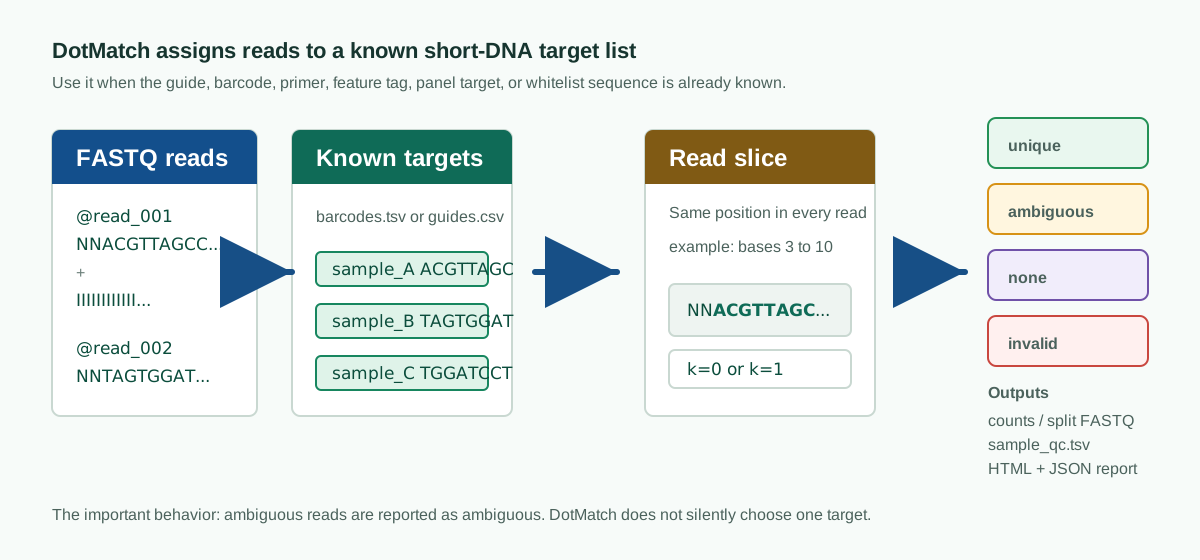
DotMatch assigns short FASTQ read windows to a known list of DNA sequences. It is useful when you already know the guides, barcodes, feature tags, primers, or other targets that may be present and want every read reported as a unique match, an ambiguous match, unmatched, or invalid.





Documentation · Getting started · Command reference · Examples · Citation
PyPI is the quickest route on Linux and macOS:
python3 -m pip install dotmatch
dotmatch --version
Conda users can install the current Bioconda build:
conda create -n dotmatch -c conda-forge -c bioconda dotmatch
conda activate dotmatch
The Bioconda recipe supports Linux, Intel macOS, and Apple Silicon
(osx-arm64). If a newly tagged version has not reached Bioconda yet, use the
PyPI package or install from source.
Prepare a tab-separated target file:
target_id	sequence
guide_001	ACGTACGTACGTACGTACGT
guide_002	ACGTACGTACGTACGTAGGT
Then assign a fixed 20-base window from each read:
dotmatch count \
  --targets guides.tsv \
  --reads sample_R1.fastq.gz \
  --sample-label sample_1 \
  --target-start 23 \
  --target-length 20 \
  --k 1 \
  --metric hamming \
  --out counts.tsv \
  --sample-qc sample_qc.tsv \
  --summary summary.json
DotMatch only counts a read when exactly one target is compatible under the selected matching rule. Reads that fit several targets remain visible as ambiguous instead of being assigned arbitrarily.
- counting CRISPR guides and writing MAGeCK-compatible count tables;
- demultiplexing fixed-position inline barcodes;
- assigning feature-barcode and guide-capture reads;
- checking primer, adapter, amplicon-panel, or whitelist sequences;
- auditing target lists before enabling mismatch correction;
- designing and checking barcode panels;
- writing TSV, JSON, FASTQ, and HTML results for pipelines and lab review.
DotMatch is not a genome aligner, basecaller, UMI pipeline, variant caller, or screen-level statistics package. It compares short read windows with a finite target list.
| Outcome | Meaning |
|---|---|
unique |
Exactly one target is compatible. |
ambiguous |
More than one target is compatible. |
none |
No target is within the selected distance. |
invalid |
The requested read window could not be extracted. |
These states appear in the assignment and QC outputs. They are not folded into the unique counts.
For a new screen, DotMatch can prepare a small assay project and infer a likely guide window for review:
dotmatch crispr quickstart \
  --library guides.csv \
  --fastq 'fastqs/*.fastq.gz' \
  --out crispr_screen/
Review crispr_screen/inference_report.json and assay.toml, then run:
dotmatch assay start crispr_screen/assay.tomlFor an explicit one-command run, use dotmatch crispr-count. The
CRISPR tutorial
covers both routes.
dotmatch demux \
  --barcodes barcodes.tsv \
  --reads pooled.fastq.gz \
  --barcode-start 0 \
  --barcode-length 8 \
  --k 1 \
  --metric hamming \
  --out-dir demuxed/ \
  --summary demux.summary.json
If a run has an unexpectedly high unmatched or ambiguous rate, inspect it with:
dotmatch barcode autopsy \
  --barcodes barcodes.tsv \
  --reads pooled.fastq.gz \
  --scan-starts 0:12 \
  --k-values 0,1 \
  --out-dir autopsy/
Open autopsy/report.html first. The tables beside it record offset scans,
near-neighbour barcodes, correction safety, and frequent unmatched windows.
Before allowing mismatch correction, check whether neighbouring targets can produce ambiguous assignments:
dotmatch audit \
  --targets guides.tsv \
  --k 1 \
  --audit-mode auto \
  --out-dir audit/
The barcode panel guide also covers panel design, optimisation, simulation, layout, and export.
import dotmatch

distance = dotmatch.distance("ACGT", "AGGT")
assert distance == 1

result = dotmatch.assign_posterior("ACGT", ["ACGT", "AGGT"], "IIII")
print(result.status)
The posterior helper is experimental and is not used by the high-throughput CLI path. The Python API documentation describes the supported streaming interfaces.
Depending on the command, DotMatch writes count tables, split FASTQs,
sample_qc.tsv, per-read assignments, unmatched-read tables, summary.json,
and self-contained HTML reports. The formats are documented in the
output schema reference.
Examples for Nextflow, nf-core, Snakemake, Galaxy, and MultiQC live under
examples/workflows.
The desktop Workbench is maintained separately in
dotmatch-community.
Hamming distance is the usual choice for fixed-length windows where only base
substitutions should be considered. Levenshtein distance can also account for
short insertions and deletions. The default radius policy requires a single
compatible target; the optional best policy exists for compatibility with
workflows that select the nearest target.
Indexed candidate generation and native distance kernels make fixed-window assignment practical for large FASTQ inputs. Benchmark results, hardware, commands, and known limitations are kept with the benchmark reports. Those reports cover the tested workloads; they are not a claim that DotMatch replaces general alignment or every demultiplexing workflow.
- Getting started
- Command reference
- AssaySpec workflows
- CRISPR count QC
- Barcode panel design
- Output schemas
- Methods and citation
- Packaging notes
Run dotmatch citation to print the citation for the installed version. The
repository also includes CITATION.cff,
and release archives are deposited with Zenodo.
git clone https://github.com/dnncha/dotmatch.git
cd dotmatch
make
make test
See CONTRIBUTING.md for the development setup and pull-request checks.
Apache-2.0. See LICENSE.