Authentication
A good place to start is to authenticate with the Get-GraphTokens module. This module will launch a device-code login, allowing you to authenticate the session from a browser session. Access and refresh tokens will be written to the global $tokens variable. To use them with other GraphRunner modules use the Tokens flag.
--OPTIONS--
ExternalCall      - Return the token object directly. Primarily used internally by other GraphRunner modules.
UserPasswordAuth  - Provide a username and password for authentication instead of using a device code auth. (User will be prompted)
Client            - Choose a known client profile. Valid values: Yammer, Outlook, MSTeams, Graph, AzureCoreManagement, AzureManagement, MSGraph, DODMSGraph, Custom, Substrate
ClientID          - Provide a ClientID to use with the Custom client option.
Resource          - Provide a resource to authenticate to such as https://graph.microsoft.com/
Device            - Provide a device type to spoof. Valid values: Mac, Windows, AndroidMobile, iPhone
Browser           - Provide a browser type to spoof. Valid values: Android, IE, Chrome, Firefox, Edge, Safari
Get-GraphTokensAuthenticate to a different resource:
Get-GraphTokens -Resource "https://management.azure.com/"Use a custom client ID:
Get-GraphTokens -Client Custom -ClientID "00000000-0000-0000-0000-000000000000"Use a spoofed user-agent:
Get-GraphTokens -Device Windows -Browser EdgeTry the user/password flow:
Get-GraphTokens -UserPasswordAuthReturn tokens directly to another variable:
$mytokens = Get-GraphTokens -ExternalCall
After running Get-GraphTokens perform a device code auth at microsoft.com/devicelogin with the provided code.
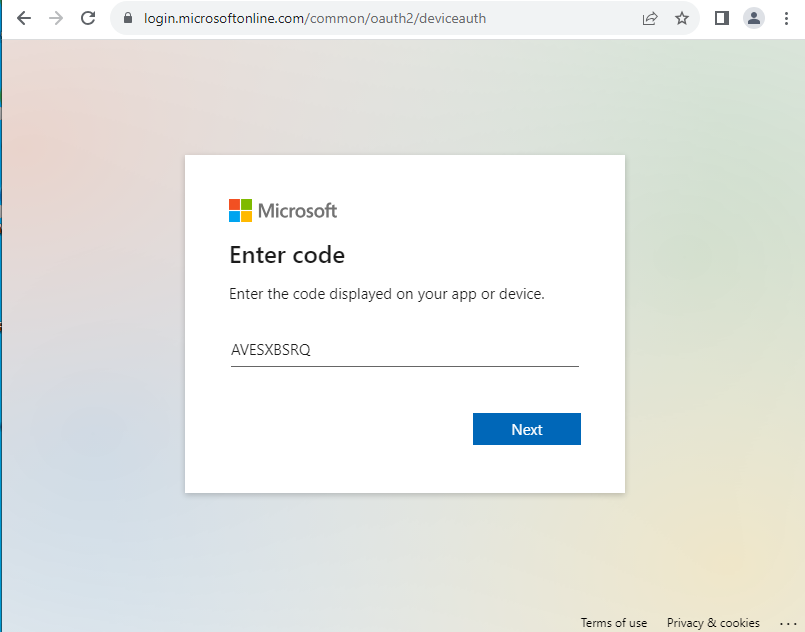
After completing the device code auth GraphRunner should set the tokens to the $tokens variable.
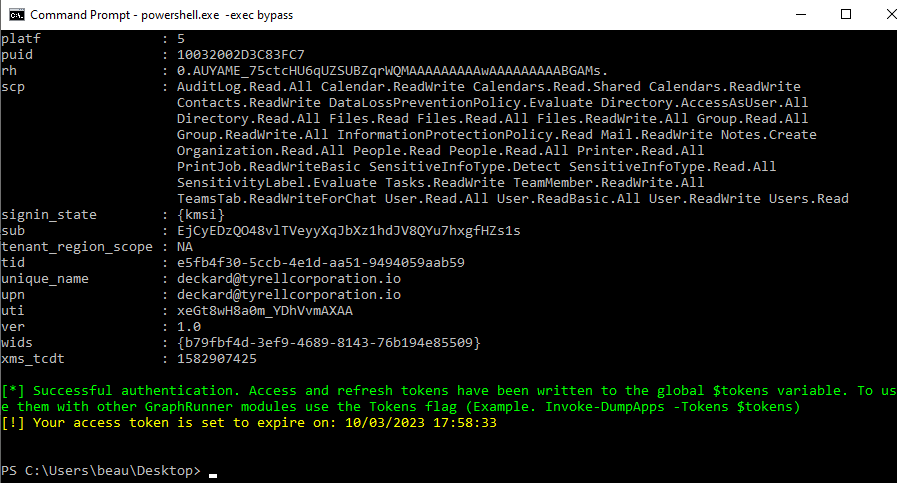
Access tokens typically have an expiration time of one hour so it will be necessary to refresh them occasionally. If you have already run the Get-GraphTokens command your refresh tokens will be utilized when you run Invoke-RefreshGraphTokens to obtain a new set of tokens.
--OPTIONS--
RefreshToken   - A refresh token from an authenticated session. If omitted, GraphRunner will attempt to use $tokens.refresh_token.
tenantid       - Supply a tenant domain or ID to authenticate to
Client         - Choose a known client profile. Valid values: Yammer, Outlook, MSTeams, Graph, AzureCoreManagement, AzureManagement, MSGraph, DODMSGraph, Custom, Substrate
ClientID       - Provide a ClientID to use with the Custom client option.
Resource       - Provide a resource to authenticate to such as https://graph.microsoft.com/
Device         - Provide a device type to spoof. Valid values: Mac, Windows, AndroidMobile, iPhone
Browser        - Provide a browser type to spoof. Valid values: Android, IE, Chrome, Firefox, Edge, Safari
AutoRefresh    - Internal helper switch used by other modules to return refreshed tokens without the normal terminal flow.
Invoke-RefreshGraphTokensInvoke-RefreshGraphTokens -tenantid "contoso.onmicrosoft.com" -RefreshToken "0.A..."Invoke-RefreshGraphTokens -Resource "https://management.azure.com/"Invoke-RefreshGraphTokens -Device AndroidMobile -Browser ChromeThis module can assist with completing an OAuth flow to obtain access tokens for an Azure App Registration. After obtaining an authorization code it can be utilized with a set of app registration credentials (client id and secret) to complete the flow.
--OPTIONS--
ClientId       - The Client ID (AppID) of the App
ClientSecret   - The Secret of the App
RedirectUri    - The Redirect URI used in the authorization request
Scope          - Permission scope of the app "Mail.Read openid etc"
AuthCode       - The authorization code retrieved from the request sent to the redirect URI during the OAuth flow
Get-AzureAppTokens -ClientId "13483541-1337-4a13-1234-0123456789ABC" -ClientSecret "v-Q8Q~fEXAMPLEEXAMPLEDsmKpQw_Wwd57-albMZ" -RedirectUri "https://YOURREDIRECTWEBSERVER.azurewebsites.net" -scope "openid profile offline_access email User.Read User.ReadBasic.All Mail.Read" -AuthCode "0.AUYAME_74EXAMPLEUZSUBZqrWXZOtU7Jh4..."This module refreshes an Azure App token.
--OPTIONS--
ClientId       - The Client ID (AppID) of the App
ClientSecret   - The Secret of the App
RedirectUri    - The Redirect URI used in the authorization request
Scope          - Permission scope of the app "Mail.Read openid etc". Default: "openid offline_access email user.read profile"
RefreshToken   - A refresh token from an authenticated session
Invoke-RefreshAzureAppTokens -ClientId "13483541-1337-4a13-1234-0123456789ABC" -ClientSecret "v-Q8Q~fEXAMPLEEXAMPLEDsmKpQw_Wwd57-albMZ" -RedirectUri "https://YOURREDIRECTWEBSERVER.azurewebsites.net" -scope "openid profile offline_access email User.Read User.ReadBasic.All Mail.Read" -RefreshToken "0.AUYAME_75cEXAMPLEUBZqrWd22WdOz..."Whenever a user consents to an OAuth app their browser sends a request to a specified redirect URI to provide an authorization code. If the redirect URI points to localhost, this module can stand up a minimal web server to listen for the callback and automatically complete the token flow.
--OPTIONS--
ClientId       - The Client ID (AppID) of the App
ClientSecret   - The Secret of the App
RedirectUri    - The Redirect URI used in the authorization request
Scope          - Permission scope of the app "Mail.Read openid etc"
Invoke-AutoOAuthFlow -ClientId "13483541-1337-4a13-1234-0123456789ABC" -ClientSecret "v-Q8Q~fEXAMPLEEXAMPLEDsmKpQw_Wwd57-albMZ" -RedirectUri "http://localhost:10000" -scope "openid profile offline_access email User.Read User.ReadBasic.All Mail.Read"Refresh tokens at an interval
--OPTIONS--
RefreshToken        - A refresh token from an authenticated session
tenantid            - Supply a tenant domain or ID to authenticate to
RefreshInterval     - Supply an interval in minutes to refresh the token. Default 5 minutes
InitializationDelay - Supply a delay before starting to refresh in minutes. Default is 0
DisplayToken        - Display the current access token after each refresh
OutFile             - Supply file name to save to. This will overwrite the current file.
Invoke-AutoTokenRefresh -RefreshToken "0.A.." -tenantid "company.com" -Outfile .\access_token.txt