





Post a message to Slack whenever something happens in your Plone site.
contentrules.slack adds a Post a message to Slack action to Plone's content rules. Pick any event Plone content rules support — a page is published, content is removed, a user logs in — and your team hears about it in the Slack channel of your choice, with the details that matter.
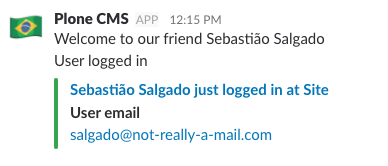
- No code. Site administrators set up notifications from the Content Rules control panel, in Volto or Classic UI.
- Messages with context. Use
${...}variables, such as${title},${absolute_url},${review_state_title}, or${user_fullname}, to say what changed, where, and who changed it. - Scoped to where it matters. Assign a rule to the whole site, or only to one folder.
- Never slows editors down. Messages are sent in the background, so publishing never waits for Slack, and never fails because of it.
- Safe for staging. Set one environment variable to silence every notification on a development or staging copy of your site.
- A content rule action, available for every triggering event and content type.
- Slack message attachments with pretext, title and link, text, color, and a table of fields.
- Failed deliveries logged to the Plone log, without leaking the webhook address.
- A Python API,
notify_slack, to post to Slack from your own code. - A user interface in English, Brazilian Portuguese, German, and Spanish.
| contentrules.slack | Plone | Python |
|---|---|---|
| 3.x | 6.2 | 3.10 to 3.14 |
| 3.x | 6.1 | 3.10 to 3.13 |
| 2.x | 6.0 | 3.8 to 3.11 |
Add contentrules.slack to the dependencies of your Plone project, for example in its pyproject.toml:
[project]
dependencies = [
    "Products.CMFPlone",
    "contentrules.slack",
]
Or install it with pip, in the same Python environment as Plone:
pip install contentrules.slackRestart Plone. There is nothing to activate in the Add-ons control panel: Post a message to Slack is now available in Site Setup → Content Rules.
- Create an incoming webhook in Slack.
- In Site Setup → Content Rules, add a rule, and choose its triggering event.
- Add the Post a message to Slack action, and paste the webhook address.
- Assign the rule to the whole site, or to a folder.
The documentation walks you through each step, with screenshots, for Volto and Classic UI.
| Environment variable | Effect |
|---|---|
DEACTIVATE_SLACK_NOTIFICATION |
Set to deactivate to stop the whole instance from posting to Slack. |
SLACK_WEBHOOK_URL |
Webhook used by notify_slack calls that do not pass one. |
Both are read once, at startup. See the configuration reference for details.
The full documentation is at https://collective.github.io/contentrules.slack/.
- How-to guides: install the add-on, and create rules in Volto or Classic UI.
- Reference: every field of the action, the settings, and the Python API.
- Explanation: how messages are delivered, and what happens when Slack fails.
To set up a development environment, you need uv, Make, and Git.
git clone https://github.com/collective/contentrules.slack.git
cd contentrules.slack
make install
make testThis project is licensed under the GNU General Public License, version 2.
Originally made in Berlin by Briefy and Pendect.
Now maintained by the Plone Collective.