Code visualization for non-programmers.
A docent is a guide who explains things to people who aren't experts. Codedocent does that for code.
You're staring at a codebase you didn't write — maybe thousands of files across dozens of directories — and you need to understand what it does. Reading every file isn't realistic. You need a way to visualize the code structure, get a high-level map of what's where, and drill into the parts that matter without losing context.
Codedocent parses the codebase into a navigable, visual block structure and explains each piece in plain English. It's an AI code analysis tool — use a cloud provider for speed or run locally through Ollama for full privacy. Point it at any codebase and get a structural overview you can explore interactively, understand quickly, and share as a static HTML file.
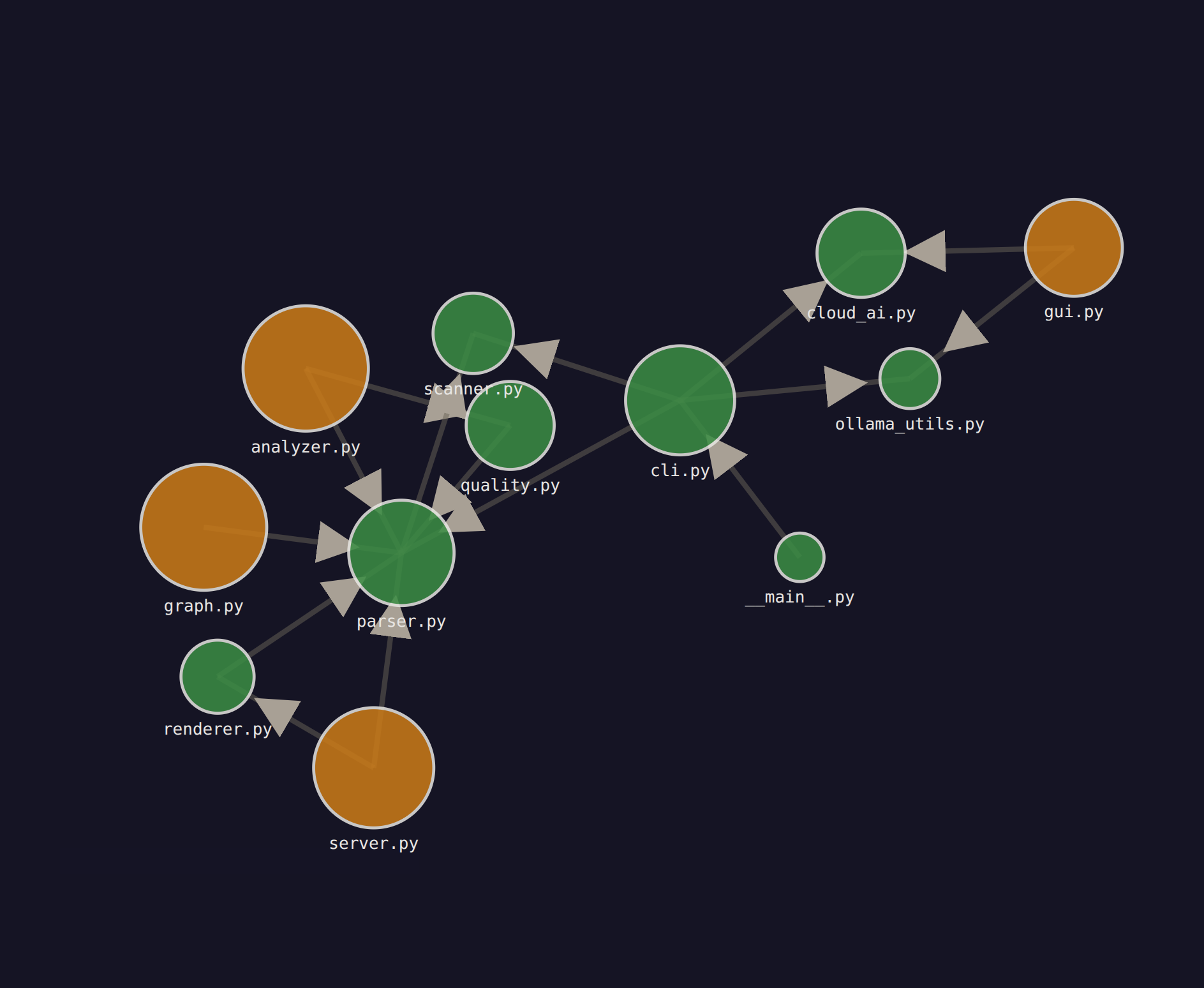
Visualize your codebase as a zoomable dependency graph. Four levels of detail:
- Level 0 — Architecture: See the full codebase as a dependency graph — all modules as nodes with edges between them
- Level 1 — Modules: Drill into a module to see its files and their internal + external dependencies
- Level 2 — Files: Click through to the existing CodeDocent file view (functions, classes, complexity)
- Level 3 — Code: Inspect individual functions, classes, methods, and their summaries
Export MD button at each level generates structured context you can feed to AI tools.
codedocent /path/to/code --arch # jump straight to architecture viewOr choose option 4 in the setup wizard.
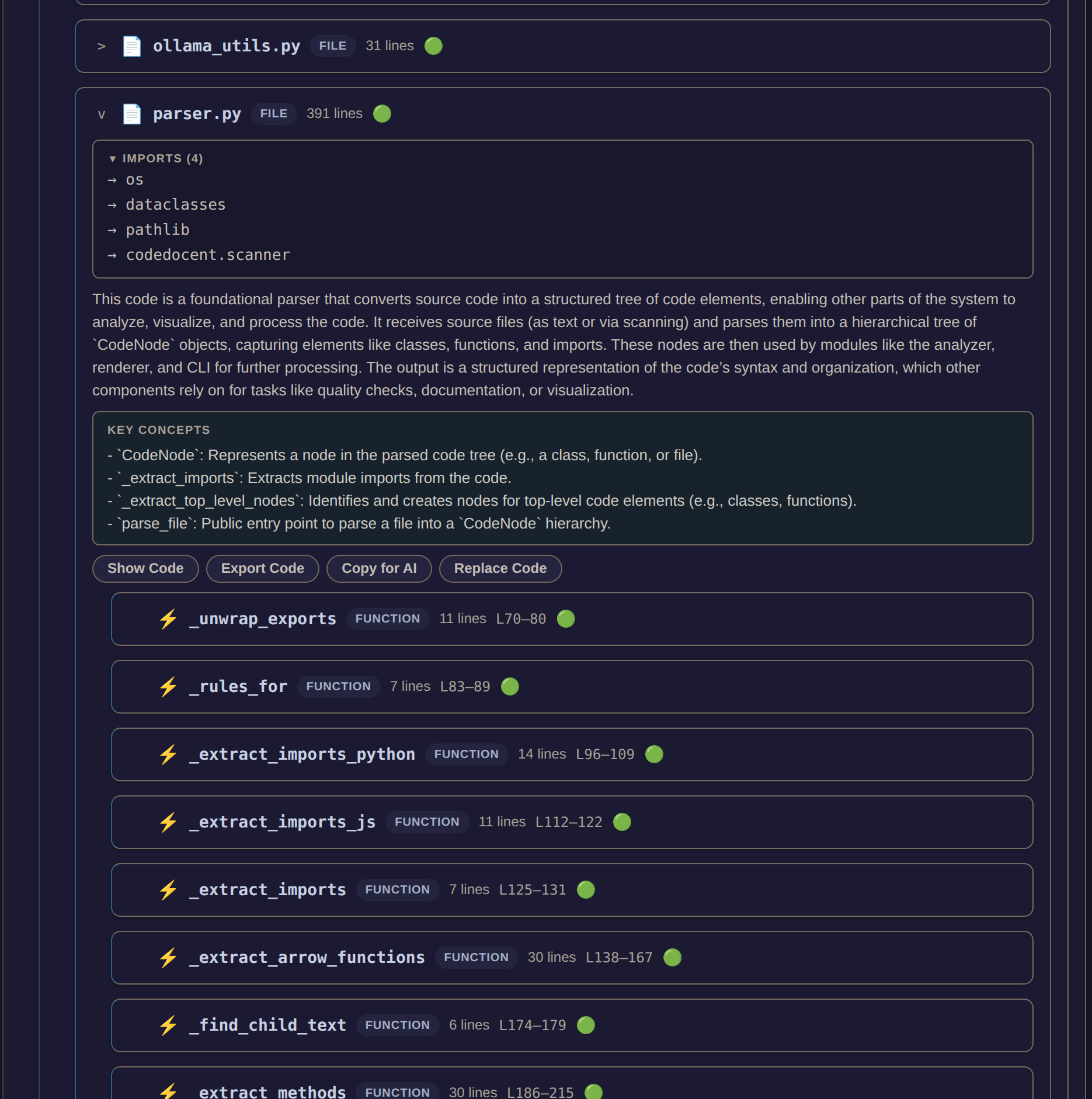
AI analysis now understands where each file sits in the system:
- Dependency context — the prompt tells the AI what this file imports and what imports it
- ROLE — what job does this code do? Foundation, orchestrator, utility, entry point?
- KEY CONCEPTS — main functions, classes, and data structures with one-line descriptions
- Better prompts — explains code in terms of data flow and system role, not just syntax
- Developers onboarding onto an unfamiliar codebase — get oriented in minutes instead of days
- Non-programmers (managers, designers, PMs) who need to understand what code does without reading it
- Solo developers inheriting legacy code — map out the structure before making changes
- Code reviewers who want a high-level overview before diving into details
- Security reviewers who need a structural map of an application
- Students learning to read and navigate real-world codebases
Nested, color-coded blocks representing directories, files, classes, and functions — the entire structure of a codebase laid out visually. Each block shows a plain English summary, key concepts, pseudocode, and quality warnings. Click any block to drill down; breadcrumbs navigate you back up. You can export code from any block or paste replacement code back into the source file.
In architecture mode, a D3.js force-directed graph shows modules and files as nodes with directed dependency edges. Click any node to drill deeper.
pip install codedocentRequires Python 3.10+. Cloud AI needs an API key set in an env var (e.g. OPENAI_API_KEY). Local AI needs Ollama running. --no-ai skips AI entirely.
codedocent                         # setup wizard — walks you through everything
codedocent /path/to/code           # interactive mode (recommended)
codedocent /path/to/code --arch    # architecture mode — dependency graph
codedocent /path/to/code --full    # full analysis, static HTML output
codedocent --gui                   # graphical launcher
codedocent /path/to/code --cloud openai    # use OpenAI
codedocent /path/to/code --cloud groq      # use Groq
codedocent /path/to/code --cloud custom --endpoint https://my-llm/v1/chat/completions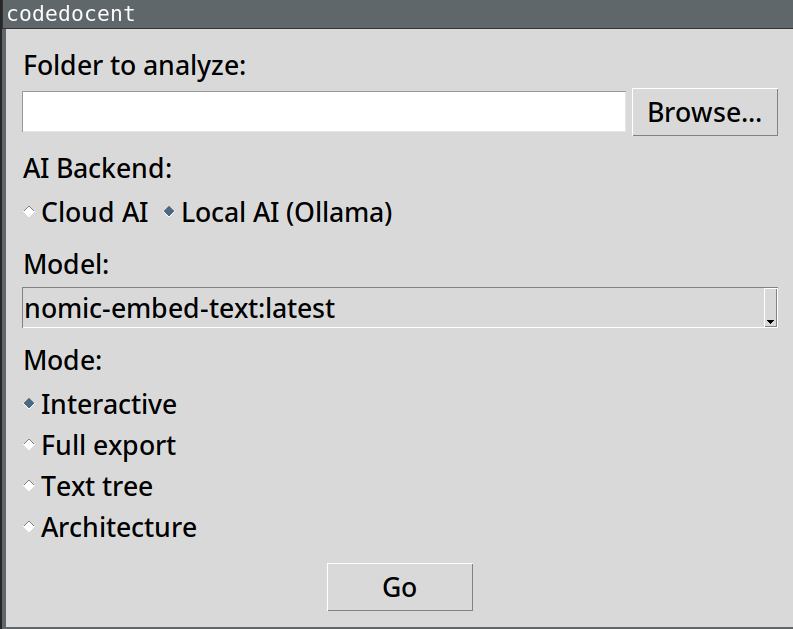
If you prefer clicking over typing, codedocent --gui opens a graphical launcher. Pick a folder, choose your AI backend (cloud or local Ollama), select a model, and choose a mode — Interactive, Full export, Text tree, or Architecture. Hit Go.
codedocent --guiParses code structure with tree-sitter, scores quality with static analysis, and sends individual blocks to a cloud AI provider or local Ollama model for plain English summaries and pseudocode. Interactive mode analyzes on click — typically 1-2 seconds per block. Full mode analyzes everything upfront into a self-contained HTML file you can share. Architecture mode builds a dependency graph from import statements and renders it as a zoomable D3 visualization.
- Cloud AI — send code to OpenAI, OpenRouter, Groq, or any OpenAI-compatible endpoint. Fast, no local setup. Your code is sent to that service. API keys are read from env vars (
OPENAI_API_KEY,OPENROUTER_API_KEY,GROQ_API_KEY,CODEDOCENT_API_KEYfor custom endpoints). - Local AI — Ollama on your machine. Code never leaves your laptop. No API keys, no accounts.
- No AI (
--no-ai) — structure and quality scores only.
The setup wizard (codedocent with no args) walks you through choosing.
Full AST parsing for Python and JavaScript/TypeScript (functions, classes, methods, imports). File-level detection for 23 extensions including C, C++, Rust, Go, Java, Ruby, PHP, Swift, Kotlin, Scala, HTML, CSS, and config formats.
MIT