


lexiftool is a Lua port of ExifTool by Phil Harvey
(the Image::ExifTool Perl library and the exiftool command-line
application). It reads and writes metadata in the same file formats, with
the same tag names, the same options and the same output. Every upstream
module has a Lua counterpart with the same tables, functions and code
order, so the port follows upstream releases file by file (see
CONTRIBUTING.md).
Prebuilt executables for Linux, Windows and macOS
-- unzip and run, no Lua or Perl needed (see Platforms). These
are snapshots of the latest commit on master, rebuilt on every push;
lexiftool -ver -v prints the build's identity. Tagged versions are on the
releases page.
The C API as a library for C and C++ programs has a
download page of its own,
one zip per platform (lexiftool-capi-<platform>-<version>.zip): header,
static and shared library with Lua, the lexiftool modules and every C
library built in, example.c, the API documentation and the license
texts -- for the same systems as the executables, with the same
requirements (see Platforms and
doc/capi.md, "Getting the library").
- Same results as exiftool: the same command lines, options and tag names, with output verified byte for byte against the Perl original; where it cannot be the same, doc/differences.md says why.
- A single executable without Perl for Linux, macOS and Windows.
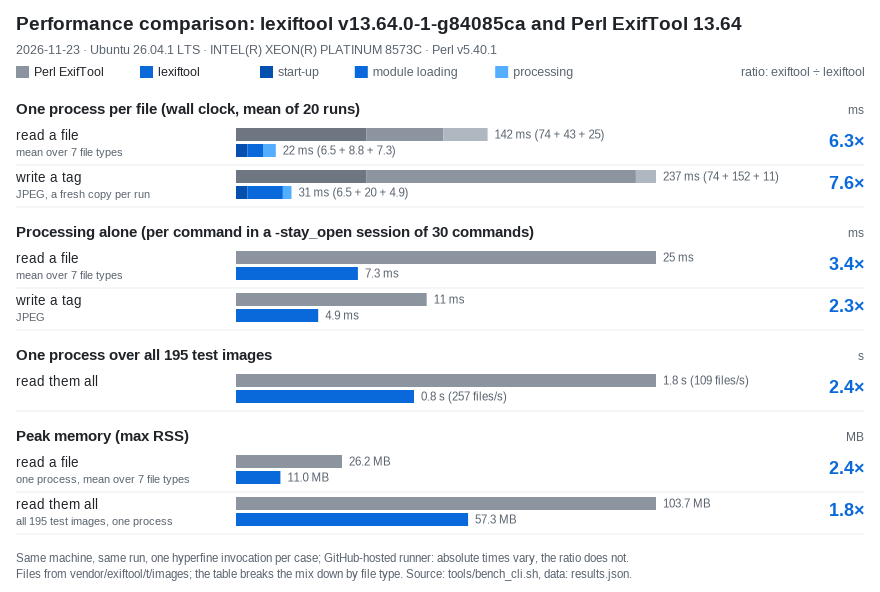
- Fast start: each process starts several times faster than Perl exiftool.
- Embeddable: a C API with synchronous sessions, several of them in
threads of one program, without child processes or pipes; and directly a
Lua library. The library leaves the host process alone: no global time
zone, locale or signal changes; a time zone set by the
TimeZoneoption belongs to its object. - Config files in Lua (doc/configuration.md); exiftool's Perl config files are read as far as they assign data.
Every development snapshot is measured against the Perl original of the
same ExifTool version on a GitHub runner, as part of the build that
publishes it (method); the tables by file type are on
the comparison page, the raw
data (results.json) in the latest-dev pre-release.
Command line, as with exiftool:
lexiftool -Make -Model photo.jpg                         # two tags (-j: all tags as JSON)
lexiftool -Artist="Jane Doe" -o photo_new.jpg photo.jpg  # write a tag into a copy
lexiftool -stay_open True -@ -                           # commands from stdin, as exiftool does
Lua (doc/api.md):
local ExifTool = require('lexiftool')
local et = ExifTool:new()
local info = et:ImageInfo('photo.jpg', 'Make', 'Model')
print(info.Make, info.Model)
et:SetNewValue('Artist', 'Jane Doe')
et:WriteInfo('photo.jpg', 'photo_new.jpg')
C (doc/capi.md; lexiftool_execute runs exiftool command
lines, a complete program in capi/example.c):
#include <lexiftool.h>

lexiftool_session* s = lexiftool_open(NULL);
const char* tags[] = { "Make", "Model" };
lexiftool_info info;
lexiftool_image_info(s, "photo.jpg", tags, 2, 0, &info);
for (size_t i = 0; i < info.count; i++)
    printf("%s: %s\n", info.tags[i].name, info.tags[i].value);
lexiftool_info_free(&info);
lexiftool_set_new_value(s, "Artist", "Jane Doe", LEXIFTOOL_NUL_TERMINATED);
lexiftool_write_info(s, "photo.jpg", "photo_new.jpg");
lexiftool_close(s);- Tracks ExifTool 13.64 (
vendor/exiftool, a git submodule of the upstream repository). - Reading and writing are ported; the command-line tool
lexiftoolaccepts exiftool's command lines and produces byte-identical output for them. - The ported upstream test suite (
vendor/exiftool/t/*.t→src/test/) passes on Lua 5.4 and 5.5. - What cannot behave identically -- mainly user-supplied Perl code such as
config files and
-if/-pexpressions beyond the supported subset -- is listed in doc/differences.md.
| Linux | macOS | Windows | |
|---|---|---|---|
| LuaRocks install | Lua 5.4 / 5.5 | Lua 5.4 / 5.5 | Lua 5.4 / 5.5 (MSVC or MinGW) |
| Standalone executable | x86-64, glibc 2.17 or newer | 11 or newer, x86-64 and Apple Silicon | x64 |
| C API (download zip) | x86-64, glibc 2.17 or newer | 11 or newer, x86-64 and Apple Silicon | x64, Windows 7 or newer (MSVC, MinGW) |
glibc 2.17 covers RHEL/CentOS 7, Debian 8, Ubuntu 14.04 and everything
newer; on musl systems such as Alpine, install the rock. The executables and
the C API libraries need nothing but the system's C library: libc, libm
and libpthread on Linux, libSystem on macOS, KERNEL32.dll and
msvcrt.dll on Windows.
lexiftool needs Lua 5.4 or 5.5 and a few LuaRocks modules, five of which bind C libraries that have to be present first (see C libraries below):
| Rock | Purpose | C library |
|---|---|---|
lpcre |
PCRE2 regex engine behind the perl facade |
libpcre2-8 |
carray |
mutable byte buffers | -- |
luafilesystem |
file system access | -- |
compress.zlib |
compressed data (Compress::Zlib, IO::*::*flate) | zlib |
digest |
MD5 and SHA-2 digests (Digest::MD5/SHA) | -- |
compress.brotli |
Brotli-compressed metadata (IO::*::Brotli) | libbrotlidec/-enc |
compress.lzma |
compressed 7z headers (Compress::Raw::Lzma) | liblzma |
compress.bzip2 |
Rawzor metadata (IO::Uncompress::Bunzip2) | libbz2 |
cipher.aes |
AES-encrypted PDF documents | -- |
cipher.rc4 |
RC4-encrypted PDF documents | -- |
All of them are required. The rock also builds the port's own small C
modules lexiftool.sys and lexiftool.util, which need nothing but the C
runtime.
lexiftool itself is published on luarocks.org as an scm rockspec (it builds the current master from GitHub); its dependencies come as releases from luarocks.org. Install it by its URL:
luarocks --lua-version 5.4 install https://luarocks.org/dev/lexiftool-scm-0.rockspec
lexiftool -ver -v
or from a checkout of this repository:
git clone https://github.com/blitzview-org/lexiftool
cd lexiftool
luarocks --lua-version 5.4 make rockspecs/lexiftool-scm-0.rockspec
--lua-version 5.5 works as well; --lua-version matters because
Debian's and Ubuntu's luarocks defaults to Lua 5.1. Without further
options this is a system-wide installation (sudo luarocks ..., e.g. on
Debian/Ubuntu); --local installs into ~/.luarocks instead.
This installs the library (require('lexiftool'), see
doc/api.md) and the command-line tool lexiftool into the rock
tree's bin/ directory, together with all dependencies. With --local,
put ~/.luarocks/bin on your PATH. lexiftool -ver -v lists the Lua
libraries it found in place of exiftool's optional Perl modules.
The rock runs from the Lua sources.
All rocks lexiftool depends on are published on luarocks.org; should one
be missing there, install it with luarocks make rockspecs/<name>-scm-0.rockspec
in a clone of github.com/osch/lua-<name> (lua-compress, lua-cipher
for the compress.* and cipher.* rocks).
The headers and libraries of PCRE2, Brotli, zlib, liblzma (XZ Utils) and libbz2, the Lua headers and a C compiler:
| Platform | Command |
|---|---|
| Arch / Manjaro | pacman -S lua luarocks pcre2 brotli zlib xz bzip2 base-devel |
| Debian / Ubuntu | apt install lua5.4 liblua5.4-dev luarocks libpcre2-dev libbrotli-dev zlib1g-dev liblzma-dev libbz2-dev build-essential |
| Fedora | dnf install lua lua-devel luarocks pcre2-devel brotli-devel zlib-devel xz-devel bzip2-devel gcc |
| macOS (Homebrew) | brew install lua luarocks pcre2 brotli xz bzip2 (zlib comes with the system) |
| Windows (vcpkg) | vcpkg install pcre2 brotli zlib liblzma bzip2 (with a Lua and LuaRocks set up for MSVC or MinGW) |
When LuaRocks does not find a library by itself (typically Homebrew on Apple Silicon or vcpkg), point it at the installation prefix, e.g.
luarocks install lpcre    PCRE2_DIR=$(brew --prefix pcre2)
luarocks install compress.brotli BROTLIDEC_DIR=$(brew --prefix brotli) BROTLIENC_DIR=$(brew --prefix brotli)
luarocks install compress.zlib   ZLIB_DIR=$(brew --prefix zlib)          # optional on macOS
luarocks install compress.lzma   LZMA_DIR=$(brew --prefix xz)
luarocks install compress.bzip2  BZIP2_DIR=$(brew --prefix bzip2)        # keg-only in Homebrew
luarocks install lpcre PCRE2_DIR=C:\vcpkg\installed\x64-windows # likewise BROTLIDEC_DIR/BROTLIENC_DIR, ZLIB_DIR, LZMA_DIR, BZIP2_DIRSingle-file executables that contain a Lua 5.5 interpreter, all lexiftool
modules, the Geolocation database and the C modules listed above
(statically linked, with PCRE2, zlib and Brotli) -- from the
download page; the systems they run on are listed
under Platforms. Each zip holds a lexiftool-<platform>-<version>/ folder with
the executable, LICENSE, LICENSE-THIRD-PARTY and the license texts of
all built-in components (licenses/).
The executables are not signed: macOS asks for confirmation on the first
start (or run xattr -d com.apple.quarantine lexiftool-macos-<version>/lexiftool), Windows
SmartScreen may warn. They are built reproducibly with podman on Linux
(make windows, make macos, make linux); see
standalone/README.md.
git clone --recurse-submodules https://github.com/blitzview-org/lexiftool.git lexiftool
cd lexiftool
for r in carray luafilesystem digest lpcre compress.zlib compress.brotli \
         compress.lzma compress.bzip2 cipher.aes cipher.rc4; do
    luarocks --lua-version 5.4 --local install $r
done
make sys          # builds build/<5.4|5.5>/lexiftool/{sys,util}.so
. ./activate.sh   # module paths of this checkout for the running shell
bin/lexiftool -ver -v
bin/lexiftool is the command-line entry point; . ./activate.sh (see
Starting lexiftool) makes it find its modules under
src/, the C modules under build/<version>/ and the rocks under
~/.luarocks. The library can also be used directly: put src/ on
package.path and build/<version>/ on package.cpath, then
require('lexiftool') (see doc/api.md).
make install installs the command-line tool, the Lua modules, the two C
modules and the C API (a shared library) for one Lua version, in
the layout of a distribution package. The rocks above must be installed
system-wide for that Lua. Paths and settings: doc/install.md.
make install PREFIX=/usr LUA_VERSION=5.5 # DESTDIR=... for a staged installOn Arch Linux, the AUR has lexiftool-git and the rocks it needs.
The lexiftool launcher sets no module paths: it runs with
package.path/package.cpath exactly as the interpreter set them up for
its Lua version. Who starts it provides them:
- In a checkout,
. ./activate.shfrom the repository root, in the shell that runsbin/lexiftool(orlua5.4 bin/lexiftool). For every Lua lexiftool runs on that is installed (5.4, 5.5) it setsLUA_PATH_5_x/LUA_CPATH_5_x:src/,build/5.x/, the rock treeLUA_ROCKS(default~/.luarocks, as in the Makefile), then that Lua's default paths. The versioned variables take precedence over an unversionedLUA_PATH/LUA_CPATHset up for another Lua (e.g. byluarocks pathfor 5.1), which is left as it is. Sourcing it again gives the same paths. The Makefile's targets set their ownLUA_PATH/LUA_CPATHand need noactivate.sh. Without it,bin/lexiftooltakes the modules from wherever the interpreter's paths lead -- an installed lexiftool, or none, in which case it stops withmodule 'lexiftool.sys' not foundand a hint. make installwrites the installation's module directories into the installed launcher and runs it aslua -E:LUA_PATH,LUA_CPATHandLUA_INITare ignored, the rocks come from Lua's default paths (doc/install.md).- LuaRocks installs a wrapper script in the tree's
bin/that sets the paths of the rock tree. - The standalone executables carry all modules and read none of these variables (standalone/README.md).
- doc/api.md -- the Lua library
- doc/capi.md -- the C API
- doc/install.md -- system-wide installation (
make install) - doc/configuration.md -- the config file
- doc/differences.md -- differences from exiftool
- doc/cli-tests.md -- the comparison with Perl exiftool
- doc/benchmark.md -- the performance comparison with Perl exiftool
- standalone/README.md -- building the standalone executables
- For contributors: CONTRIBUTING.md, doc/conventions.md, doc/perl-facade.md
make check builds the C modules and runs the test suite (Lua 5.4 and 5.5)
and luacheck; the tests need the vendor/exiftool submodule. The rules the
port follows are in CONTRIBUTING.md.
lexiftool is distributed under the same terms as ExifTool and Perl itself: the Artistic License or the GNU General Public License, version 1 or later. See LICENSE; third-party components are listed in LICENSE-THIRD-PARTY.