This repository contains the backend service for the Smart Healthcare Appointment & Records System. It is a robust, secure, and scalable RESTful API built with Java and the Spring Boot framework. This service is responsible for all business logic, data persistence, and security operations.
-
Core Entities & Repositories: ✅ Completed (Patient, Doctor, Appointment, etc.).
-
Security Layer: ✅ Register and Login is Completed With "JWT" Role Based Autorization is done Admin,Docotr, Patient.
- Patient can access the All Doctors: ✅ through
http://localhost:8080/api/patient/doctorsGET - Patient can Book a Appointment from a Doctors: ✅ through
http://localhost:8080/api/patient/appointments/newPOST - ** View personal appointment history: ✅**through
http://localhost:8080/api/patient/appointments/myGET
- View upcoming appointments: ✅through
http://localhost:8080/api/patient/appointments/myGET - Create a new prescription for a completed appointment: ✅through
http://localhost:8080/api/doctor/prescriptionsPost
- Get all doctors, including pending ones: ✅through
http://localhost:8080/api/admin/doctorsGET - Approve a doctor's registration.: ✅through
http://localhost:8080/api/admin/doctors/{id}/approvePUT - Get all patients.: ✅through
http://localhost:8080/api/admin/patientsGET - Service & Controller Layers: ✅ Completed (Developed business logic for user management, appointment booking, and prescription services).
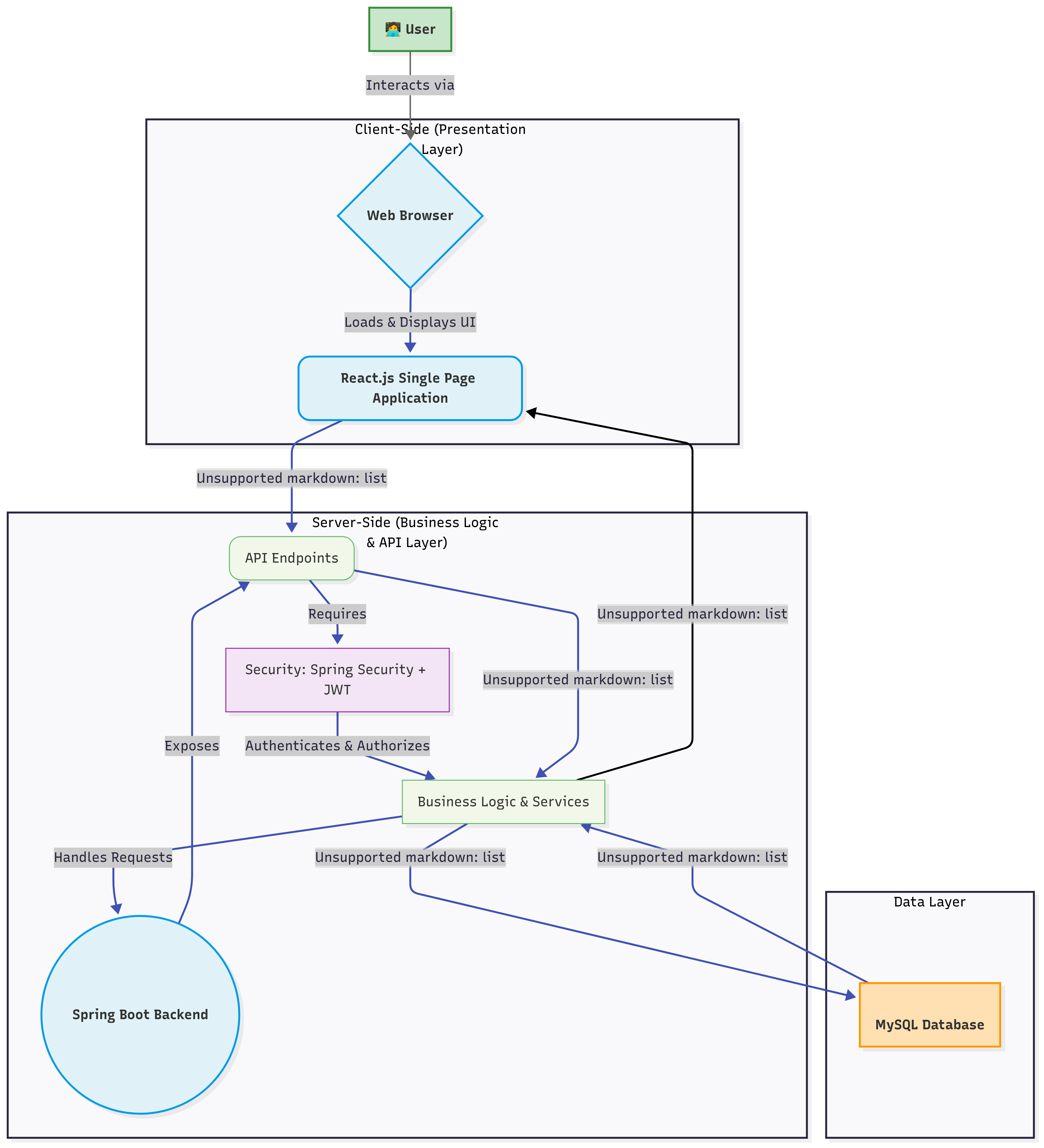
This backend follows a classic 3-tier architecture to ensure a clean separation of concerns, making the application maintainable and scalable.
-
Controller Layer: Exposes the REST API endpoints (@RestController). It handles incoming HTTP requests, validates them, and delegates business operations to the service layer. +
-
Service Layer: Contains the core business logic (@Service). It orchestrates data and operations by interacting with the repository layer.
-
Repository/Data Access Layer: Manages all database interactions using Spring Data JPA (@Repository). It abstracts away the boilerplate code for data persistence.
| Component | Technology / Library | Purpose |
|---|---|---|
| Framework | Spring Boot 3.x | Core framework for rapid, production-grade application development. |
| Web | Spring Web | Building RESTful APIs (MVC architecture). |
| Security | Spring Security 6.x | Authentication, authorization, and securing endpoints. |
| Authentication | JSON Web Tokens (JWT) | Stateless, secure token-based authentication. |
| Database | Spring Data JPA with Hibernate | Object-Relational Mapping (ORM) for database interactions. |
| DB Driver | MYSQL JDBC Driver | Database connectivity. |
| API Documentation | SpringDoc OpenAPI (Swagger) | Automatically generating interactive API documentation. |
| Build Tool | Maven | Dependency management and project build lifecycle. |
| Testing | JUnit 5, Mockito | Unit and integration testing. |
| Utilities | Lombok | Reducing boilerplate code (getters, setters, constructors). |
Security is a core feature, implemented using Spring Security and JWT.
-
Authentication: Users authenticate via a /auth/login endpoint with their credentials.
-
Token Generation: Upon successful authentication, the server generates a signed JWT containing the user's roles and identity.
-
Authorization: For subsequent requests to protected endpoints, the client must include the JWT in the Authorization: Bearer header.
-
Filter Chain: A custom JwtAuthFilter intercepts every request, validates the token, and sets the user's security context, enabling role-based access control (@PreAuthorize) on controller methods.
Comprehensive and interactive API documentation is automatically generated using SpringDoc OpenAPI. Once the application is running, the Swagger UI is available at: (http://localhost:8080/swagger-ui/index.html#/)
This UI allows you to view all available endpoints, see their request/response models, and execute API calls directly from your browser.

The database schema is designed to be normalized and efficient, capturing the essential relationships within the healthcare system.
Follow these instructions to get a local instance of the backend service up and running.
-
Java JDK 17 or later
-
Apache Maven
-
PostgreSQL (or another relational database)
-
Bash
git clone https://github.com/ankitdoi-coder/healthcare-backend.gitcd healthcare-backend -
Configure the database:
-
Create a new database in MYSQL (e.g., healthcaredb).
-
Update the src/main/resources/application.properties file with your database credentials.
-
-
Bash
mvn spring-boot:runThe server will start on http://localhost:8080.
For security and flexibility, sensitive data and environment-specific settings should be managed via environment variables. Create a .env file or configure your deployment environment with the following keys:
| Variable | Description | Example Value |
|---|---|---|
| DB_URL | The JDBC URL for your database connection. | jdbc:postgresql://localhost:5432/healthcaredb |
| DB_USERNAME | The username for your database. | My SQL |
| DB_PASSWORD | The password for your database. | your_password |
| JWT_SECRET | A long, random string used to sign JWTs. | a-very-long-and-secure-random-secret-key-123 |
| JWT_EXPIRATION_MS | The expiration time for JWTs in milliseconds. | 86400000 (24 hours) |