

A minimal local coding agent built on the CloudWeGo eino framework — the framework-variant sibling of mini-coding-agent-go, using native tool-calling instead of a hand-rolled text protocol.
English | 简体中文
Two variants of the same agent. This repo rebuilds it on eino's ADK (
ChatModelAgent+ native tool-calling). Its sibling mini-coding-agent-go is the framework-free port — faithful to the Python original down to the code structure and agent flow.
This repo contains a small standalone coding agent:
- code: a single
mainpackage (agent.go,tools.go,model.go, ...) - CLI:
mini-coding-agent-eino
It is a minimal local agent loop with:
- workspace snapshot collection
- stable prompt plus turn state
- structured tools
- approval handling for risky tools
- transcript and memory persistence
- bounded delegation
The model backend is currently based on Ollama.
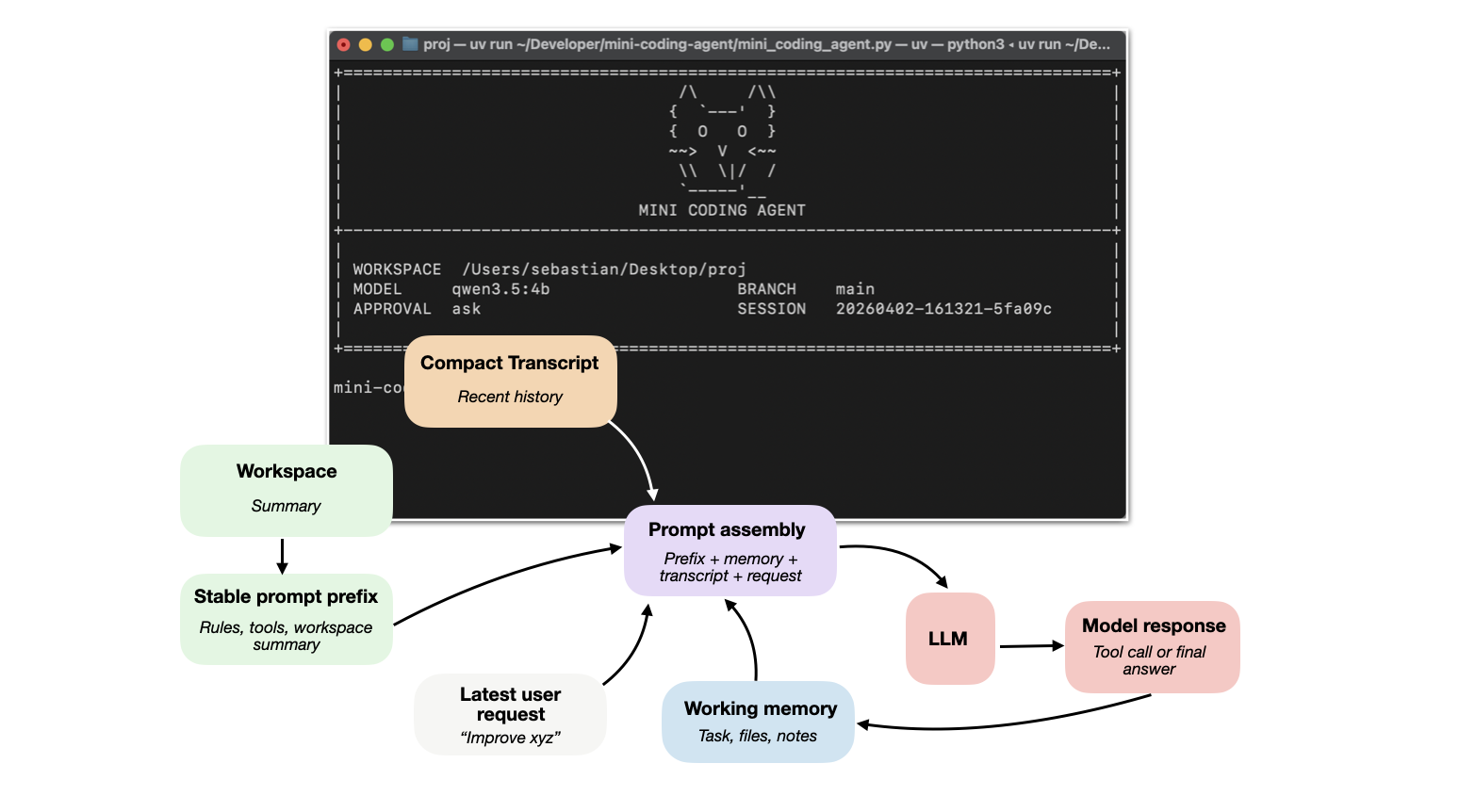
The detailed tutorial: Components of a Coding Agent — both variants trace back to the Python original component by component.
The agent's shape — six components, seven tools, approval gates, sessions, REPL — is the same as the framework-free mini-coding-agent-go. What changes is the engine:
- Native tool-calling: the model calls tools through the provider's tool-call API
(
/api/chat+ tools), not by emitting<tool>...</tool>/<final>...</final>text. The model must therefore support tool calling. - adk ChatModelAgent: the ReAct loop (model → tool → model) is driven by
eino/adk.ChatModelAgentwith the system prompt injected as itsInstruction, instead of a hand-written ask() loop with tolerant parsing. - eino-ext components: the Ollama
ChatModel, the local filesystemBackend(read/write/edit/grep), andutils.InferToolfor deriving tool JSON schemas from Go structs. - Error folding: recoverable tool errors are returned to the model as
"error: ..."results instead of aborting the turn, so the model can react and retry. - Sequential tool execution: multiple tool calls in one turn run one at a time, eliminating same-file write races.
- Extra tool —
python_execute: run Python code through a backend-shared executor (--python-cmd; empty disables the tool). - Debug:
MC_EINO_DEBUG=1prints each step (role / tool name / content excerpt) to stderr; request/response traffic is appended to.mini-coding-agent/agent.log. --max-stepsdefaults to12(the framework loop benefits from more headroom).
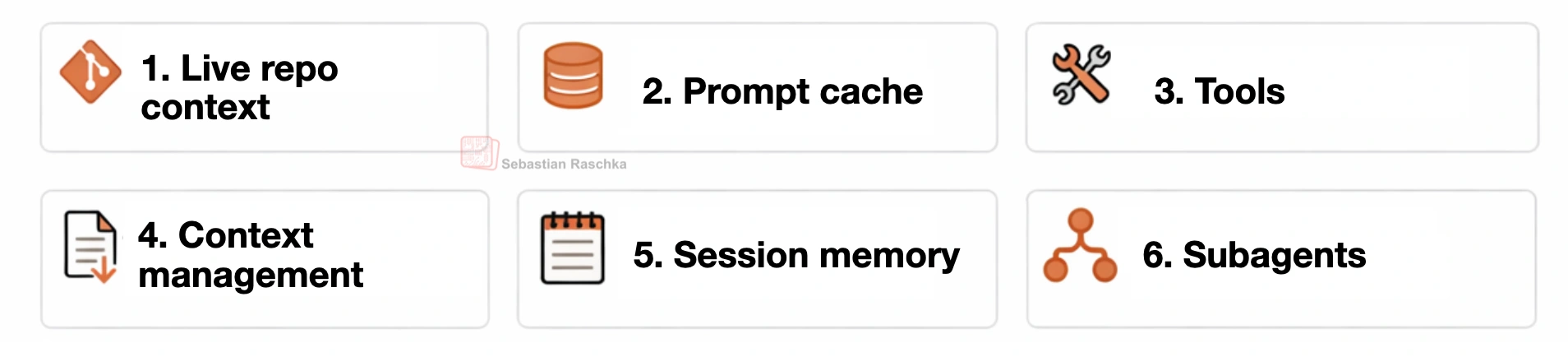
This coding harness is organized around six practical building blocks:
- Live repo context The agent collects stable workspace facts upfront, such as repo layout, instructions, and git state.
- Prompt shape and cache reuse A stable prompt prefix, which is separate from the changing request, transcript, and memory so repeated model calls can reuse the static parts efficiently.
- Structured tools, validation, and permissions The model works through named tools with checked inputs, workspace path validation, and approval gates instead of free-form arbitrary actions.
- Context reduction and output management Long outputs are clipped, repeated reads are deduplicated, and older transcript entries are compressed to keep prompt size under control.
- Transcripts, memory, and resumption The runtime keeps both a full durable transcript and a smaller working memory so sessions can be resumed while preserving important state via working memory.
- Delegation and bounded subagents Scoped subtasks can be delegated to helper agents that inherit enough context to help (but operate within limits).
You need:
- Go 1.27+
- Ollama installed
- an Ollama model pulled locally (with tool-calling support)
Install Ollama on your machine so the ollama command is available in your shell.
Official installation link: ollama.com/download
Then verify:
ollama --helpStart the server:
ollama serveIn another terminal, pull the default model used by this project:
ollama pull gemma4:cloudThe agent talks to Ollama's /api/chat endpoint with tools attached, so the model must
support tool calling; any tool-calling model exposed by your Ollama instance works.
Clone the repo or your fork and change into it:
git clone https://github.com/aiongo/mini-coding-agent-eino.git
cd mini-coding-agent-eino
Build the binary:
go build # produces ./mini-coding-agent-einoOr install it directly into your GOBIN:
go install github.com/aiongo/mini-coding-agent-eino@latest
Start the interactive REPL:
./mini-coding-agent-einoRun a single prompt without entering the REPL:
./mini-coding-agent-eino prompt "Inspect this repo and summarize the layout"(prompt has the alias p.)
By default it uses:
- model:
gemma4:cloud - approval:
ask
For a concrete usage example, see EXAMPLE.md.
Risky tools such as shell commands and file writes are gated by approval.
--approval askprompts before risky actions (default and recommended)--approval autoallows risky actions automatically, including arbitrary command execution and file writes by the model; use only with trusted prompts and trusted repositories--approval neverdenies risky actions
Example:
./mini-coding-agent-eino --approval auto
The agent saves sessions under the target workspace root in:
.mini-coding-agent/sessions/
Resume the latest session:
./mini-coding-agent-eino --resume latestResume a specific session:
./mini-coding-agent-eino --resume 20260401-144025-2dd0aa
Inside the REPL, slash commands are handled directly by the agent instead of being sent to the model as a normal task.
/helpshows the list of available interactive commands/memoryprints the distilled session memory, including the current task, tracked files, and notes/sessionprints the path to the current saved session JSON file/resetclears the current session history and distilled memory but keeps you in the REPL/exitexits the interactive session/quitexits the interactive session; alias for/exit
./mini-coding-agent-eino --helpCLI flags are passed before the agent starts. Use them to choose the workspace, model connection, resume behavior, approval mode, and generation limits.
Important flags:
--cwdsets the workspace directory the agent should inspect and modify; default:.(current directory)--modelselects the Ollama model name (must support tool calling); default:gemma4:cloud--hostpoints the agent at the Ollama server URL (usually not needed); default:http://127.0.0.1:11434--ollama-timeoutcontrols how long the client waits for an Ollama response (usually not needed); default:300seconds--resumeresumes a saved session by id or useslatest; default: start a new session--approvalcontrols how risky tools are handled:ask,auto, ornever; default:ask--max-stepslimits how many model and tool turns are allowed for one user request; default:12--max-new-tokenscaps the model output length for each step; default:4096--temperaturecontrols sampling randomness; default:0.2--top-pcontrols nucleus sampling for generation; default:0.9--python-cmdsets the Python interpreter used by thepython_executetool (as the backend's env sees it); empty disables the tool; default:python3
See EXAMPLE.md
- The model must support native tool calling — this variant does not parse any
<tool>/<final>text protocol. - Different Ollama models follow tool-calling instructions with different reliability.
MC_EINO_DEBUG=1prints every step (role / tool name / content excerpt) to stderr.- Debug traffic (prompts and raw responses) is appended to
.mini-coding-agent/agent.logunder the workspace root. - The agent is intentionally small and optimized for readability, not robustness.
The code in this repository is licensed under the MIT License.
It is a Go port of rasbt/mini-coding-agent, which is licensed under Apache 2.0; that license is retained in LICENSE-APACHE for the portions derived from the original.
- Original Python implementation and design write-up: Sebastian Raschka — Components of a Coding Agent
- Original repo: rasbt/mini-coding-agent
- Framework-free sibling: aiongo/mini-coding-agent-go
- eino framework: cloudwego/eino