Player Prefab Architecture
VR Tracker Player prefab architecture is simple, here is an example :
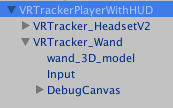
The parent, the VR Tracker Player prefab itself contains the Player Network Identity, with local player authority, allowing it to be networked on the other players for multiplayer applications.
The Network Transform is necessary for the Network Transform Child .
The Network Transform Child allows to Network child object movements. In our case we usually want to network the childrens of VR Tracker Player , which are often Tag (player headset or player controller). The Target are set to both children as you can see in the screenshot below :
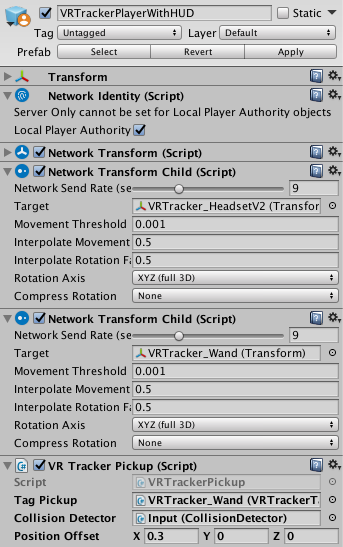
VR Tracker Pickup script can seem to be not at a good place here as it is simply used to grab, drag and drop objects using the Wand (a Tag with a button). But we have to set it here because is has Networked functions and Unity requires those functions to be where the Network Idendity script is.
The Tag Pickup is the Gameobject containing the VR Tracker Tag script used for the Wand (here VR Tracker Wand )
The Collision Detector is the Gameobject containing the Collider that will detect collision with the object to move. In a later version we could use a raycast. In this case it's the Input object in VR Tracker Wand . That object needs to have the script Collision Detector.
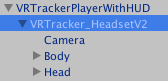
VR Tracker Headset represents the user VR headset, it has a camera as children, and also the user body.
VR Tracker Tag is of course the script receive the Tag position and will set those positions to this transform.
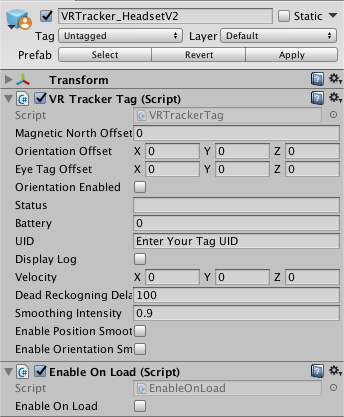
Enable On Load script enables the Camera only for the Local player. This is important for multiplayer games.
VR Tracker Wand is a controller made of a Tag and a button.
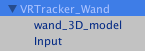
VR Tracker Wand contains simply a VR Tracker Tag script, with the Orientation Enabled.

The wand_3D_model is just the 3D model (mesh) representing the controller
The Input Gameobject is for interactions, it contains the Collider , in conjunction with the Rigibody and Collision Detector to detect collision with other object we want to select.
NOTE : The collider MUST have isTrigger set.
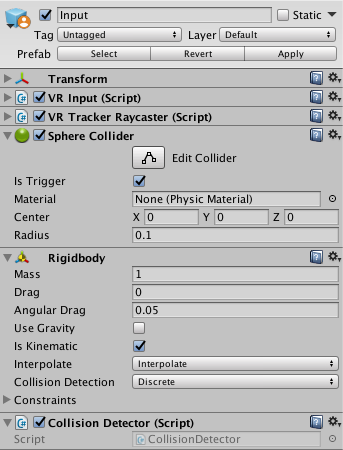
VR Input is from VR Standard Assets and is made to interact with selectors and other object, it is used in the Intro Assignation Scene for example to select the buttons. The selectable objects must have VR Interactive Item scripts.
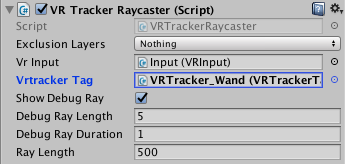
VR Tracker Raycaster uses Ray casting from Input to interact with the VR Interactive Item . It can be used to select object at a certain distance. This is the script that draws the blue line from the Wand in scene mode, but we could also add a line the User could see, that would start when pushing the Wand button.
Learn more about VR interactions in Unity here :