


"Your README is the first thing people see, give it some vibes."
RepoVibes is a web tool that analyzes any public GitHub repository and distills its health into a single, hand-drawn hexagon chart. Think of it as a vibe check for your code.
Paste a repo URL, and RepoVibes fetches public data from the GitHub API commit history, issue management, community contributions, releases, and more then scores the repo across six axes of project health. The result is a sketchy, crayon-and-paper style hexagon chart you can embed directly into your README.
No login. No setup. Just vibes.
| Feature | Description |
|---|---|
| Hexagon Vibe Chart | A unique six-axis radar chart rendered with animated draw-in effects -- each axis represents a different health metric. |
| Embeddable SVG Badge | Generate a self-contained SVG badge that updates dynamically. Drop one line of Markdown into your README and you're done. |
| Real-Time Analysis | Fetches live data from the GitHub API, no stale snapshots. |
| Score Breakdown Bars | A compact bar-chart view of all six scores, color-coded by performance tier. |
/* The crayon palette */
--paper:        #f6efdd;   /* Warm cream background  */
--paper-2:      #fffaf0;   /* Off-white card surface */
--ink:          #3a3128;   /* Dark brown text        */
--crayon-red:   #d8452f;   /* Error / low scores     */
--crayon-blue:  #3d9be5;   /* Accent / links         */
--crayon-yellow:#f2b53a;   /* Highlights             */
--crayon-green: #5a9e4f;   /* Success / high scores  */
--crayon-orange:#e0932f; /* Warning / mid scores */Screenshots of the live application at repovibes.vercel.app
The homepage greets you with a sketchy input form, hand-drawn borders, and that unmistakable notebook-paper texture.

After analyzing a repo, you get a cohesive Vibe Report -- sticky-note header, animated hexagon chart, and a color-coded score breakdown.

See exactly how your embed will look inside a GitHub README before you copy the snippet.

The first way is to just go to the webapp
The further guide is for local users and contributors
# 1. Clone the repository
git clone https://github.com/Terminay/repovibes.git
cd repovibes

# 2. Install dependencies
npm install

# 3. Start the development server
#    This starts both the Express backend (port 3001)
#    and the Vite frontend (port 3000) concurrently.
npm run dev| Service | URL |
|---|---|
| Frontend | http://localhost:3000 |
| Backend API | http://localhost:3001 |
- Go to repovibes.vercel.app (or your local
localhost:3000) - Paste a GitHub repo URL or shorthand:
- Full URL:
https://github.com/facebook/react - Shorthand:
facebook/react
- Full URL:
- Click "Check the vibes!"
- Get your Vibe Report with the hexagon chart and score breakdown
# starts both backend & frontend
npm run dev

# bundles the frontend
npm run build

# serves the built frontend
npm startEvery repo analyzed gets a unique, auto-updating SVG embed. Just copy the Markdown snippet and paste it into your README.md:
| Repository | Embed Code | Preview |
|---|---|---|
facebook/react |
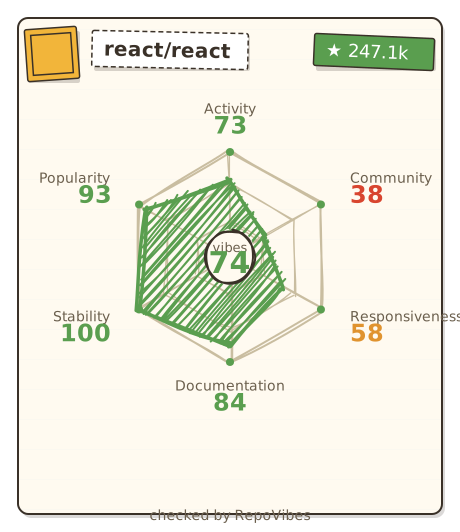 |
 |
vercel/next.js |
 |
 |
microsoft/vscode |
 |
 |
RepoVibes evaluates repositories on six honest little vibe-o-meters:
| Vibe | What It Measures |
|---|---|
| Activity | How recently and how often code gets pushed. |
| Community | The number of different people contributing to the project. |
| Responsiveness | How well maintainers keep up with and close issues. |
| Documentation | The presence and depth of README, license, description, and topics. |
| Stability | The use of tagged releases and how fresh the latest one is. |
| Popularity | Stars and forks, adjusted for repo age to measure growth. |
70-100  High vibe    This repo is thriving!
40-69   Mid vibe     Room for improvement.
0-39    Low vibe     Could use some love.
Got an idea? Found a bug? We'd love your help.
- Fork the repository
- Clone your fork:
git clone https://github.com/Terminay/repovibes.git - Create a branch:
git checkout -b feature/amazing-thing - Make your changes
- Commit:
git commit -m "feat: add amazing thing" - Push:
git push origin feature/amazing-thing - Open a Pull Request
If you're contributing UI changes:
- Use the design tokens in
src/index.cssno hardcoded colors. - Borders should feel hand-drawn (rough.js or irregular border-radius).
- Shadows are hard-offset, not blurred (
3px 4px 0 rgba(58,49,40,0.18)). - Fonts: Caveat (headings), Kalam (body), Patrick Hand (labels).
- Animations should be playful but respect
prefers-reduced-motion.
This project is open source and available under the MIT License.
