Centralized, reusable Git worktrees for humans and coding agents.
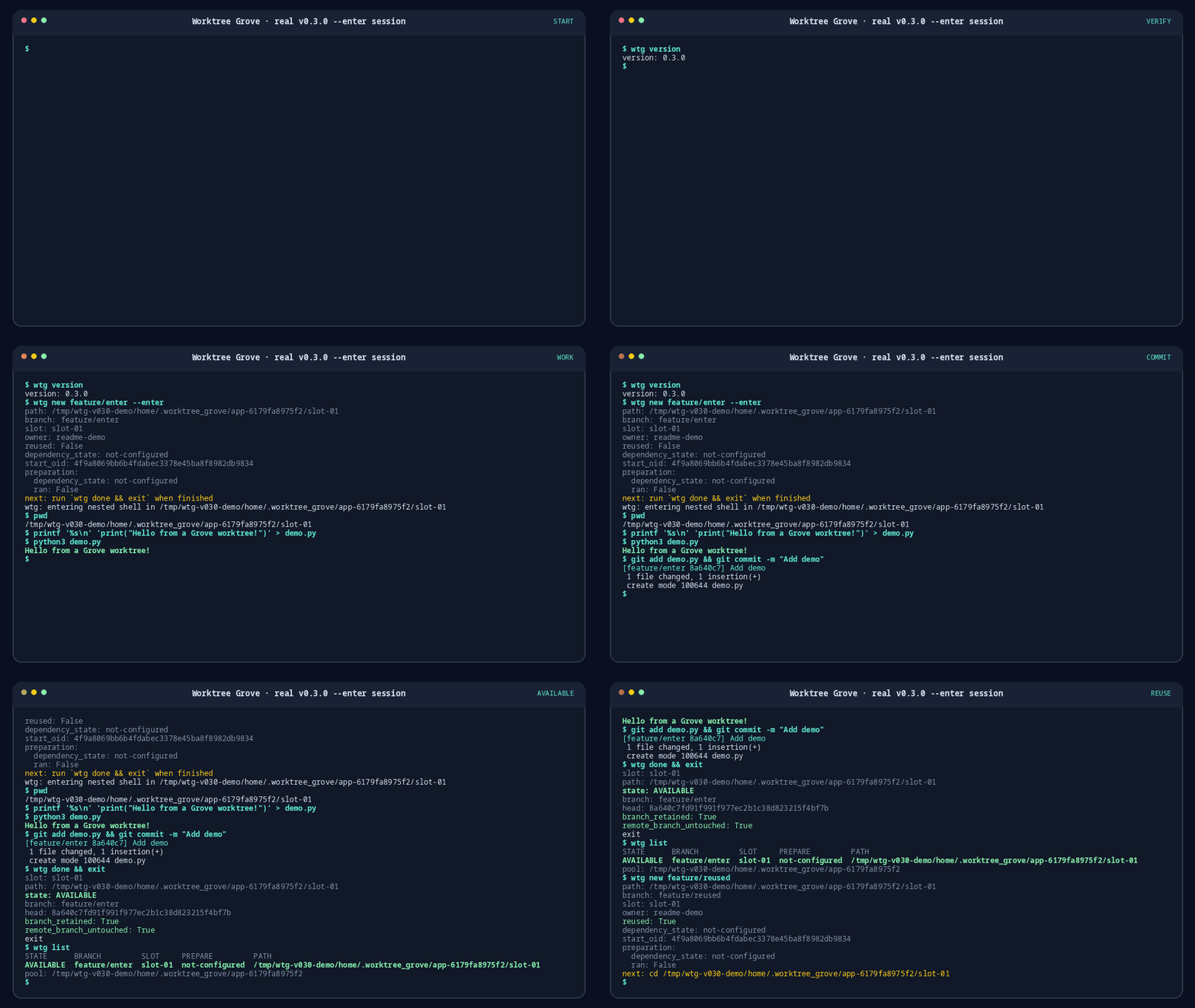
Recorded from real commands against the built v0.3.0 wheel in a fresh Git repository:
create and enter a worktree with --enter, run and commit demo.py, mark it done, and
confirm the slot is reused. View the captured transcript.
Worktree Grove keeps a small pool of locked worktrees, safely reuses approved dependency
caches, and coordinates concurrent tasks. It adds lifecycle and recovery behavior that
native git worktree add, list, and remove do not provide.
Worktree Grove requires Python 3.10+, Git 2.31+, and Linux or macOS. The current release is 0.3.0. Download the named wheel and checksum file from the v0.3.0 release, or use GitHub CLI:
gh release download v0.3.0 --repo SmartAI/worktree-grove \
  --pattern 'worktree_grove-0.3.0-py3-none-any.whl' \
  --pattern SHA256SUMS
Verify the selected wheel with the command for your platform. Continue only when it
reports OK.
Linux:
awk '$2 == "worktree_grove-0.3.0-py3-none-any.whl"' SHA256SUMS | sha256sum -c - || exit 1macOS:
awk '$2 == "worktree_grove-0.3.0-py3-none-any.whl"' SHA256SUMS | shasum -a 256 -c - || exit 1Install that verified local file with one isolated CLI installer:
uv tool install ./worktree_grove-0.3.0-py3-none-any.whl
# or: pipx install ./worktree_grove-0.3.0-py3-none-any.whl
wtg version
For development from a source checkout:
python3 -m venv .venv
. .venv/bin/activate
python3 -m pip install -e '.[dev]'
wtg versionA tool installed by uv or pipx can securely check or install the latest stable
release. Because v0.2.x predates the updater, install v0.3.0 once with the verified
wheel above; subsequent releases can use:
wtg update --check
wtg update
update bypasses project configuration so it remains available when a repository pins
an older required_version. It requires an immutable GitHub release whose title exactly
equals its vX.Y.Z tag. It verifies GitHub's SHA-256 asset digests, the published
SHA256SUMS entry, wheel metadata, and the replaced installation before reporting
success. Automatic manager detection fails closed unless the current environment is
exactly the manager's standard worktree-grove environment. --installer uv or
--installer pipx only resolves ambiguity between managers that both prove that exact
ownership; it never overrides an unknown, suffixed, or nonstandard layout. Manager
execution is limited to ten minutes and failures may require repair through that
manager. Source, editable, suffixed, venv, and system installs must be updated directly
with their owning installation method.
Required v0.2 migration: existing
.worktree-grove.tomlfiles commonly contain the exact pinrequired_version = "0.2.0". After installing 0.3.0, deliberately change that pin torequired_version = "0.3.0"before running repository commands. Grove never rewrites project policy during self-update.
Create a ready-to-use worktree from the primary repository:
cd ~/src/my-project
wtg init --write-config       # optional; new also initializes lazily
wtg new feature/my-task
# Continue task work only after dependency_state is ready or not-configured.
worktree=$(wtg path feature/my-task) || exit 1
cd "$worktree" || exit 1
new creates the branch and automatically runs configured preparation. It does not
print a lease token in human output. Begin task work only when its output reports
dependency_state: ready or dependency_state: not-configured. If it reports failed,
the checkout remains IN_USE; enter it only to fix the setup and retry wtg prepare.
The directory is otherwise a normal Git checkout: edit, test, commit, and push normally.
If remote or base detection is ambiguous, set remote, default_base, and park_base
in .worktree-grove.toml. wtg config show validates the file and displays the
resolved pool location.
To enter without copying or resolving the path yourself, start a visibly nested shell:
wtg new feature/my-task --enter
# Work inside the nested shell. When the checkout is clean:
wtg done && exit
The shell starts only after acquisition and preparation release the Grove lock. It does
not change the parent shell's directory, and exiting returns there. Grove warns before
entry when preparation is still required or failed; run wtg prepare before task work.
It never parks automatically when the shell exits.
When finished, return the clean checkout to the reusable pool:
wtg donedone preserves both local and remote task branches and performs no network access.
It requires a clean checkout and refuses an in-progress Git operation. No token is
needed when the command runs from the leased checkout.
Inspect managed worktrees with:
wtg list
wtg show feature/my-task
wtg path feature/my-taskRun physical removal from the primary checkout, not from the worktree being deleted:
wtg remove slot-01 --dry-run  # AVAILABLE slots only
wtg remove slot-01
To abandon an active or quarantined worktree, use the deliberately separate command:
wtg discard feature/experiment --dry-run
wtg discard feature/experiment
Before deletion, discard snapshots the final worktree and the original staged index
separately under refs/worktree-grove/recovery/..., including non-ignored untracked
files in the worktree snapshot. It leaves remote refs untouched and reports whether the
local branch still exists. Inspect the exact refs reported by discard with
git show --stat <recovery-ref>, or list all retained snapshots with:
git for-each-ref --format='%(refname)' refs/worktree-grove/recovery/Unknown ignored files cannot be stored in a recovery ref, so Grove refuses deletion
unless the user explicitly adds --discard-ignored. That flag permanently deletes
those ignored files. Dirty nested submodule contents may also be refused when they
cannot be represented safely.
New repositories default to:
~/.worktree_grove/<repository-name>-<repository-id>/slot-N
For example:
~/.worktree_grove/my-project-a1b2c3d4e5f6/slot-01
The repository ID prevents collisions between unrelated repositories with the same
directory name. wtg init, wtg status, and wtg config show display the exact
resolved root. Existing v0.1 pools remain at their recorded or inferred location and
are never moved automatically.
Set pool_root in .worktree-grove.toml to override the default. ~ is expanded;
relative values resolve from the primary checkout and must resolve outside it.
A Node project can keep ignored node_modules content and prepare it only when the
lockfile or toolchain fingerprint changes:
preserve_paths = ["node_modules"]

[prepare]
command = ["npm", "ci"]
fingerprint_files = ["package-lock.json"]
fingerprint_commands = [["node", "--version"], ["npm", "--version"]]
A deterministic preparation failure leaves the worktree IN_USE and records a
retryable error instead of quarantining it. After fixing the tool or environment, enter
the reported worktree and retry with wtg prepare. Interruptions and uncertain
transition failures still quarantine the slot.
The original machine-oriented commands remain available for compatibility:
wtg --json acquire BRANCHreturns the full private lease token and does not automatically prepare.wtg --json prepareaccepts the exact current worktree without a token, or a private token for cross-checkout automation.wtg --json releaserequires exactly one proof:--pr,--merged-into, or--no-change. It may compare-delete task refs after exact proof.
Copy the bundled, versioned agent instructions with:
wtg skill install ~/.agents/skills/worktree-grove/SKILL.mdThis creates the file but does not activate it in a particular agent runtime. Grove
refuses to overwrite an existing destination unless --force is deliberately supplied.
- Pool roots, markers, slots, private state, and locks are ownership-validated.
- Managed worktrees are locked and must be exact direct children of their owned pool.
- Cleanup is allowlisted; Grove never runs broad
git cleanfor normal reuse. donenever deletes task refs.discardcreates a recovery ref before deleting representable work.- Strict
releasevalidates proof before compare-deleting local or remote task refs. - Uncertain mutations quarantine rather than guess.
- There is no automatic expiry or automatic deletion of active worktrees.
Worktree Grove coordinates cooperative processes sharing one OS account. It is not a sandbox or security boundary against a malicious same-UID process. See the security policy for the threat model.