Redd-Eye is an advanced browser extension (Firefox & Chrome) that detects potential AI-generated content and bot accounts on Reddit, providing a transparent, configurable, and powerful set of tools to help you identify inauthentic content as you browse.
🚨 Compatibility Notice

As of version 4.2.0, this extension is optimized for and fully functional on old.reddit.com. Functionality on the new Reddit design (www.reddit.com) is not guaranteed and may be unreliable. For the best experience, please use the extension with Old Reddit.
-Real-Time Scanning: Uses an efficient MutationObserver to scan posts and comments as they appear on the page, including with infinite scroll.
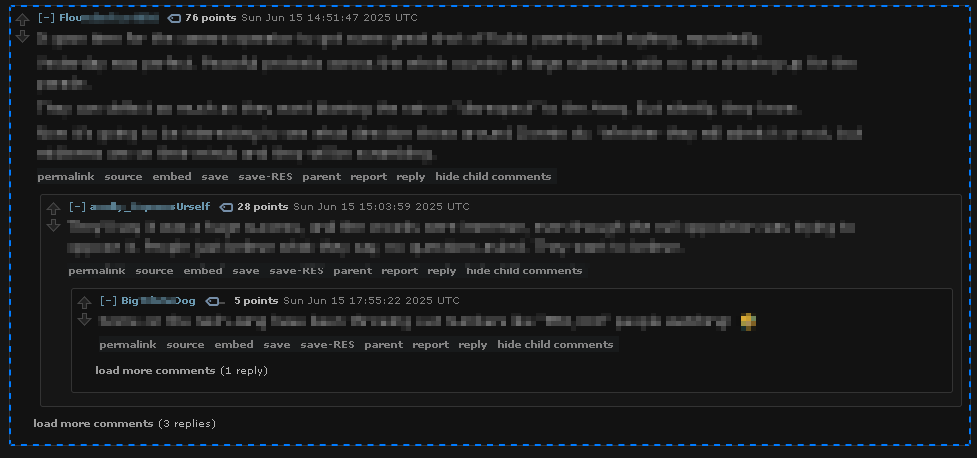
-Confidence-Based Highlighting: AI-generated content is highlighted with different outlines based on the detection confidence score, allowing you to see at a glance what's "possibly AI" versus "very likely AI."
-On-Hover Score Breakdown: Hover over any highlighted comment to see a detailed tooltip explaining why it was flagged, including which heuristics were triggered and the score breakdown.
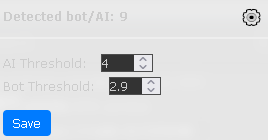
-Configurable Sensitivity: Don't like the default settings? Open the settings panel directly from the popup to adjust the AI and Bot detection thresholds to your preference. Your settings are saved locally.
-Advanced Heuristic Engine: The extension's detection engine is built on principles from modern AI detection methodologies.
The extension analyzes content using a multi-layered heuristic engine inspired by professional detection tools.
-Stylometry & Linguistic Fingerprinting: The extension analyzes the author's writing style. It looks for an overly formal tone, a lack of common contractions, and an objective, encyclopedic voice that often lacks personal opinion or experience.
-Burstiness & Variation: Human writing has a natural rhythm with varying sentence lengths. The extension measures this "burstiness." AI-generated text often has a uniform, consistent sentence structure, which results in a low burstiness score.
-Paraphrase Shield: To combat users who use tools to rephrase AI content, the extension includes a heuristic that detects the "anomalous use of synonyms". It flags text that uses an unnaturally high number of complex words where simpler ones would suffice—a key trait of paraphrased content.
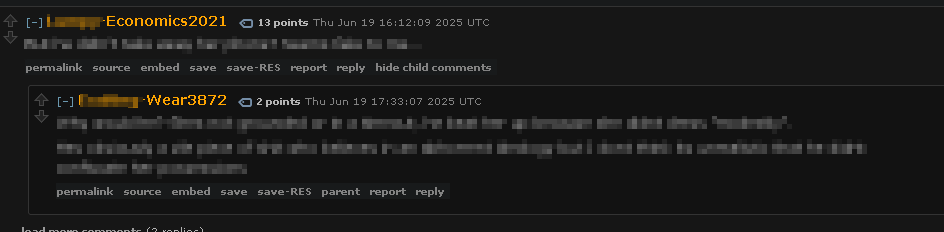
-Bot & Spam Heuristics: The extension also runs checks for classic bot indicators, including suspicious username patterns (e.g., Word-Word1234) and links to known spam domains.
- Download or clone this repository and locate the
firefox-extension/folder. - Open Firefox and navigate to
about:debugging. - Click "This Firefox" in the left sidebar.
- Click "Load Temporary Add-on…".
- Browse to the
firefox-extension/folder and select themanifest.jsonfile. - The extension is now active. It will remain loaded until you restart Firefox.
If the extension is published on addons.mozilla.org, you can install it directly from there like any other Firefox add-on. Once installed it will persist across browser restarts and update automatically.
- Ensure you have Node.js and
web-extinstalled:npm install --global web-ext - From the
firefox-extension/directory, run:This creates aweb-ext build.zipfile infirefox-extension/web-ext-artifacts/. - In Firefox, go to
about:addons→ click the gear icon → "Install Add-on From File…" and select the generated.zip.Note: Firefox requires extensions to be signed by Mozilla for permanent installation outside of Developer Edition / Nightly. Use about:debugging for unsigned local testing.
- Download or clone this repository and locate the
chrome-extension/folder. - Open Chrome and navigate to
chrome://extensions. - Enable "Developer mode" using the toggle in the top-right corner.
- Click "Load unpacked".
- Browse to and select the
chrome-extension/folder. - The extension is now active.
If the extension is published on the Chrome Web Store, you can install it directly from there like any other Chrome extension. Once installed it will persist across browser restarts and update automatically.
Reading the Highlights:
    -Light Blue Dashed Outline = Low Confidence AI content.
    -Medium Blue Dashed Outline = Medium Confidence AI content.
    -Dark Blue Solid Outline = High Confidence AI content.
    -Purple Dashed Outline = Flagged as both Bot & AI.
    -Orange Username = Indicates a suspected bot account.

Viewing Details:
    -Hover your mouse over any highlighted comment to see a detailed tooltip with the exact scores and the reasons for the flag.
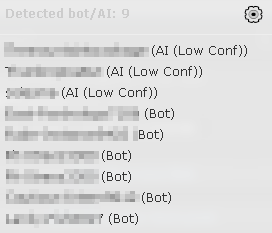
    -Click the popup in the top-right corner to see a list of all detected items on the page.

Adjusting Settings:
    -Click the ⚙️ gear icon in the popup to open the settings panel.
    -Change the threshold values and click "Save". Higher numbers make the extension less sensitive.
    -Your settings are persisted via browser.storage.local and survive browser restarts.
The detection thresholds for both AI and Bot scoring are configurable via the UI. The default values are:
AI Threshold: 3.5
Bot Threshold: 2.9
Your custom settings are saved in your browser's local storage and will persist across sessions.