

Native taskbar transparency for Windows. Built with Rust.


Download · Preview · Resource use · Getting started · Compatibility · Build · Contribute · Support
TransparentBar removes the taskbar background while keeping your Windows icons and controls in place. It runs in the system tray, with optional startup at sign-in and a native menu for the settings you need.
Your wallpaper stays visible behind pinned apps and system controls. This framed preview uses a real Windows 11 desktop screenshot, with the taskbar detail enlarged from the same capture.
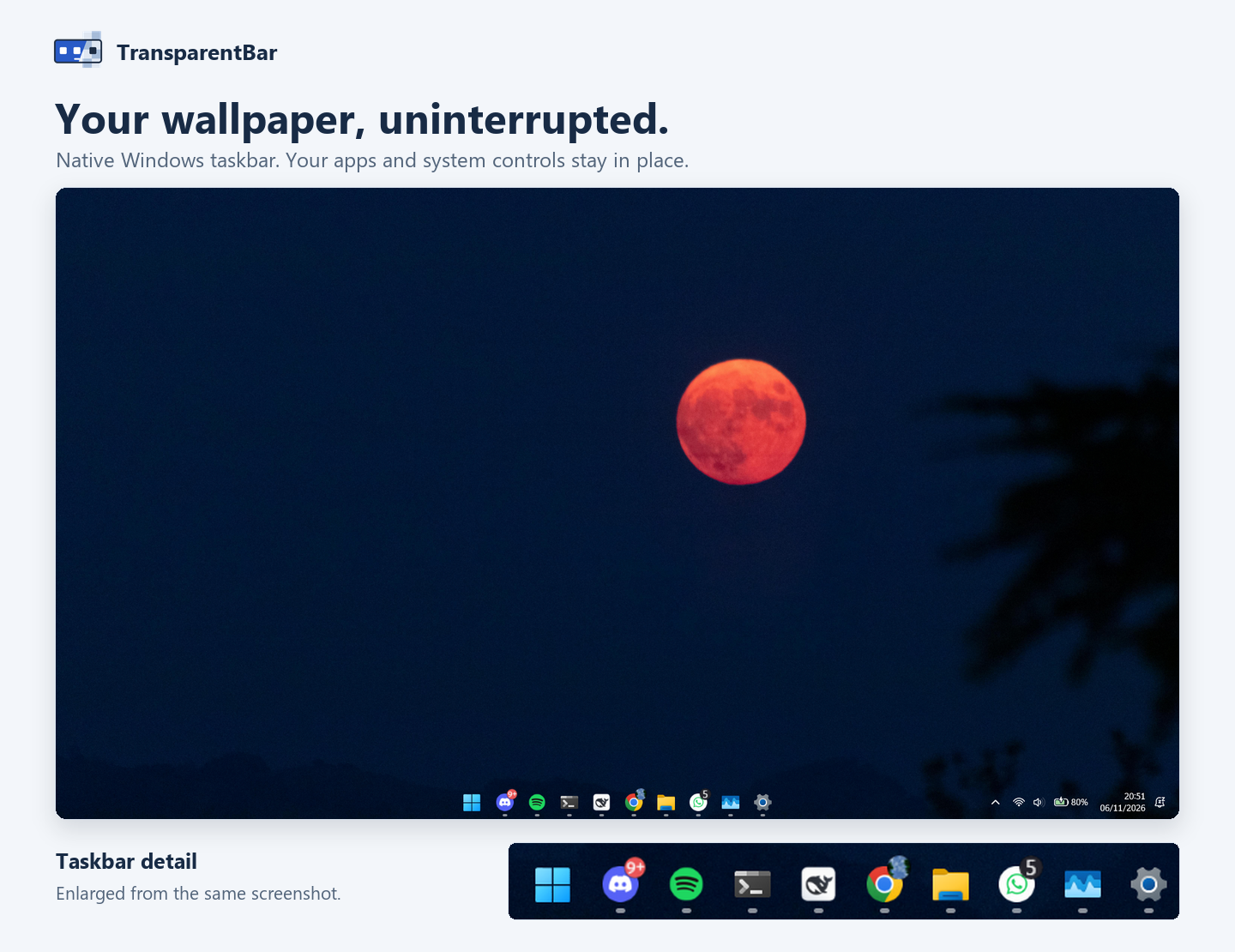
- Transparent taskbar. A clear background without blur or color effects.
- Maximized-window connector. An optional soft gradient strip follows the visible bottom edge of a maximized window, preserving different colors across its width and updating as content scrolls. Toggle it on or off from the tray menu. Fullscreen windows hide the strip.
- Native Rust. No webview, browser engine, or bundled UI framework.
- Conditional refresh. Taskbar transparency responds to Windows events. The connector samples a four-pixel-high edge at 16 ms while active, relaxing to 64 ms when settled, with cross-faded colors and automatic pause during display sleep or session lock. Foreground and location events wake the fast timer so the strip hides promptly when a window closes, restores, or loses focus. While inactive, an enabled connector checks window eligibility once per second without capturing pixels; disabling it stops that timer.
- Optional startup. Enable or disable launch at sign-in from the tray menu. Off by default.
- Release update check. Checks GitHub Releases for a newer version and notifies you from the system tray, with a manual check option in the tray menu.
- Installer or portable. Install for your account, or extract a ZIP and run it.
- No accounts or telemetry. Runs locally with no user accounts or analytics. The app uses the network only to check GitHub Releases for updates; the optional support page opens in your browser only when you choose it.
The latest user-shared Task Manager crop shows 3.9 MB of memory for the TransparentBar host process. The image below preserves the supplied screenshot without changing its values.
| Memory | CPU | Disk | Network |
|---|---|---|---|
| 3.9 MB | 0% | 0 MB/s | 0 Mbps |

These are displayed values at capture time, not a benchmark or an upper limit. CPU is rounded by Task Manager. Usage varies with Windows version and activity; this row covers only the host process, not the bridge loaded inside Explorer.
| Package | Best for |
|---|---|
| Windows installer | Start Menu integration and a standard uninstall entry |
| Portable ZIP | Running without installation |
Requires Windows 10 or Windows 11 on an x64 PC. No administrator access is required for normal use. ARM64 is not supported.
Browse all releases for earlier versions and release notes. Development builds are available in GitHub Actions.
- Download the installer or extract the entire portable ZIP to a permanent folder. The installer closes the running instance automatically (restoring the saved appearance first), then starts the new version when finished.
- Close any other taskbar customization tools, then open TransparentBar.
- Click its icon in the system tray near the clock. If hidden, open the tray overflow menu.
| Tray option | Action |
|---|---|
| Taskbar connector | Toggle the maximized-window gradient connector strip |
| Connector pattern | Toggle the faint grid pattern on the strip |
| Reduce connector animation | Disable the cross-fade so colors snap to the new edge immediately |
| Run at sign-in | Toggle startup at Windows sign-in |
| Check for updates / Update available | Check GitHub Releases for a newer version, or open the latest release page when an update is found |
| About / license | View version, license information, and the support URL |
| Buy me a coffee | Open the optional support page in your default browser |
| Support via Saweria (next release) | Open the optional Saweria support page in your default browser |
| Exit | Restore the saved appearance and exit |
The tray menu uses English labels, supports keyboard navigation, and adapts to the Windows system dark or light theme. Opening the application again opens the existing instance's menu.
For portable use, keep the executable and its versioned bridge DLL together. If you move the folder after enabling startup, disable and re-enable startup from the new location.
The connector currently supports the primary and secondary bottom-docked taskbars with auto-hide off. It samples a thin visible screen band above its own overlay, weights four rows toward the visible edge, and smooths nearby columns to reduce text noise. It is a softened approximation of that edge, not a capture of the entire application. Pixels stay in memory and are never saved or uploaded. The connector sizes itself from the monitor DPI of the taskbar, caps its height at 55% of a thin taskbar, and bounds its width to 1920 px; the process runs per-monitor DPI aware, so its geometry and screen sampling stay in the same device pixels at any display scaling. Unsupported taskbar placements and fullscreen windows hide the connector.
TransparentBar detects the taskbar implementation rather than relying on a fixed Windows build number. It includes separate paths for legacy and XAML taskbars, with UI-thread handling for XAML windows.
This is an early release. Windows updates can change taskbar behavior; compatibility with every Windows build or third-party shell is not guaranteed. Multi-monitor behavior needs validation on the Windows version you use. If a taskbar update breaks transparency, please report the issue.
Windows security warnings
Current release binaries are unsigned. Windows may show an unknown-publisher or SmartScreen warning. Download only from this repository's Releases page, and follow your organization's security policy. Do not disable antivirus or Windows protection to run the application.
The build pipeline supports Authenticode signing when the maintainer provides a trusted code-signing certificate. A self-signed certificate does not establish public trust.
Taskbar restoration and updates
Choose Exit to restore the saved taskbar appearance before closing. The XAML bridge also watches for the host process to exit. If Windows rejects restoration, the application reports an error rather than discarding the saved state.
Windows keeps the XAML bridge loaded in Explorer for the remainder of that Explorer session. A versioned DLL allows application updates without overwriting the loaded image. TransparentBar does not replace Windows system files.
If transparency does not activate, include the following in an issue:
- TransparentBar version and whether you used the installer or portable package.
- Windows version and build number from
winver. - The complete error message or a screenshot.
- Monitor count and any taskbar customization tools in use.
Startup diagnostics are saved to %LOCALAPPDATA%\TransparentBar\startup.log. Review the file before sharing it. For a diagnostic run that inspects XAML elements without changing their opacity, run from the application folder:
.\transparentbar.exe --diagnoseUse Rust stable with the x86_64-pc-windows-msvc toolchain, Visual Studio C++ build tools, and the Windows SDK. The SDK resource compiler embeds the application icon and version information.
git clone https://github.com/Raflyf/transparentbar.git
cd transparentbar
cargo fmt --check
cargo clippy --locked --all-targets -- -D warnings
cargo test --locked
cargo build --release --locked
.\build.ps1 -SkipBuild
The portable package is created in dist\TransparentBar-windows-x64-v<version>.zip. To build the installer, install Inno Setup and compile setup.iss. GitHub Actions builds both packages; version tags publish them to Releases.
GNU toolchain builds are available for development, but the release pipeline uses MSVC to embed Windows executable resources.
Bug reports, compatibility results, and focused pull requests are welcome. Check existing issues before opening a new one, keep changes scoped, and run formatting, Clippy, and tests before submitting a pull request.
The project focuses on taskbar transparency and low background overhead. Discuss new features in an issue before adding UI frameworks or runtime dependencies.
New features and bug fixes receive a new release version. Bug-fix releases increment the patch version. Design-only updates, documentation, and other maintenance keep the current version; the commit SHA and CI run identify each build. Portable packages include BUILD.txt with the version and source commit. Each release displays its changelog directly; the source notes are maintained in release-notes.
If TransparentBar helps you enjoy your desktop, you can buy me a coffee or send support through Saweria. Donations are optional; the app and its features remain free and open source.
The repository Sponsor button lists both destinations. Buy me a coffee is available in the published app. Support via Saweria and its URL in About / license are prepared in source for the next release alongside another feature or fix; the current v0.2.4 downloads remain unchanged. Support pages open only when selected, and the app does not handle payments.
MIT © Rafly Firmansyah.