Releases: QoderAI/changelog-QoderWork
Everyday Polish

Design Desk and Voice Input are here!
Design Desk is here — describe your idea, get a real deliverable. Not just for designers: anyone can go from idea to professional design to runnable code, all in one place. Voice Input launches alongside — just say it and it gets done.
🎉 Design Desk
Introducing Design Desk. Ideas become products. Design becomes code.
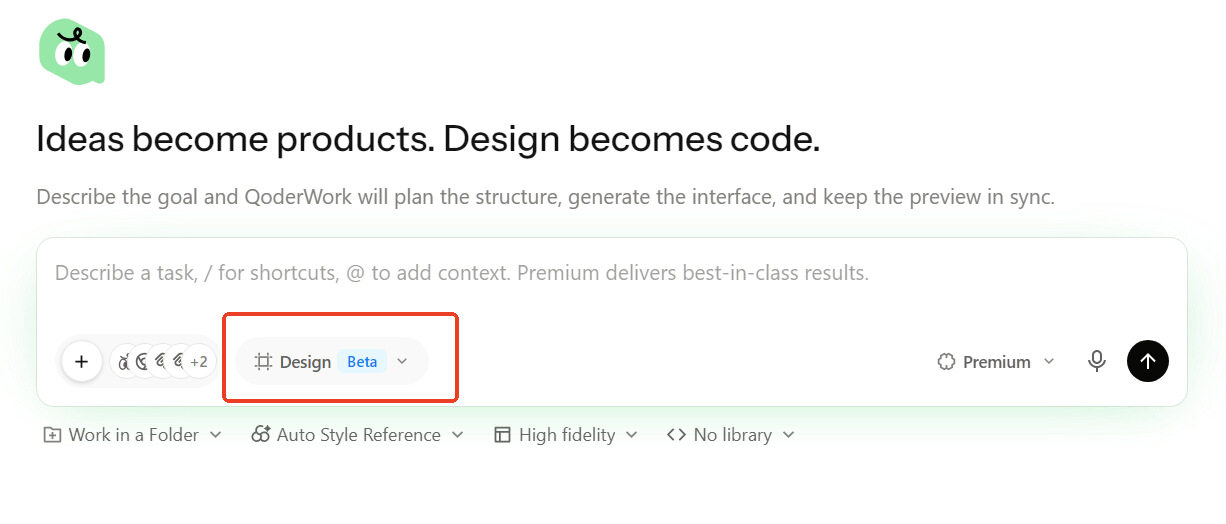
Switch to "Design" mode in the input box, describe what you need — "build a SaaS analytics dashboard" — and QoderWork plans the page structure, generates the full interface, and shows it in a live canvas preview on the right. Choose from 100+ style references including Apple, Stripe, and Linear. Toggle between wireframe and high-fidelity. Use Ant Design, shadcn/ui, or other component libraries. After generation, fine-tune colors, spacing, radius, and light/dark theme — then export or hand off to Cursor, Zed, or any dev tool you use.
For example, a product manager who needs a quick prototype can switch to Design mode, say "task management dashboard in Linear style", get a high-fidelity preview in seconds, tweak the colors, and export — no Figma needed.
✨ New
Voice input: talk instead of type
Press the shortcut to start talking — transcription fills the input box automatically. Works when you're walking, between meetings, or when your hands are busy. Supports Fn key, custom keys, and key combinations. Configure it your way in Settings.
🐛 Fixes
- Fixed Dock icon display issues after updating on macOS, and unexpected main window defocus on launch
- General stability improvements
Message Recall
Press ↑/↓ in the chat input to cycle through your previous messages — just like a terminal.
✨ New
- Arrow-key message recall
Press ↑ or ↓ in the input box to instantly recall messages you've sent in the current conversation. Edit and resend without retyping.
🐛 Fixes
- Fixed in-chat search accuracy, IM channel sync issues, and other daily-use annoyances
- Resolved several crashes for improved overall stability
Everyday Polish
General stability and quality-of-life improvements.
Network Proxy
QoderWork now supports global network proxy configuration — use it behind corporate firewalls or restricted networks without issues. You can also search across all conversations to quickly locate past tasks.
✨ New
- Network proxy
Configure a global proxy in Settings to route all network traffic through it — works behind corporate firewalls and restricted environments. - Global task search
Search across all your conversations to quickly find past tasks and messages.
🐛 Fixes
- Resolved various issues including HTML preview rendering, glass theme display, and credit usage icon visibility.
Task Groups
Conversations can now be organized into groups — managing a busy task list just got easier. This release also addresses a number of quality-of-life issues.
✨ New
- Task groups
Organize your conversations into groups, making it easier to find what you need when tasks pile up.
🐛 Fixes
- Resolved various issues including sidebar layout and Windows upgrade stability.
Everyday Polish
General stability and quality-of-life improvements.
DingTalk Workspace CLI
QoderWork now connects to the DingTalk Workspace CLI — manage todos, reports, attendance, and 10+ modules in natural conversation.
✨ New
- DingTalk Workspace CLI (DWS)
Enable the DingTalk connector and use natural language to manage todos, daily reports, attendance, calendar, approvals, and more. No more navigating pages and clicking buttons — just say what you need.

🔧 Improvements
- Guided connector setup Connectors now offer a step-by-step setup flow with automatic authentication — faster onboarding, fewer manual steps.
- Input bar refinements Improved connector grouping and behavior in the chat input.
🐛 Fixes
- Resolved various issues related to conversation cancellation, connector display, IM channel list, and overall page stability.
Expert Kits: Now Available
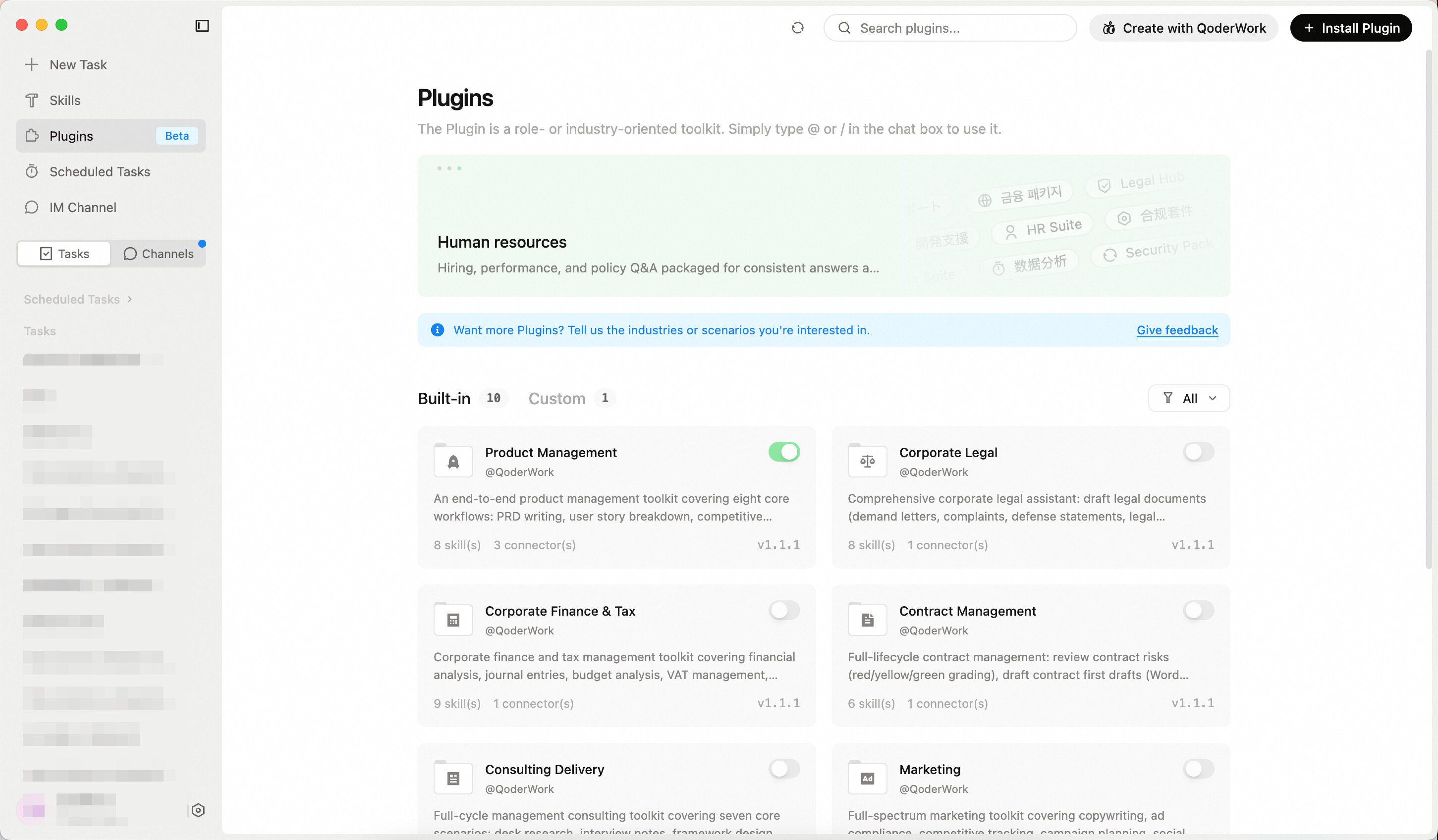
The past few releases focused on ongoing stability and experience improvements. With 0.3.15, we're introducing Expert Kits — 10 built-in kits covering legal, finance, contract management, product management and more, turning AI from a generalist into a domain expert. Custom kit creation and sharing are also supported.
Expert Kits don't just connect AI to tools — they give AI professional-grade capabilities for specific roles.
✨ New
- 10 Built-in Kits at Launch
Covering finance, legal, marketing, and more — ready to use out of the box.
Multiple kits can be used in a single conversation. For example, combine "Contract Management" and "Corporate Legal" to handle legal review and contract generation in the same workflow.
| Kit | Description |
|---|---|
| Product Management | PRD writing, user story breakdown, competitive analysis, requirement prioritization, user feedback analysis, roadmap updates, product metrics review |
| Corporate Legal | Draft legal documents, generate corporate resolutions, case research with win-rate analysis, compliance review, risk assessment |
| Contract Management | Contract review, contract drafting, redline comparison, NDA quick screening, statute lookup, contract ledger reminders |
| Corporate Finance & Tax | Financial analysis, bookkeeping vouchers, budget analysis, VAT management, annual settlement, internal audit, financial statements, month-end closing |
| Consulting Delivery | Desk research, interview notes, framework design, report writing, benchmarking, weekly reports, CEO briefings |
| Marketing | Marketing copy, ad compliance, competitor tracking, campaign planning, social media trending, SEO optimization, campaign analytics, brand consistency review |
| Investment Research | In-depth reports, industry research, annual report analysis, earnings flash reviews, research notes, morning meeting briefs, research summaries, comparable company analysis |
| Investment Banking | IPO prospectus drafting, M&A reports, bond offering memorandums, exchange inquiry responses, roadshow materials, financial modeling |
| Private Equity | Project screening, due diligence checklists, term sheet review, investment committee memos, return modeling, exit analysis |
| Wealth Management | Market briefings, asset allocation, fund analysis, client reporting, financial planning, tax planning |
Everyday Improvements
Versions 0.3.8 through 0.3.11 bring a wide range of everyday usability improvements.
🔧 Improvements
- Settings Page
Refined layout and updated copy
🐛 Fixes
- Fixed various issues affecting daily usage
- Fixed several Windows platform compatibility issues
- Additional stability improvements