Version / 版本号
N/A — this is a README / documentation defect, not an app defect, so no app build is involved.
不适用 —— 这是 README / 文档 层面的问题,与具体 App 版本无关。
Platform / 平台
N/A — affects anyone viewing the repo page on github.com (README.md and README.zh-CN.md).
不适用 —— 影响所有在 GitHub 网页上浏览英文 README.md 与中文 README.zh-CN.md 的人。
OS version / 系统版本
N/A — browser-side rendering question only.
不适用 —— 只涉及 GitHub 页面渲染。
Issue area / 问题类型
Other (documentation / README)
其他(文档 / README)
Upload ID / 日志上传 ID
N/A — no app logs are relevant here (the app is never launched). Evidence is in the sections below.
不适用 —— 不涉及 App 日志,证据见下方。
What happened? / 问题描述
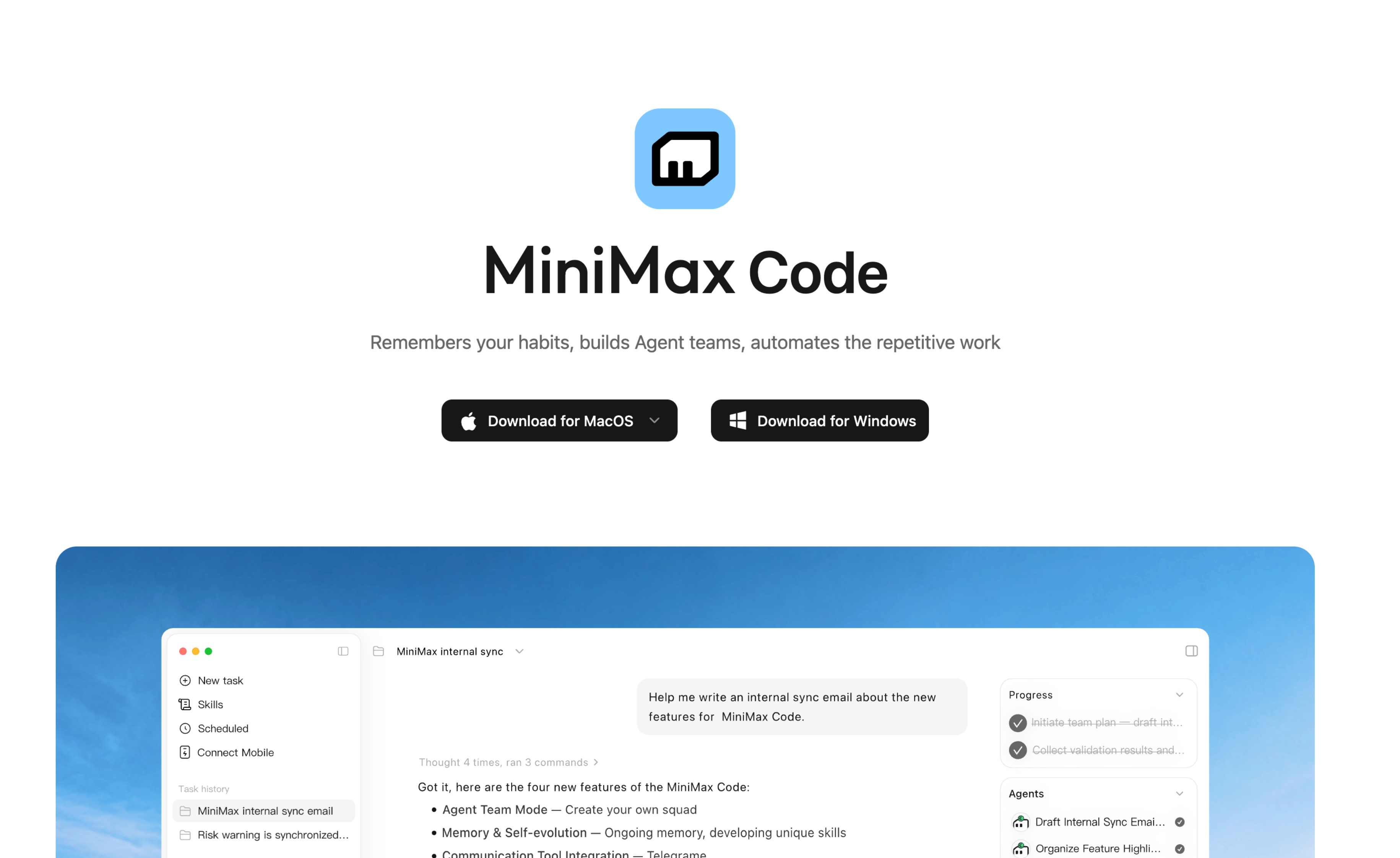
The top of both README.md and README.zh-CN.md renders a full-width banner image:
<img src="https://filecdn.minimax.chat/public/c3ebbd2e-f55b-48d7-adff-030abb63e06d.png" alt="MiniMax Code" width="100%" />
That PNG is not only a logo/wordmark — it is a hero mockup that paints two black, button-shaped graphics labelled "Download for macOS" (with a dropdown chevron) and "Download for Windows". They look exactly like the primary call-to-action on the landing page, but they are just raster pixels inside the image. There is no <a> around them and no download behaviour of any kind.
Because the <img> is a bare image, GitHub wraps it in an anchor pointing at the camo copy of that same PNG:
<a target="_blank" rel="noopener noreferrer nofollow" href="https://camo.githubusercontent.com/994bcf891f8b1973255b9bb1f41f7f52914652e740ac2f804ee489265d59bf0e/687474...png">
  <img src="https://camo.githubusercontent.com/994bcf891f8b1973255b9bb1f41f7f52914652e740ac2f804ee489265d59bf0e/687474...png" alt="MiniMax Code" width="100%" data-canonical-src="https://filecdn.minimax.chat/public/c3ebbd2e-f55b-48d7-adff-030abb63e06d.png" style="max-width: 100%;">
</a>
So clicking either "button" opens the banner PNG itself in a new tab — which is exactly the confusing behaviour reported.
The banner already contains the app icon, the "MiniMax Code" wordmark and the tagline, so embedding it in the issue to make the two fake buttons visible:

Note: purely textual links do exist immediately below the banner and they work correctly —
[Download for macOS](https://agent.minimax.io/download) · [Download for Windows](https://agent.minimax.io/download)
([macOS 下载](https://agent.minimaxi.com/download) · [Windows 下载](https://agent.minimaxi.com/download) in the Chinese README; both targets return HTTP 200)
— but the painted buttons sit at the very top of the page and are visually far more prominent, so they are what a visitor clicks first.
A related cosmetic issue: since the banner already renders the wordmark and the tagline, the markdown right below it repeats them (# MiniMax Code + the same tagline), so the top of the page shows the product name and tagline twice.
Steps to reproduce / 复现步骤
- Open https://github.com/MiniMax-AI/minimax-code (or https://github.com/MiniMax-AI/minimax-code/blob/main/README.zh-CN.md)
- At the very top of the page, look at the dark buttons "Download for macOS ▾" / "Download for Windows"
- Click either of them
- Observe: no download starts; a new tab opens showing the banner image itself (
camo.githubusercontent.com/...c3ebbd2e-....png)
Same result on both the English and the Chinese README, in Chrome / Edge, logged out and logged in.
Expected behavior / 预期行为
Clicking "Download for macOS" / "Download for Windows" should lead to the download page — https://agent.minimax.io/download — i.e. behave like the textual links already present below the banner. If something is not interactive, it should not be drawn to look like a button.
点击 Banner 里的「Download for macOS」/「Download for Windows」应当跳转到下载页 https://agent.minimax.io/download,也就是和 Banner 下方那行文字链接行为一致。不能点击的装饰元素不应该画成按钮的样子。
Actual behavior / 实际行为
Nothing download-related happens. The click simply opens the underlying PNG in a new browser tab, so the user learns that the most prominent control on the page is a dead image.
点击后没有任何下载行为,只是在新标签页里打开了那张 PNG 本身 —— 页面上最显眼的控件其实是一张死图。
Suggested fix / 建议修复
- Recommended: remove the two painted buttons from the banner PNG and keep the existing working textual links (optionally restyle them as badges: two small badge images each wrapped in
<a href="https://agent.minimax.io/download">).
推荐:把 Banner 图里那两个按钮图形删掉,继续用现有可用的文字链接(也可以改用两张 badge 小图,各自用 <a href="https://agent.minimax.io/download"> 包裹)。
- Alternatively, make the whole banner one link:
[](https://agent.minimax.io/download) — cheap, but it collapses the macOS/Windows distinction and makes the entire hero clickable.
或者把整张 Banner 做成一个链接(代价是 macOS / Windows 不再区分)。
- An HTML image map (
<map> / <area> with per-button hotspots) is not a viable option: GitHub's markdown sanitizer strips those tags, so two separate hotspots inside one README image cannot be made clickable.
While touching this, the duplicated wordmark + tagline below the banner could be dropped too.
Screenshots / 截图
See the embedded banner in "What happened?" above — the two fake buttons are the black controls under the tagline. Direct link to the asset: https://filecdn.minimax.chat/public/c3ebbd2e-f55b-48d7-adff-030abb63e06d.png
Before submitting / 提交前确认
Version / 版本号
N/A — this is a README / documentation defect, not an app defect, so no app build is involved.
不适用 —— 这是 README / 文档 层面的问题,与具体 App 版本无关。
Platform / 平台
N/A — affects anyone viewing the repo page on github.com (
README.mdandREADME.zh-CN.md).不适用 —— 影响所有在 GitHub 网页上浏览英文
README.md与中文README.zh-CN.md的人。OS version / 系统版本
N/A — browser-side rendering question only.
不适用 —— 只涉及 GitHub 页面渲染。
Issue area / 问题类型
Other (documentation / README)
其他(文档 / README)
Upload ID / 日志上传 ID
N/A — no app logs are relevant here (the app is never launched). Evidence is in the sections below.
不适用 —— 不涉及 App 日志,证据见下方。
What happened? / 问题描述
The top of both
README.mdandREADME.zh-CN.mdrenders a full-width banner image:That PNG is not only a logo/wordmark — it is a hero mockup that paints two black, button-shaped graphics labelled "Download for macOS" (with a dropdown chevron) and "Download for Windows". They look exactly like the primary call-to-action on the landing page, but they are just raster pixels inside the image. There is no
<a>around them and no download behaviour of any kind.Because the
<img>is a bare image, GitHub wraps it in an anchor pointing at the camo copy of that same PNG:So clicking either "button" opens the banner PNG itself in a new tab — which is exactly the confusing behaviour reported.
The banner already contains the app icon, the "MiniMax Code" wordmark and the tagline, so embedding it in the issue to make the two fake buttons visible:
Note: purely textual links do exist immediately below the banner and they work correctly —
[Download for macOS](https://agent.minimax.io/download) · [Download for Windows](https://agent.minimax.io/download)(
[macOS 下载](https://agent.minimaxi.com/download) · [Windows 下载](https://agent.minimaxi.com/download)in the Chinese README; both targets return HTTP 200)— but the painted buttons sit at the very top of the page and are visually far more prominent, so they are what a visitor clicks first.
A related cosmetic issue: since the banner already renders the wordmark and the tagline, the markdown right below it repeats them (
# MiniMax Code+ the same tagline), so the top of the page shows the product name and tagline twice.Steps to reproduce / 复现步骤
camo.githubusercontent.com/...c3ebbd2e-....png)Same result on both the English and the Chinese README, in Chrome / Edge, logged out and logged in.
Expected behavior / 预期行为
Clicking "Download for macOS" / "Download for Windows" should lead to the download page —
https://agent.minimax.io/download— i.e. behave like the textual links already present below the banner. If something is not interactive, it should not be drawn to look like a button.点击 Banner 里的「Download for macOS」/「Download for Windows」应当跳转到下载页
https://agent.minimax.io/download,也就是和 Banner 下方那行文字链接行为一致。不能点击的装饰元素不应该画成按钮的样子。Actual behavior / 实际行为
Nothing download-related happens. The click simply opens the underlying PNG in a new browser tab, so the user learns that the most prominent control on the page is a dead image.
点击后没有任何下载行为,只是在新标签页里打开了那张 PNG 本身 —— 页面上最显眼的控件其实是一张死图。
Suggested fix / 建议修复
<a href="https://agent.minimax.io/download">).推荐:把 Banner 图里那两个按钮图形删掉,继续用现有可用的文字链接(也可以改用两张 badge 小图,各自用
<a href="https://agent.minimax.io/download">包裹)。[](https://agent.minimax.io/download)— cheap, but it collapses the macOS/Windows distinction and makes the entire hero clickable.或者把整张 Banner 做成一个链接(代价是 macOS / Windows 不再区分)。
<map>/<area>with per-button hotspots) is not a viable option: GitHub's markdown sanitizer strips those tags, so two separate hotspots inside one README image cannot be made clickable.While touching this, the duplicated wordmark + tagline below the banner could be dropped too.
Screenshots / 截图
See the embedded banner in "What happened?" above — the two fake buttons are the black controls under the tagline. Direct link to the asset:
https://filecdn.minimax.chat/public/c3ebbd2e-f55b-48d7-adff-030abb63e06d.pngBefore submitting / 提交前确认
mainREADME.