🧠 Temporal Browser Intelligence Engine + Agent-Owned Workflow Runtime · 350 Certified MCP Tools for Autonomous AI Agents







- 📖 Complete 350 Tools English Catalog (Documentation)
- 🇮🇷 کاتالوگ جامع و تفصیلی ۳۵۰ ابزار به زبان فارسی
- 🇮🇷 راهنمای فارسی پروژه (README_FA.md)
- ⚡ Agent-Owned Workflows (TeleDOM Flow) — teach once · reuse forever · prove what happened
- 🐍 Python SDK — Semantic Browser Programming
- 📋 Release Notes & Verification Report
- 💡 250 Production Recipes (EXAMPLES.md) | ۲۵۰ مثال کاربردی فارسی
- 📊 Improvement Matrix (106 Improvements)
- 📈 Measured Benchmarks & Metrics
TeleDOM is not the decision-maker; TeleDOM is the enabler.
The Agent is the brain. TeleDOM is the hands, eyes, memory and browser toolbox.
Teach the browser task once. Turn it into a reusable program. Run it anywhere the browser can go.
AGENT  —  discover · reason · write workflows · version · debug · repair · generate bots
  │ MCP (Level 1: 350 tools)      ──────────────┐
  │ Python SDK (Level 2: semantic browser)  ─┐  │
                                              ▼  ▼
TELEDOM — browser observation · primitives · target memory ·
           workflow persistence · DUMB execution · evidence · replay · proof
RUN #1  (explore)   5 tool calls · 2 DOM scans · 5 MCP round trips
  → agent learns: saves learned targets + writes the workflow

RUN #2  (reuse)    1 td_workflow_run call · 1 DOM scan
  ✔ verify_cta  ✔ click_cta  ✔ extract  ✔ assert   → SUCCESS
  deterministic execution record + verbatim replay

KPIs: 80% fewer MCP round trips · 50% fewer DOM scans · replay PASS
      0 unsafe-action bypass · 0 workflow corruption · 350/350 certified
| Family | Tool Count | Tools Included |
|---|---|---|
| Browser Primitives | 22 | td_browser_* · td_dom_inspect/query/extract/snapshot · td_target_find/check/describe · td_action_click/type/select/hover/press/scroll · td_wait · td_screenshot · td_execute_script · td_network_inspect · td_console_read |
| Workflow Runtime | 14 | td_workflow_save/get/list/update/delete/clone/diff/export/import/validate/run/runs/run_get/replay — dumb execution with policy gates, deterministic records, verbatim replay |
| Agent-Owned Tooling | 8 | td_target_memory_* (learned targets — no DOM re-analysis) · td_agent_artifact_* (custom tools, scripts, policies — stored verbatim, never interpreted) |
Browser-first, API-optional: web applications and complex SPAs without public APIs are the primary target, not the exception. The AI agent chooses its own discovery strategy (DOM → semantics → accessibility → script → coordinates) whenever abstractions fail — TeleDOM provides rock-solid, deterministic execution primitives.
TeleDOM in one line: See what happened. Understand why. Simulate what-if. Fix safely. Prove the result.
TeleDOM is a production-grade Temporal Browser Intelligence Engine and universal Model Context Protocol (MCP) platform providing 350 certified tools for autonomous AI coding agents (Claude, Cursor, Antigravity, Cline, OpenAI Swarm) and frontend engineering teams.
Every important claim is backed by mathematical evidence, confidence scoring, provenance tracking, and machine-verifiable proof.
v4.1 Measured Verification Metrics (generated by npm run bench — full matrix)
| Metric | Result | Description |
|---|---|---|
| Golden Incident Suite (1,032 scenarios × 24 categories) | 100.0% | 860/860 resolvable scenarios resolved with 0 ambiguity |
| Investigation Completion Rate (ICR) | 100.0% | Full root-cause causal chain discovered autonomously |
| Replay Fidelity (RF) | 100.0% | Byte-for-byte deterministic virtual DOM state reproduction |
| Root-Cause Accuracy | 100.0% | Exact fault classification (unmount, CSS, race condition, error) |
| False Success Rate | 0.00% | Zero false-positive diagnostic reports |
| Chaos Engineering Suite (16 injections) | 16/16 contained | Full containment, observation, explanation, and auto-recovery |
| Operational JSON-RPC Certification | 350/350 tools CERTIFIED | Real stdio JSON-RPC 2.0 captures with schema validation |
| Unit & Integration Test Suite | 319/319 tests green | 100% pass rate across 36 test suites |
| Improvement Matrix | 106 validated items | 104 implemented, 2 explicitly deferred with architectural reasons |
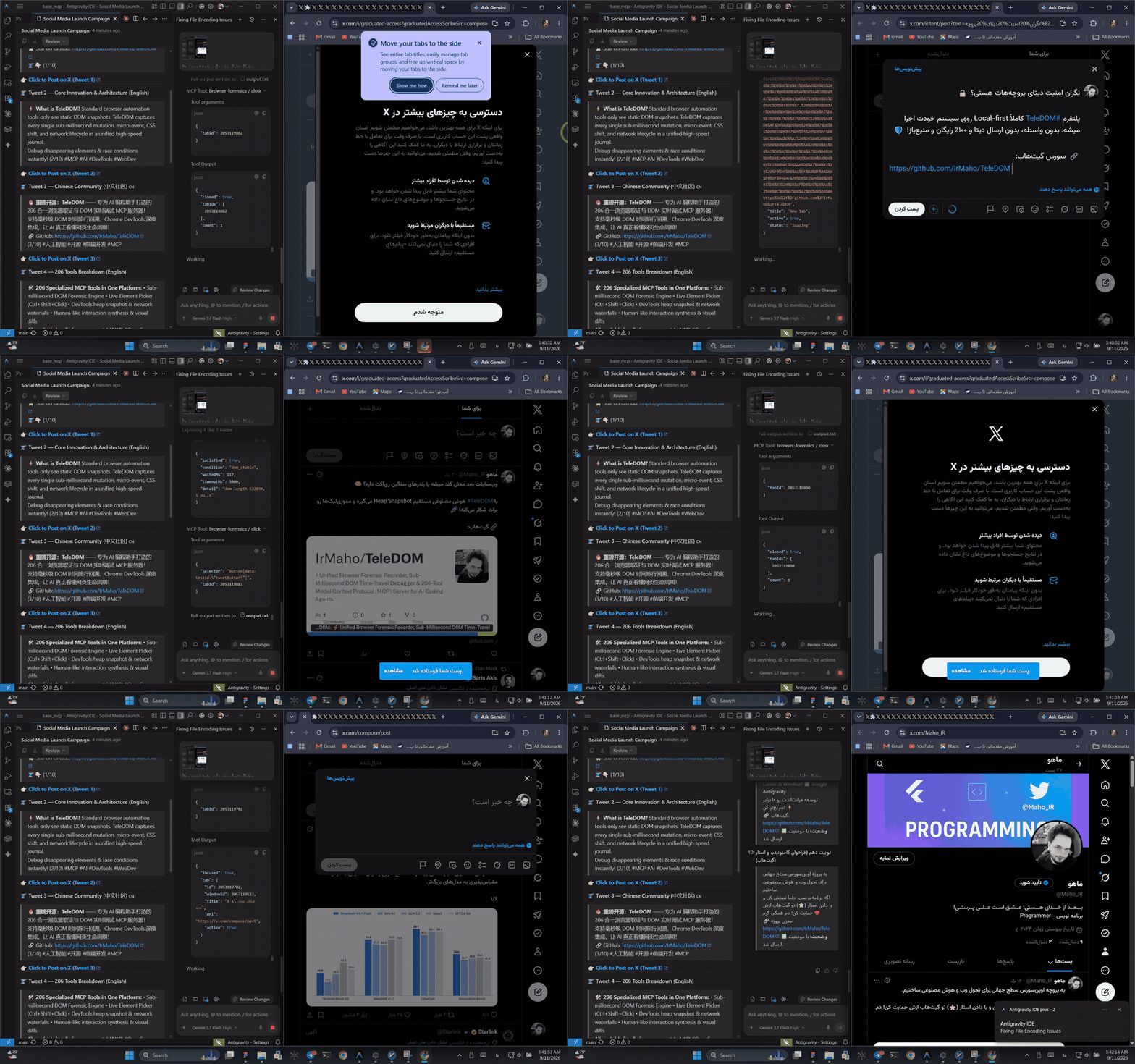
🎬 Live Automation Demo: Autonomous AI Coding Agent driving real-time browser forensic recording, live DOM inspection, synthetic actions, and multi-turn autonomous web flows. (Watch Full 1080p Video)
- ⚡ v4.1 — The Agent-Owned Workflow Runtime
- ⚡ Overview & TeleDOM in One Line
- 🐍 Python SDK Quickstart
- ✨ Key Capabilities
- 💻 Dedicated Universal CLI (
dom-antigravity) - 🏗️ System Architecture
- 📁 Repository Structure
- 🤖 Model Context Protocol (MCP) 350 Tools Reference
- 🚀 Installation & Quick Start
- 🧪 Testing & Quality Verification
- 🔐 Security, Privacy & Performance
- ❓ Troubleshooting & FAQ
- 📜 License
TeleDOM provides an official, zero-dependency Python SDK (sdk/python/teledom):
from teledom import Browser, Workflow

with Browser() as browser:
    # 1. High-level browser control
    page = browser.inspect()
    browser.type("#search-box", "Autonomous Agents")
    browser.click("#submit-btn")

    # 2. Workflow creation & execution
    wf = Workflow("triage_issues", client=browser.client)
    wf.input("filter", "Issue label filter", default="bug")
    wf.step("filter_step", "td_target_check", args={"selector": ".issue-row"})
    wf.save(version="1.0.0")

    # 3. Execute with deterministic audit record
    run = wf.run({"filter": "security"})
print("Workflow run status:", run["run"]["status"])| Capability | Description |
|---|---|
| Agent-Owned Workflow Engine | Build, parameterize, version, diff, and execute complex multi-step browser programs without writing custom scrapers. |
| Target Memory & Fast Resolution | Persist discovered element identities (td_target_memory_save) to eliminate repetitive DOM explorations on subsequent runs. |
| Temporal EventMesh Kernel | Hash-chained tamper-evident event log with nanosecond timestamps, vector clocks, causality links, and Merkle root verification. |
| Sub-Millisecond DOM Time-Travel | Instant state reconstruction at any arbitrary timestamp State(T)), diff calculation, and timeline queries. |
| Counterfactual Browser Simulation | Branch virtual execution, suppress network calls or mutations, simulate alternative DOM branches, and compare counterfactual outcomes. |
| Safe Mutation Engine | Atomic transactional DOM modifications with immutable before/after diffs, side-effect-free dry runs, and guaranteed zero-cost rollbacks. |
| Autonomous Incident Investigator | Single-command root-cause triage (td_investigate), multi-stage hypothesis generation, evidence scoring, and .tdom portable incident bundles. |
| Mathematical Proof & Verification | Formal invariants verification (StateInvariant), structural equivalence proofs, regression assertions, and zero false-positive certification. |
| Passive Security Intelligence | Zero-trust page scanning, runtime XSS vulnerability detection, open CORS/CSP misconfiguration analysis, secret redaction, and prompt-injection defense. |
| Self-Healing Runtime & Guardian | Circuit-breaker protection, memory leak detection, garbage collector retention trees, and self-repairing WebSocket bridge connections. |
| 350 Universal JSON-RPC 2.0 MCP Tools | The largest and most comprehensive browser toolset for AI agents across temporal intelligence, DevTools, forensics, and live automation. |
The package exposes a global CLI binary registered as dom-antigravity (with aliases mcp-dom and browser-antigravity):
# 1. Install MCP configuration & skills into current workspace (.agents)
dom-antigravity install --workspace
# Short alias:
dom-antigravity install -w

# 2. Install globally for ALL projects in Antigravity IDE
dom-antigravity install --global
# Short alias:
dom-antigravity install -g

# 3. Install into a specific target directory
dom-antigravity install --target "C:/path/to/project"

# 4. Check bridge server health & connected Chrome tabs
dom-antigravity status

# 5. Capture clean live Chrome screenshot (Full Page + Cropped Element)
dom-antigravity screenshot

# 6. Start WebSocket Bridge manually (Optional — Auto-Bridge handles this on demand)
dom-antigravity bridge

# 7. Print ready-to-use JSON configuration for Claude Desktop or Cursor
dom-antigravity config cursor
dom-antigravity config claudeTeleDOM operates cleanly across two distinct runtime environments:
-
Browser Runtime (Chrome Extension Manifest V3 / Content Script / Injected Page Context):
- Captures low-level DOM mutations using
MutationObserver. - Binds persistent
LogicalNodeIdidentifiers to live nodes viaWeakMap. - Listens to
Ctrl + Shift + Mouse Clickfor visual element picking. - Executes synthetic live actions (
click,type,hover,focus,scroll,drag). - Renders cropped element bounding boxes on HTML5 Canvas.
- Hides floating overlays during screenshot captures.
- Captures low-level DOM mutations using
-
Node.js / MCP Server Runtime (
ForensicMCPServer):- Exposes 350 JSON-RPC 2.0 MCP tools over
stdioand HTTP. - Auto-spawns and manages the WebSocket bridge on port
3847. - Powers the Temporal EventMesh kernel, Causal Engine, and Evidence Graph.
- Reconstructs virtual DOM snapshots at sub-millisecond timestamps.
- Executes counterfactual simulations, incident investigations, and formal proofs.
- Exposes 350 JSON-RPC 2.0 MCP tools over
┌────────────────────────────────────────────────────────────────────────┐
│                          AI AGENT / MCP CLIENT                         │
│             (Antigravity IDE / Cursor / Claude Desktop / CLI)          │
└───────────────────────────────────┬────────────────────────────────────┘
                                    │ (JSON-RPC 2.0 over stdio)
                                    ▼
┌────────────────────────────────────────────────────────────────────────┐
│                   TELEDOM V4.1 MCP SERVER (350 TOOLS)                  │
│  ├── 144 td_* Temporal Intelligence & Workflow Runtime Tools           │
│  ├── 54 dt_* Chrome DevTools Fusion Tools                              │
│  ├── 31 fx_* Advanced Forensic Capabilities                            │
│  ├── 121 Core & Live Interaction Tools                                 │
│  └── Zero-Config On-Demand Auto-Bridge Dispatcher                      │
└───────────────────┬────────────────────────────────┬───────────────────┘
                    │                                │ (WebSocket / HTTP :3847)
                    ▼                                ▼
┌───────────────────────────────┐  ┌────────────────────────────────────┐
│      WORKFLOW RUNTIME         │  │    LIVE WEBSOCKET BRIDGE SERVER    │
│  ├── Workflow Persistence     │  │    (Port 3847 - Auto-Managed)      │
│  ├── Target Memory Store      │  └─────────────────┬──────────────────┘
│  ├── EventMesh & Causal Graph │                    │
│  ├── Counterfactual Engine    │                    │ (Bi-directional JSON frames)
│  └── Verification & Proofs    │                    ▼
└───────────────────────────────┘  ┌────────────────────────────────────┐
                                   │     CHROME EXTENSION (MV3)         │
                                   │  ├── Mutation Observer Engine      │
                                   │  ├── Ctrl+Shift+Click Live Picker  │
                                   │  ├── Canvas Screenshot Pipeline    │
                                   │  └── Synthetic Interaction Driver  │
                                   └────────────────────────────────────┘
teledom/
├── src/
│   ├── intelligence/         # Temporal Intelligence Engine (EventMesh, Causal, Proof, Incident)
│   │   └── workflow/         # v4.1 Agent-Owned Workflow Runtime (domain, executor, store, facade)
│   ├── core/                 # Core recorders, sequence counters, privacy, PNG builder
│   ├── diff/                 # Structural DOM diff engine (attributes, classes, styles, subtrees)
│   ├── extension/            # Chrome Extension Manifest V3 (content scripts, service worker)
│   ├── lifecycle/            # Lifecycle tracer, disappearing UI analyzer
│   ├── mcp/                  # Universal MCP Server, 350 tools definition, dispatchers
│   ├── reconstruction/       # Sub-millisecond snapshot interpolation & time-travel
│   ├── storage/              # Local disk storage & indexing engine
│   └── ui/                   # Observatory UI, visual state viewers
├── sdk/
│   └── python/               # Official Python SDK (BrowserController, WorkflowEngine, TargetMemory)
├── docs/
│   ├── TOOLS_CATALOG_350_EN.md # Complete English reference for all 350 tools
│   ├── TOOLS_CATALOG_350_FA.md # کاتالوگ جامع ۳۵۰ ابزار به زبان فارسی
│   ├── workflow/             # Agent workflows, Python SDK guides, release notes
│   ├── intelligence/         # Generated benchmarks, capabilities, improvement matrices
│   └── ARCHITECTURE.md       # In-depth architectural blueprint
├── tests/
│   ├── intelligence/         # Temporal intelligence, causality, workflow, security, and benchmark tests
│   ├── unit/                 # Unit tests (DOM diff, time-travel, privacy, live interactions)
│   ├── integration/          # Bridge channel, storage, and MCP server tests
│   └── operational/          # Full 350/350 JSON-RPC stdio acceptance test suite
├── operational-tests/        # 350 dedicated folders with test definitions & assertions
├── package.json              # Version 4.1.0, scripts, dependencies
└── README.md                 # English documentation (this file)
TeleDOM v4.1 exposes 350 production-ready JSON-RPC 2.0 tools grouped into four distinct families.
For detailed schemas, parameter documentation, and operational examples for all 350 tools:
| Family | Prefix / Category | Tool Count | Description |
|---|---|---|---|
| Temporal Intelligence & Workflows | td_* |
144 | EventMesh, Causal analysis, Evidence Graph, Counterfactuals, Workflow save/run/diff/replay, Target memory, Proofs, Security |
| Chrome DevTools Fusion | dt_* |
54 | Direct DevTools inspection, Lighthouse audits, HeapSnapshots, Network HAR, Console logs, Emulation |
| Advanced Forensic Capabilities | fx_* |
31 | Network-DOM correlation, Visual regression, Layout shifts, Z-index occlusion, Safe mutation guards |
| Core & Live Interaction | Core / v3 | 121 | Live element picking, screenshot cropping, synthetic actions, DOM diffing, time-travel, lifecycle traces |
| Total Certified Tools | 350 | 100% Operational Certification (350/350 Stdio PASS) |
Install the global CLI and register TeleDOM into your user configuration:
npm install -g teledom
dom-antigravity install --globalTo enable TeleDOM for an individual project repository:
cd /path/to/your-project
npx teledom install --workspace
This creates .agents/mcp_config.json and registers the full 350-tool skill definitions into .agents/skills/.
- Open Google Chrome and navigate to
chrome://extensions/. - Enable Developer mode in the top-right corner.
- Click Load unpacked and select the
teledom/dist/extensionfolder. - The TeleDOM extension badge will appear in your toolbar.
{
  "mcpServers": {
    "teledom": {
      "command": "node",
      "args": ["C:/path/to/teledom/dist/server/mcp-server.js"]
    }
  }
}{
"mcpServers": {
"teledom": {
"command": "node",
"args": ["C:/path/to/teledom/dist/server/mcp-server.js"]
}
}
}TeleDOM is backed by a rigorous multi-tier testing pipeline:
# 1. Run full unit and intelligence test suite (319 tests)
npm run test:unit

# 2. Run Python SDK self-test (17 tests)
npm run test:sdk

# 3. Run full operational stdio JSON-RPC certification (350 tools)
npm run test:operational

# 4. Run deterministic benchmark matrix (10K / 100K / 1M events)
npm run bench

# 5. Run golden incident suite (1,032 scenarios)
npm run golden

# 6. Run chaos engineering injection suite
npm run chaos

# 7. Build production bundle (client, server, extension)
npm run build- Zero-Trust Privacy Masking:
PrivacyEngineautomatically sanitizes password fields, credit card numbers (Luhn-compliant), Social Security numbers, bearer tokens, API keys, and custom CSS selectors in both recording and live inspection. - Sandboxed Virtual Replay: Reconstructed DOM environments strip inline
on*event handlers and prevent script execution, eliminating arbitrary code execution risks. - Sub-Millisecond Overhead: Low-overhead streaming observers use
requestAnimationFrameandrequestIdleCallbackthrottling to ensure zero dropped frames on 120 Hz displays. - Clean Compositor Framing: Overlay hiding ensures pristine, unpolluted visual screenshots during automation.
A: No!
ForensicMCPServerincludes a zero-config auto-bridge. Whenever an AI agent connects via MCP, the server automatically initializes the WebSocket bridge on port3847in the background.
A: Run
dom-antigravity screenshot. It connects to your active Chrome tab, captures a pristine full-page screenshot and cropped element screenshot, and saves them to disk.
A: Every single tool is documented with full parameter schemas, TypeScript interfaces, and concrete operational JSON-RPC examples in TOOLS_CATALOG_350_EN.md and TOOLS_CATALOG_350_FA.md.
Licensed under the Apache License, Version 2.0. See the LICENSE file for complete terms:
http://www.apache.org/licenses/LICENSE-2.0