


Render GPS routes as PNG map images in Node.js. Give it an encoded polyline (e.g. the map.summary_polyline of a Strava activity) and get back a static map image with the route drawn on a real basemap — no browser or headless Chrome needed.
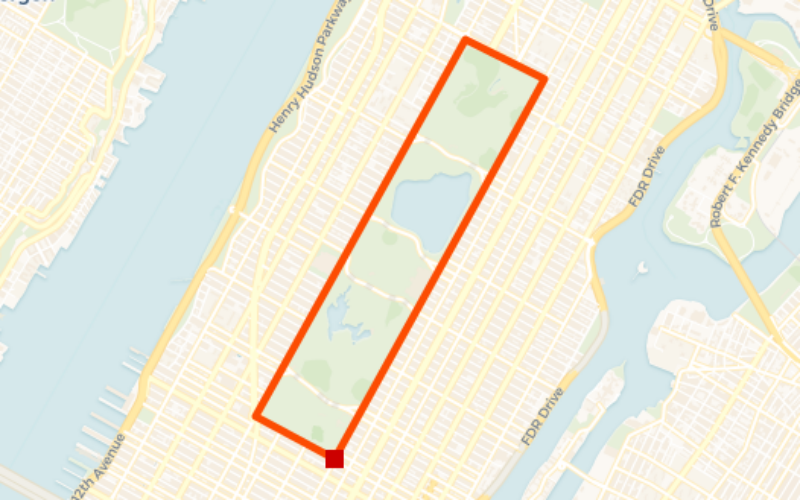
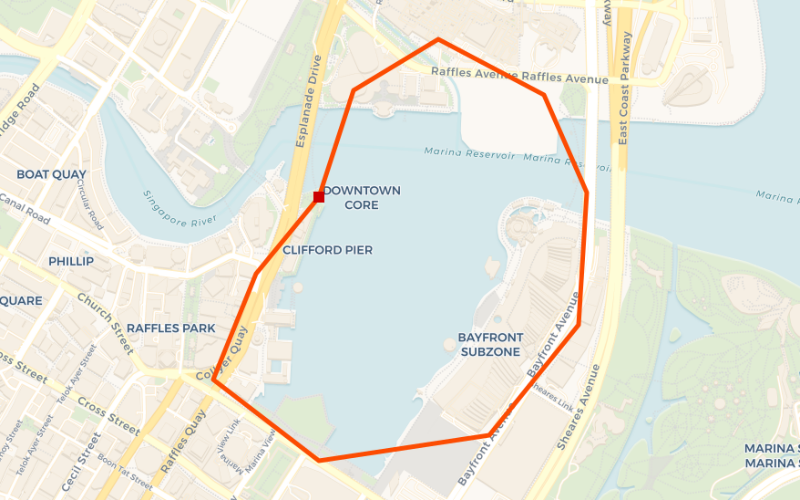
Useful for activity thumbnails, dashboards, social share cards, emails and anywhere you need a static route map image on the server.
TrajMap does one thing: turn a GPS route into a map image you can keep drawing on.
- Pixel coordinates come back with the image.
render()returns the PNG and the pixel position of every track point (result.points), so you can overlay distance markers, stops, a live vehicle position or labels in exact alignment with the route. - A pipeline you can take apart. Bounds calculation, tile fetching, stitching and projection are exported as separate services (
BoundaryService,TileService,StitchingService,ProjectionService, …). Whenrender()doesn't fit, compose your own — e.g. a fixed map extent with stop markers for a bus route. - Layout built for route cards.
trackRegionfixes how much space the route occupies;expansionRegionadds extra map on one side, leaving room for titles or stats in thumbnails and share images. - Strava-ready input. Pass an encoded polyline such as Strava's
map.summary_polylinedirectly — no decode step. - Server-side and self-hosted. No browser or headless Chrome; no URL-length limit on long routes and no per-request pricing as with hosted static-map APIs. TypeScript types included, retina (
@2x) tiles supported.
| trajmap | staticmaps | Hosted static map APIs (Mapbox, Google) | |
|---|---|---|---|
| Encoded polyline input | ✅ native | decode first | ✅ |
| Pixel coordinates of the route | ✅ | — | — |
| Composable pipeline stages | ✅ | — | — |
| Markers, text, polygons | start/end markers only | ✅ | ✅ |
| Long routes | no limit | no limit | limited by URL length |
| Runs in your process | ✅ (canvas) |
✅ (sharp) |
network API, per-request pricing |
If you need rich map annotations (image markers, text, polygons) out of the box today, staticmaps is the more complete choice; TrajMap focuses on route images and what you build on top of them.
- CARTO API key (required for the default basemap). Get one free at https://carto.com/basemaps/apikey and set
CARTO_API_KEY, or passtiles.apiKey. Without it every tile renders as "API KEY REQUIRED". See Map Tiles & API Key. - Native
canvasdependency. trajmap draws with node-canvas. Prebuilt binaries cover most platforms; on others (e.g. Alpine Linux, some ARM images) you need the system libraries listed in the node-canvas install guide.
- 🗺️ Map Tile Integration: Seamlessly fetches and stitches CARTO basemap tiles as backgrounds (custom tile providers supported)
- 🛣️ Polyline Decoding: Native support for Google Polyline encoded trajectory data
- 🎨 Customizable Styling: Configure trajectory colors, line widths, and marker points
- 📐 Intelligent Boundary Calculation: Automatically determines optimal display regions and zoom levels
- 🎯 Precise Projection: Leverages Web Mercator projection for accurate geographic coordinate mapping
- 🖼️ High-Quality Output: Supports Retina displays and PNG format export
- 📦 Modular Architecture: Individual processing modules can be used independently
TrajMap employs a sophisticated multi-stage rendering pipeline to ensure high-quality map visualization:
Polyline Input → Preprocessing → Boundary Calculation → Tile Fetching → Image Stitching → Trajectory Projection → Final Rendering
- Decodes Google Polyline format data into GPS coordinate points
- Validates configuration parameters
- Prepares data structures for subsequent processing
- Computes the minimum bounding box for the trajectory
- Applies a 10% buffer zone to prevent edge clipping
- Adjusts aspect ratio based on trackRegion specifications
- Applies expansionRegion for area extension
- Calculates optimal zoom level based on boundaries and target dimensions
- Determines required tile coordinate ranges
- Downloads basemap tiles (CARTO Voyager by default) in parallel
- Combines multiple tiles into a complete background image
- Manages tile boundary alignment
- Calculates final image geographic boundaries
- Uses Web Mercator projection to convert GPS coordinates to pixel coordinates
- Renders trajectory paths and marker points
- Applies custom styling (colors, line widths, etc.)
- Generates the final PNG image
- Supports Base64 encoded output
- Returns trajectory point pixel coordinate information
- Input Coordinates: WGS84 Geographic Coordinate System (lat/lng)
- Projection Coordinates: Web Mercator Projection (EPSG:3857)
- Tile Coordinates: Standard tile pyramid coordinate system
- Pixel Coordinates: Final image pixel coordinate system
npm install trajmap- Node.js >= 14.0.0
- Canvas-compatible system environment (canvas dependency auto-installed)
import { TrajMap } from 'trajmap';

// Simple configuration
const result = await TrajMap.render(
  'your_encoded_polyline_string',
  {
    trackRegion: {
      width: 800,
      height: 600
    }
  }
);

console.log('Rendering complete!');import { TrajMap, TrajmapConfig } from 'trajmap';
const polyline = 'u{~vFvyys@fS]z@cNpKoMdQaHbU{FzV}L';
const config: TrajmapConfig = {
// Required parameters
trackRegion: {
width: 1200,
height: 800
},
// Optional parameters
lineColor: '#FF5500', // Trajectory color
lineWidth: 4, // Trajectory line width
retina: true, // High-resolution rendering
// Tile provider configuration
tiles: {
apiKey: process.env.CARTO_API_KEY // CARTO basemaps API key
},
// Region expansion configuration: extra map area beyond the track region.
// At most one direction may be set.
expansionRegion: {
downPercent: 0.2 // Expand downward by 20%
},
// Marker point configuration
marker: {
start: 'circle', // Start point marker: circle
end: 'square' // End point marker: square
}
};
const result = await TrajMap.render(polyline, config);
// Access result information
console.log('Base64 image data:', result.data);
console.log('Trajectory pixel coordinates:', result.points);The default basemap is CARTO Voyager, which requires an API key. Without one, every tile renders as an "API KEY REQUIRED" placeholder. Get a key at https://carto.com/basemaps/apikey, then either:
- set the
CARTO_API_KEYenvironment variable (picked up automatically), or - pass it per render via
config.tiles.apiKey(takes precedence over the environment variable).
To use another tile provider, pass config.tiles.urlTemplate with these placeholders:
{s} subdomain (a–d), {z} {x} {y} tile coordinates, {r} retina suffix (@2x or empty),
{key} the URL-encoded apiKey. The key is only appended automatically for the default CARTO URL.
await TrajMap.render(polyline, {
  trackRegion: { width: 800, height: 600 },
  tiles: {
    urlTemplate: 'https://tiles.example.com/{z}/{x}/{y}{r}.png?token={key}',
    apiKey: 'YOUR_TOKEN'
  }
});Planned, roughly in priority order — feedback and PRs welcome via issues.
- Fixed map extent — a
boundsoption onrender()to draw on a chosen area instead of fitting the route (today this requires composing the pipeline services yourself). - Annotations — custom markers, icons and text labels along the route, positioned by lat/lng.
- Tile caching and retry — reuse downloaded tiles across renders and retry failed requests; currently one failed tile fails the whole render.
- Richer results — return a
Bufferalongside base64, plus the zoom level and geographic bounds of the image. - More input formats — GeoJSON
LineStringand GPX tracks in addition to encoded polylines. - Multiple routes per image — e.g. compare activities or show segments in different colors.
- GitHub: Frees0u1/trajmap