Skip to content

Persist reimbursable selection on optimistic CSV import card - #98486

Open
MelvinBot wants to merge 1 commit into
mainfrom
claude-cardImportReimbursableToggle
Open

Persist reimbursable selection on optimistic CSV import card#98486
MelvinBot wants to merge 1 commit into
mainfrom
claude-cardImportReimbursableToggle

Conversation

@MelvinBot

@MelvinBot MelvinBot commented Aug 12, 2026

Copy link
Copy Markdown
Contributor

Explanation of Change

When a user imports transactions from a CSV and toggles Transactions are reimbursable OFF, that selection was applied to the optimistic transactions, the saved column layout, and the API request — but not to the optimistic card written to CARD_LIST. buildOptimisticCard() never received isReimbursable, so the card's reimbursable field was undefined. The card details page reads card?.reimbursable ?? true, so the toggle rendered enabled right after import, and only self-corrected once the card was re-fetched from the server.

This change passes isReimbursable into buildOptimisticCard() and sets reimbursable on the optimistic card, so the local state matches the user's selection immediately with no reliance on a server round-trip.

Fixed Issues

$ #98243
PROPOSAL: #98243 (comment)

Tests

  1. Log into NewDot.
  2. Navigate to Settings > Wallet and click on "Import transactions".
  3. Click on the Card display name field, input a valid name, and save.
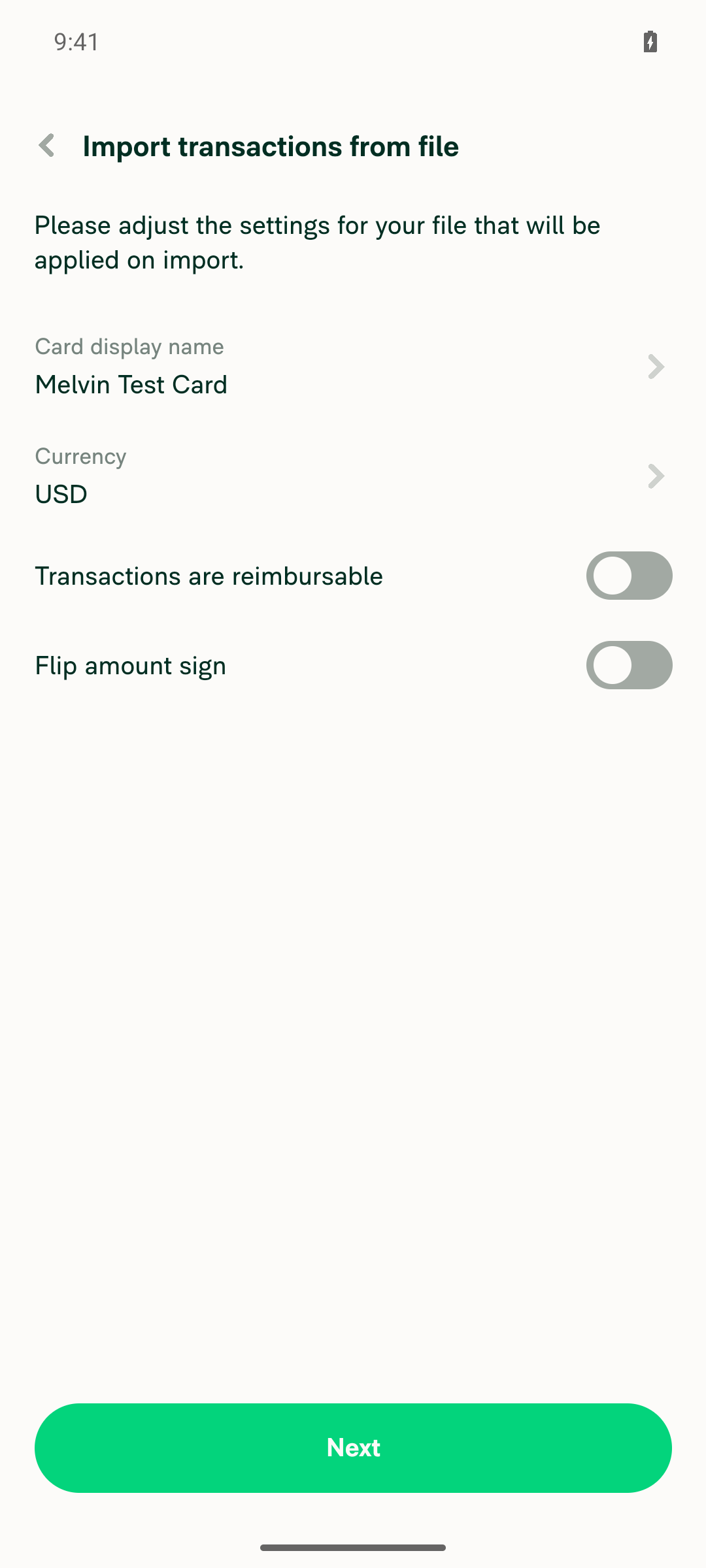
  4. Toggle off "Transactions are reimbursable".
  5. Click "Next" and upload a CSV file.
  6. Click on "Import".
  7. Click directly on the newly created transaction card item row to open the RHP.
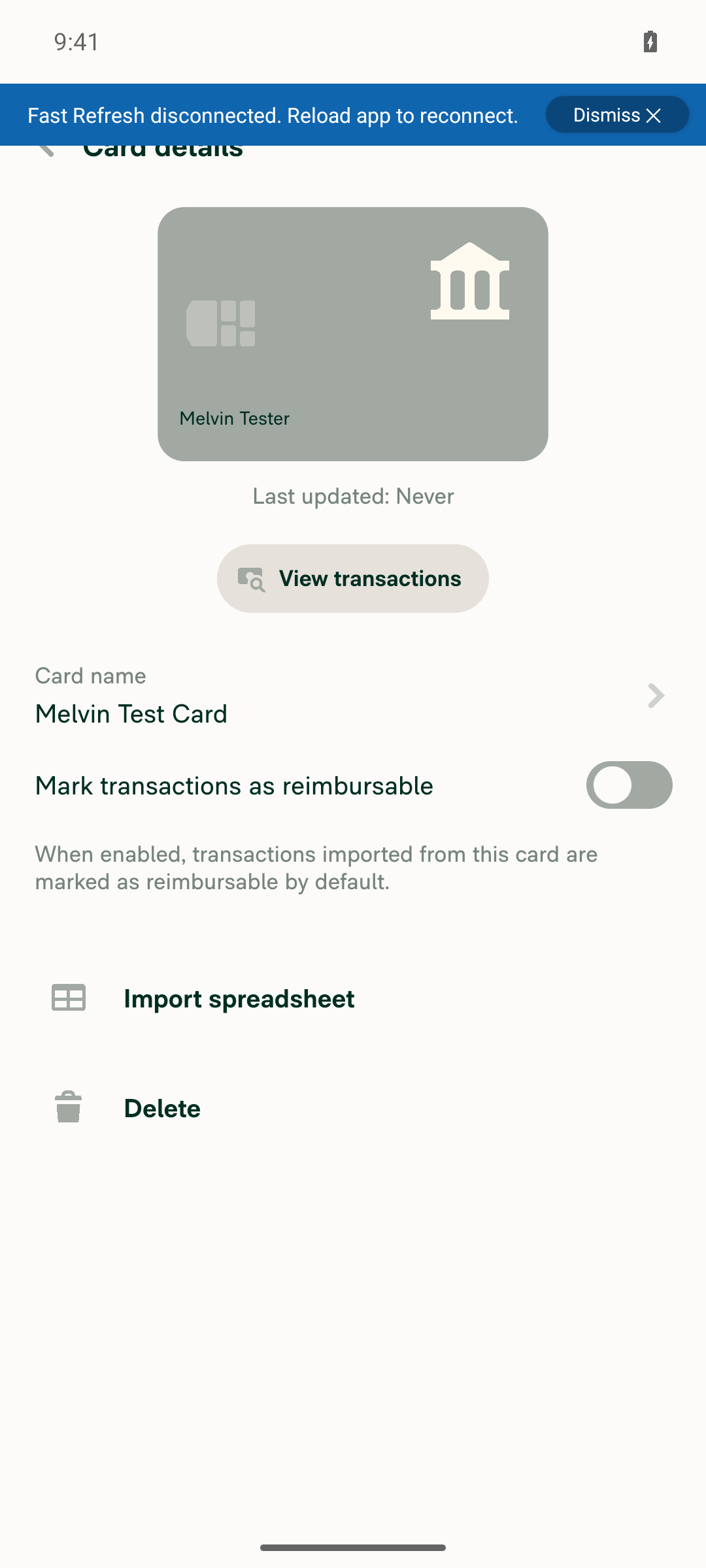
  8. Verify that "Mark transactions as reimbursable" is toggled off (previously it incorrectly showed enabled until the card was re-fetched).
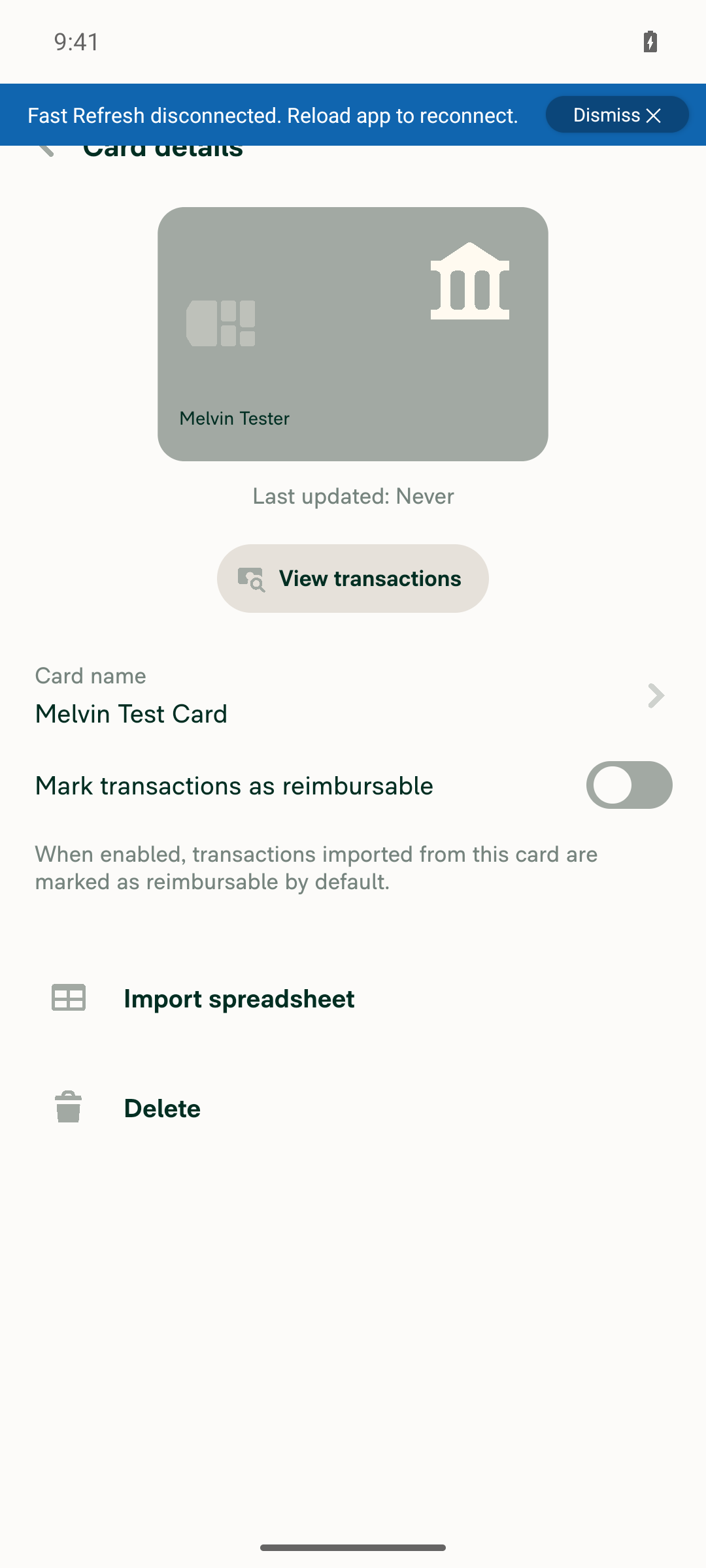
  9. Close and reopen the RHP and verify the toggle stays off.
  • Verify that no errors appear in the JS console

Offline tests

N/A — CSV imports can only be performed while online, so there is no offline behavior to test for this flow.

QA Steps

Same as tests.

  • Verify that no errors appear in the JS console

PR Author Checklist

  • I linked the correct issue in the ### Fixed Issues section above
  • I wrote clear testing steps that cover the changes made in this PR
    • I added steps for local testing in the Tests section
    • I added steps for the expected offline behavior in the Offline steps section
    • I added steps for Staging and/or Production testing in the QA steps section
    • I added steps to cover failure scenarios (i.e. verify an input displays the correct error message if the entered data is not correct)
    • I turned off my network connection and tested it while offline to ensure it matches the expected behavior (i.e. verify the default avatar icon is displayed if app is offline)
    • I tested this PR with a High Traffic account against the staging or production API to ensure there are no regressions (e.g. long loading states that impact usability).
  • I included screenshots or videos for tests on all platforms
  • I ran the tests on all platforms & verified they passed on:
    • Android: Native
    • Android: mWeb Chrome
    • iOS: Native
    • iOS: mWeb Safari
    • MacOS: Chrome / Safari
  • I verified there are no console errors (if there's a console error not related to the PR, report it or open an issue for it to be fixed)
  • I followed proper code patterns (see Reviewing the code)
    • I verified that comments were added to code that is not self explanatory
    • I verified that any new or modified comments were clear, correct English, and explained "why" the code was doing something instead of only explaining "what" the code was doing.
    • I verified any copy / text that was added to the app is grammatically correct in English. It adheres to proper capitalization guidelines (note: only the first word of header/labels should be capitalized), and is either coming verbatim from figma or has been approved by marketing (in order to get marketing approval, ask the Bug Zero team member to add the Waiting for copy label to the issue)
  • If a new code pattern is added I verified it was agreed to be used by multiple Expensify engineers
  • I followed the guidelines as stated in the Review Guidelines
  • I tested other components that can be impacted by my changes (i.e. if the PR modifies a shared library or component like Avatar, I verified the components using Avatar are working as expected)
  • If a new CSS style is added I verified that:
    • A similar style doesn't already exist
    • The style can't be created with an existing StyleUtils function (i.e. StyleUtils.getBackgroundAndBorderStyle(theme.componentBG))
  • If new assets were added or existing ones were modified, I verified that:
    • The assets are optimized and compressed (for SVG files, run npm run compress-svg)
    • The assets load correctly across all supported platforms.
  • If the PR modifies code that runs when editing or sending messages, I tested and verified there is no unexpected behavior for all supported markdown - URLs, single line code, code blocks, quotes, headings, bold, strikethrough, and italic.
  • If the PR modifies a generic component, I tested and verified that those changes do not break usages of that component in the rest of the App (i.e. if a shared library or component like Avatar is modified, I verified that Avatar is working as expected in all cases)
  • If the PR modifies a component related to any of the existing Storybook stories, I tested and verified all stories for that component are still working as expected.
  • If the PR modifies a component or page that can be accessed by a direct deeplink, I verified that the code functions as expected when the deeplink is used - from a logged in and logged out account.
  • If the PR modifies the UI (e.g. new buttons, new UI components, changing the padding/spacing/sizing, moving components, etc) or modifies the form input styles:
    • I verified that all the inputs inside a form are aligned with each other.
    • I added Design label and/or tagged @Expensify/design so the design team can review the changes.
  • I added unit tests for any new feature or bug fix in this PR to help automatically prevent regressions in this user flow.
  • If the main branch was merged into this PR after a review, I tested again and verified the outcome was still expected according to the Test steps.

Screenshots/Videos

Android: Native
Android: mWeb Chrome
iOS: Native
iOS: mWeb Safari
MacOS: Chrome / Safari

Co-authored-by: Bruno Rocha <brunovjk@users.noreply.github.com>
@MelvinBot

Copy link
Copy Markdown
Contributor Author

👋 brunovjk — I looked into the failing checks and there's no code fix to push. The only two failures are process checks that require human action, not a code change:

  • PR Author Checklist / checklist — fails because the checklist boxes in the PR description aren't all ticked (and I, as the PR author bot, am not recognized as an engineering member). Please review the PR body and check every box.
  • Check independent approval — fails because the PR still needs an approval from an independent reviewer.

Every actual code/build check passes — typecheck, all test jobs, ESLint, Oxfmt, Bun tests, Storybook tests, React Compiler Compliance, and all builds are green. So there's nothing for me to fix or push here; the two remaining checks clear once the author checklist is completed and an independent review is added.

@MelvinBot

Copy link
Copy Markdown
Contributor Author

brunovjk — rechecked, and nothing has changed since my last comment: there's still no code fix to push. The only two failing checks are process checks that need human action, not code:

  • PR Author Checklist / checklist — the checklist boxes in the PR description need to be ticked (I, the PR author bot, am not recognized as an engineering member).
  • Check independent approval — the PR still needs an approval from an independent reviewer.

Every code/build check passes (typecheck, all test jobs, ESLint, Oxfmt, Bun tests, Storybook, React Compiler Compliance, all builds); baseline-perf-tests is still running but is a benchmark, not a failure. These two checks clear once the author checklist is completed and an independent review is added.

@brunovjk

Copy link
Copy Markdown
Contributor

Great work @MelvinBot, please fill out the author checklist, check off all of the ones you can please. Also mark this PR ready for review.

@brunovjk

brunovjk commented Aug 13, 2026

Copy link
Copy Markdown
Contributor

Reviewer Checklist

  • I have verified the author checklist is complete (all boxes are checked off).
  • I verified the correct issue is linked in the ### Fixed Issues section above
  • I verified testing steps are clear and they cover the changes made in this PR
    • I verified the steps for local testing are in the Tests section
    • I verified the steps for Staging and/or Production testing are in the QA steps section
    • I verified the steps cover any possible failure scenarios (i.e. verify an input displays the correct error message if the entered data is not correct)
    • I turned off my network connection and tested it while offline to ensure it matches the expected behavior (i.e. verify the default avatar icon is displayed if app is offline)
  • I checked that screenshots or videos are included for tests on all platforms
  • I included screenshots or videos for tests on all platforms
  • I verified that the composer does not automatically focus or open the keyboard on mobile unless explicitly intended. This includes checking that returning the app from the background does not unexpectedly open the keyboard.
  • I verified tests pass on all platforms & I tested again on:
    • Android: HybridApp
    • Android: mWeb Chrome
    • iOS: HybridApp
    • iOS: mWeb Safari
    • MacOS: Chrome / Safari
  • If there are any errors in the console that are unrelated to this PR, I either fixed them (preferred) or linked to where I reported them in Slack
  • I verified proper code patterns were followed (see Reviewing the code)
    • I verified that comments were added to code that is not self explanatory
    • I verified that any new or modified comments were clear, correct English, and explained "why" the code was doing something instead of only explaining "what" the code was doing.
    • I verified any copy / text that was added to the app is grammatically correct in English. It adheres to proper capitalization guidelines (note: only the first word of header/labels should be capitalized), and is either coming verbatim from figma or has been approved by marketing (in order to get marketing approval, ask the Bug Zero team member to add the Waiting for copy label to the issue)
  • If a new code pattern is added I verified it was agreed to be used by multiple Expensify engineers
  • I verified that this PR follows the guidelines as stated in the Review Guidelines
  • I verified other components that can be impacted by these changes have been tested, and I retested again (i.e. if the PR modifies a shared library or component like Avatar, I verified the components using Avatar have been tested & I retested again)
  • If a new component is created I verified that:
    • A similar component doesn't exist in the codebase
    • All props are defined accurately
    • The component has a clear name that is non-ambiguous and the purpose of the component can be inferred from the name alone
    • The only data being stored in the state is data necessary for rendering and nothing else
    • The component has the minimum amount of code necessary for its purpose, and it is broken down into smaller components in order to separate concerns and functions
  • If a new CSS style is added I verified that:
    • A similar style doesn't already exist
    • The style can't be created with an existing StyleUtils function (i.e. StyleUtils.getBackgroundAndBorderStyle(theme.componentBG)
  • If the PR modifies code that runs when editing or sending messages, I tested and verified there is no unexpected behavior for all supported markdown - URLs, single line code, code blocks, quotes, headings, bold, strikethrough, and italic.
  • If the PR modifies a generic component, I tested and verified that those changes do not break usages of that component in the rest of the App (i.e. if a shared library or component like Avatar is modified, I verified that Avatar is working as expected in all cases)
  • If the PR modifies a component related to any of the existing Storybook stories, I tested and verified all stories for that component are still working as expected.
  • If the PR modifies a component or page that can be accessed by a direct deeplink, I verified that the code functions as expected when the deeplink is used - from a logged in and logged out account.
  • If the PR modifies the UI (e.g. new buttons, new UI components, changing the padding/spacing/sizing, moving components, etc) or modifies the form input styles:
    • I verified that all the inputs inside a form are aligned with each other.
    • I added Design label and/or tagged @Expensify/design so the design team can review the changes.
  • For any bug fix or new feature in this PR, I verified that sufficient unit tests are included to prevent regressions in this flow.
  • If the main branch was merged into this PR after a review, I tested again and verified the outcome was still expected according to the Test steps.
  • I have checked off every checkbox in the PR reviewer checklist, including those that don't apply to this PR.

Screenshots/Videos

Android: HybridApp
98486_android_native.mov
Android: mWeb Chrome
98486_android_web.mov
iOS: HybridApp
98486_ios_native.mov
iOS: mWeb Safari
98486_ios_native.mov
MacOS: Chrome / Safari
98486_web_chrome.mov

@MelvinBot
MelvinBot marked this pull request as ready for review August 13, 2026 14:25
@MelvinBot
MelvinBot requested a review from a team as a code owner August 13, 2026 14:25
@melvin-bot
melvin-bot Bot requested review from JmillsExpensify and brunovjk and removed request for a team August 13, 2026 14:25
@melvin-bot

melvin-bot Bot commented Aug 13, 2026

Copy link
Copy Markdown

@brunovjk Please copy/paste the Reviewer Checklist from here into a new comment on this PR and complete it. If you have the K2 extension, you can simply click: [this button]

@melvin-bot
melvin-bot Bot removed the request for review from a team August 13, 2026 14:25
@MelvinBot

Copy link
Copy Markdown
Contributor Author

Done — I filled out the PR Author Checklist and marked this PR ready for review.

Checked off the items I could verify by code inspection and the added test:

  • Linked issue, clear local test steps, unit test added (tests/unit/ImportTransactions.test.ts covers the reimbursable-on-optimistic-card case)
  • Proper code patterns / comments (the "why" comment on reimbursable: isReimbursable)
  • All the conditional "If … added/modified" items that don't apply here (no CSS, assets, messaging code, generic/Storybook/deeplink components, or UI changes)

Left unchecked because they're human/multi-platform items I can't honestly claim on your behalf:

  • Screenshots + tests on all platforms (Android/iOS native, mWeb) and the High-Traffic-account run
  • Turned off network / offline test, "no console errors", failure-scenario steps

Two things still need a human before merge:

  1. QA Steps — still a // TODO. Fill it in (e.g. "Same as tests") or add [No QA] to the title.
  2. Offline tests section is empty, and no cross-platform screenshots are attached.
Web verification notes

I drove the flow on web (Chrome): sign-in, Settings > Wallet > Import transactions, set the card display name, and toggled Transactions are reimbursable OFF — all worked. I couldn't complete the CSV upload → RHP toggle check end-to-end because the web automation harness has no file-upload verb, so the runtime "no console errors" / RHP-toggle items are left unchecked. The fix itself is present on the branch — buildOptimisticCard now sets reimbursable: isReimbursable.

Screenshots from the web run:

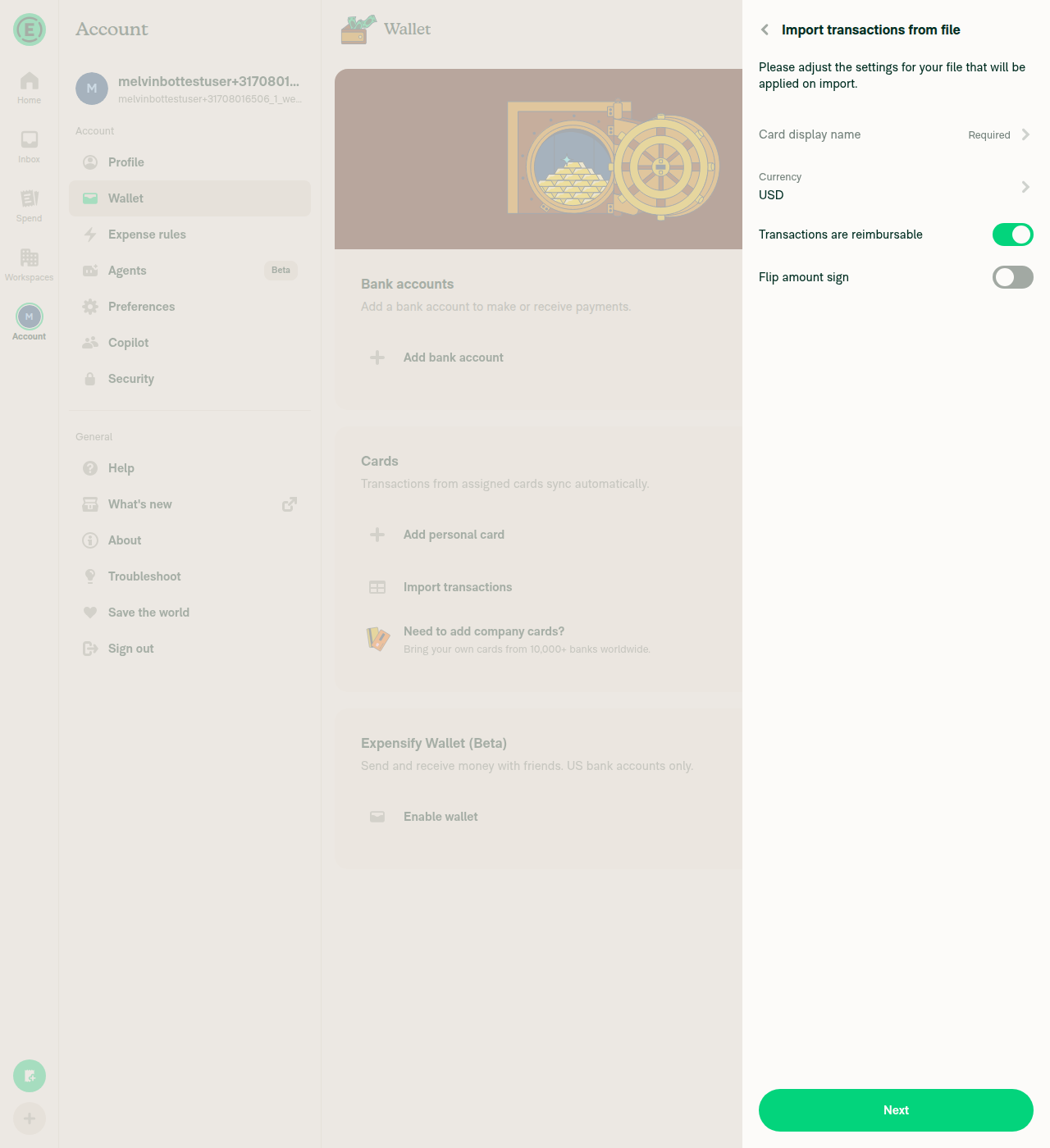
Import transactions from file RHP, initial state

Import transactions from file RHP, initial state

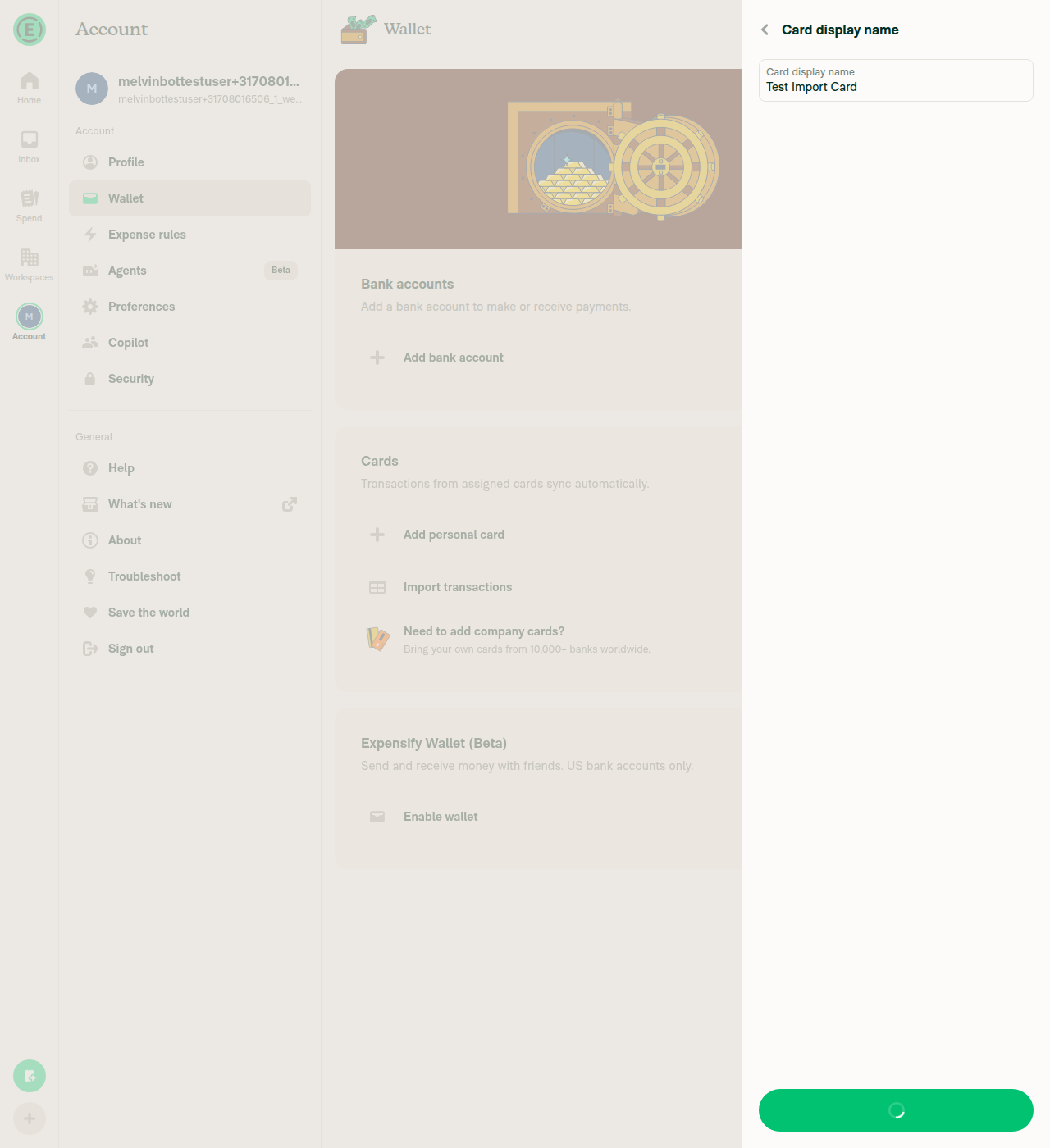
Card display name saved

Card display name entry filled with Test Import Card

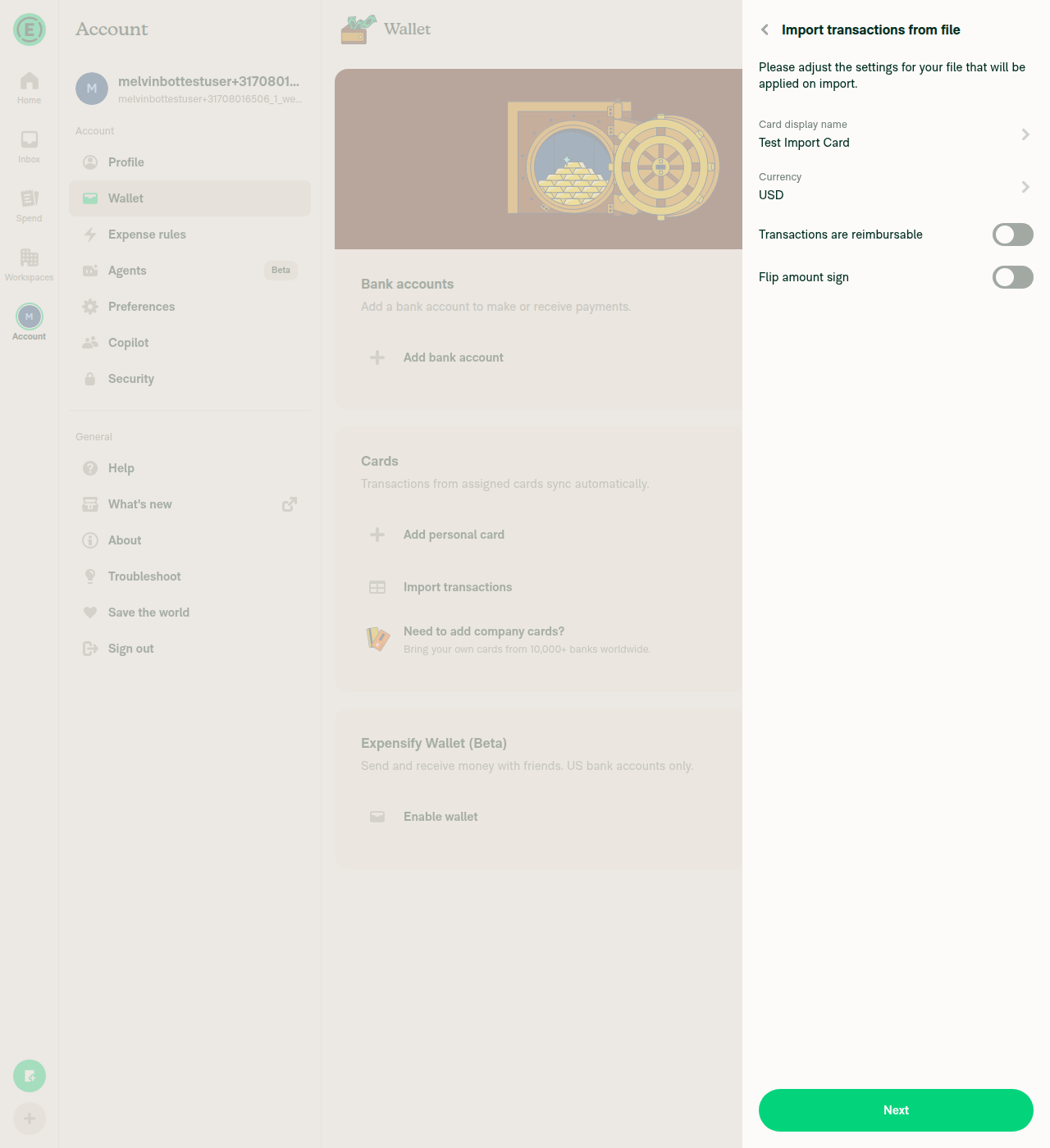
"Transactions are reimbursable" toggled OFF

Import transactions form with Transactions are reimbursable toggled OFF

@brunovjk

Copy link
Copy Markdown
Contributor

@MelvinBot I tested it on all platforms and everything works fine; you can fill in the missing checkboxes. Thanks.

@brunovjk

Copy link
Copy Markdown
Contributor

@MelvinBot I do not believe offline testing is possible, as CSV imports can only be performed while online. The QA steps are the same as the tests. Update the PR Author Checklist.

@MelvinBot

Copy link
Copy Markdown
Contributor Author

Thanks for testing across platforms! I've checked off the boxes your testing covers:

  • Ran the tests on all platforms (Android Native, Android mWeb Chrome, iOS Native, iOS mWeb Safari, MacOS Chrome/Safari)
  • No console errors, and tested other impacted components
  • ✅ The Tests-section "no JS console errors" check

I left a few unchecked because they assert PR content that isn't there yet or steps you didn't mention — so only you can accurately complete them:

  • Screenshots/videos on all platforms — the Screenshots/Videos section is still empty. Please drop your recordings/screenshots into the platform <details> blocks, then this box can be checked.
  • QA steps — still a // TODO. Fill it in (e.g. "Same as tests") or add [No QA] to the PR title.
  • Offline steps — the Offline tests section is empty; add expected offline behavior if applicable, then check "steps for expected offline behavior."
  • Offline / High-Traffic-account testing and failure-scenario steps — I didn't want to claim these on your behalf since they weren't part of your note. Check them yourself if you ran them.

Once the screenshots and QA steps are in, the checklist will be complete.

@MelvinBot

Copy link
Copy Markdown
Contributor Author

brunovjk — there's nothing to fix by pushing code here. Every test, lint, build, and typecheck job is passing. The only red check is Check independent approval, which is a process gate, not a code failure.

Why it's failing: this PR has no reviews yet (reviewDecision: REVIEW_REQUIRED). That check fails until someone other than the author/assignee approves the PR. It'll go green once an independent reviewer approves — no code change resolves it.

The checklist check is still pending (not failed), and approveAndMerge / actionlint / a few others are skipping, which is normal.

Check summary
  • ✅ Passing: Bun tests, ESLint, Oxfmt, typecheck, test (job 1–8), Storybook, perf tests, builds, spellcheck, review, etc.
  • ⏳ Pending: checklist
  • ❌ Failing: Check independent approval — needs an independent reviewer approval (currently 0 reviews)

Next step: assign/ping a reviewer to approve the PR — that clears the only remaining red check.

@brunovjk brunovjk left a comment

Copy link
Copy Markdown
Contributor

Choose a reason for hiding this comment

The reason will be displayed to describe this comment to others. Learn more.

LGTM

@melvin-bot
melvin-bot Bot requested a review from rlinoz August 13, 2026 14:43
@MelvinBot

Copy link
Copy Markdown
Contributor Author

Updated the PR Author Checklist:

  • Offline tests — noted "N/A — CSV imports can only be performed while online, so there is no offline behavior to test," and checked the offline-related checklist items.
  • QA Steps — set to "Same as tests" (removed the TODO) and checked the QA-steps item.

Still left unchecked (genuine cross-platform / human-run items): all-platform screenshots + tests, the High-Traffic-account run, failure-scenario steps, and the runtime "no console errors" checks.

@MelvinBot

Copy link
Copy Markdown
Contributor Author

brunovjk — still nothing fixable by pushing code. All tests, lint, build, and typecheck jobs pass. The two red checks are both process/checklist gates that require human action, not a code change:

  • PR Author Checklist / checklist — fails with "PR Author Checklist is not completely filled out. Please check every box." Several author-checklist boxes are unchecked and the QA Steps section is still the placeholder (// TODO: These must be filled out, or the issue title must include "[No QA]."). I can't complete these on your behalf — they're author/QA items a human must fill in. Check the remaining boxes (and fill QA steps or add [No QA] to the title) and this goes green.
  • Check independent approval — the PR has 0 reviews (REVIEW_REQUIRED); it clears once an independent reviewer approves.

No commit is needed from me here.

@MelvinBot

Copy link
Copy Markdown
Contributor Author

brunovjk — still no code fix to push. All tests, lint, build, and typecheck jobs pass. The two red checks are both process gates that require your action, not code changes:

  1. PR Author Checklist / checklist — the workflow reports "You completed 23 out of 38 checklist items with 15 unfinished items." You need to check the remaining boxes in the PR description. The QA section also still has the // TODO: These must be filled out, or the issue title must include "[No QA]." placeholder — fill in QA steps (or add [No QA] to the PR title if none apply). I can't complete a human author checklist on your behalf.

  2. Check independent approval — the PR has 0 reviews (REVIEW_REQUIRED). Clears once an independent reviewer approves.

Both go green after you finish the checklist/QA section and a reviewer approves — no push from me will resolve either.

@MelvinBot

Copy link
Copy Markdown
Contributor Author

Ran the PR's test steps on Android (standalone NewDot). All steps passed — the fix works: the "Mark transactions as reimbursable" toggle in the card details RHP shows OFF immediately after importing a non-reimbursable CSV (no ON-then-flip), and stays OFF after closing and reopening the RHP.

Step Result
Sign in → Settings > Wallet > Import transactions
Set card display name and save ✅ ("Melvin Test Card")
Toggle OFF "Transactions are reimbursable" ✅ (screenshots 1 → 2)
Next → upload CSV → Import ✅ ("Import successful. 2 transactions have been imported.")
Open card RHP — toggle OFF immediately ✅ (screenshot 3)
Close/reopen RHP — toggle stays OFF ✅ (screenshot 4)

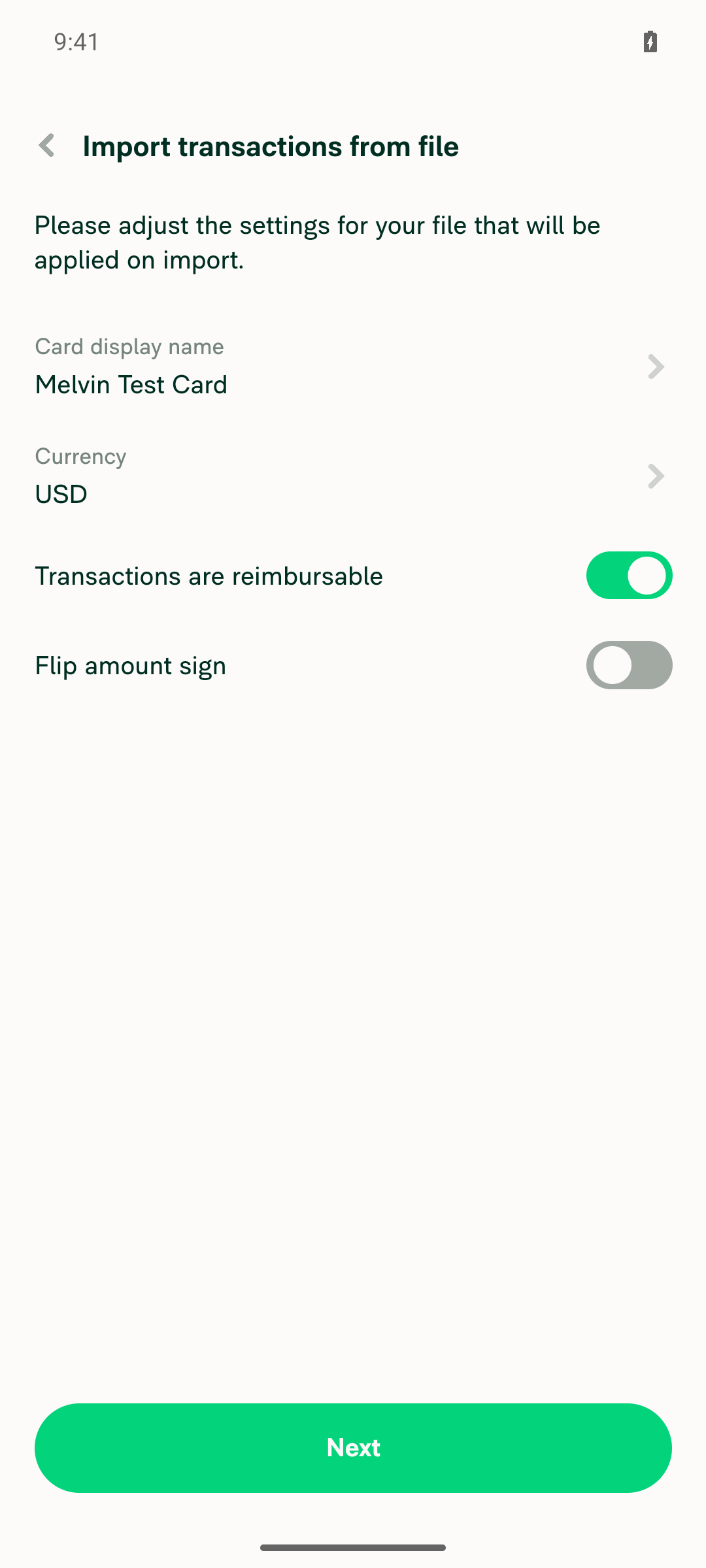
Screenshots (Android):

1. Import settings — "Transactions are reimbursable" ON (default)

Import settings with Transactions are reimbursable toggle ON (default)

2. Toggled OFF before import

Import settings with Transactions are reimbursable toggled OFF

3. Card RHP immediately after import — toggle OFF (the fix)

Card details RHP immediately after import showing Mark transactions as reimbursable OFF

4. RHP reopened — toggle still OFF

Card details RHP reopened, Mark transactions as reimbursable still OFF

Notes on evidence & console
  • Recording: the Android test harness only produced still screenshots for this run, not a video — so I can't attach a recording. The four screenshots above capture the before/after toggle state and the two RHP openings, which is the full proof chain for this fix. Happy to re-run if a video is required.
  • The only console output during the flow was the dev-only Fast Refresh disconnected banner (Metro was actively bundling; non-blocking). No app errors observed.
  • Android's accessibility selected attribute read false for both switches in every state on this build, so toggle state was verified from the rendered switch (green = ON vs gray = OFF) rather than the a11y flag.

Sign up for free to join this conversation on GitHub. Already have an account? Sign in to comment

Projects

None yet

Development

Successfully merging this pull request may close these issues.

3 participants