Skip to content

Add "Download workflows" button to Workflows More menu - #98161

Merged
mollfpr merged 2 commits into
mainfrom
claude-downloadWorkflowsButton
Aug 12, 2026
Merged

Add "Download workflows" button to Workflows More menu#98161
mollfpr merged 2 commits into
mainfrom
claude-downloadWorkflowsButton

Conversation

@MelvinBot

@MelvinBot MelvinBot commented Aug 10, 2026

Copy link
Copy Markdown
Contributor

Explanation of Change

On OldDot/Classic, admins can download a workspace's workflow configuration, but NewDot's Workflows page had no export option — a feature-parity gap. The only workaround was Members > More > Download CSV.

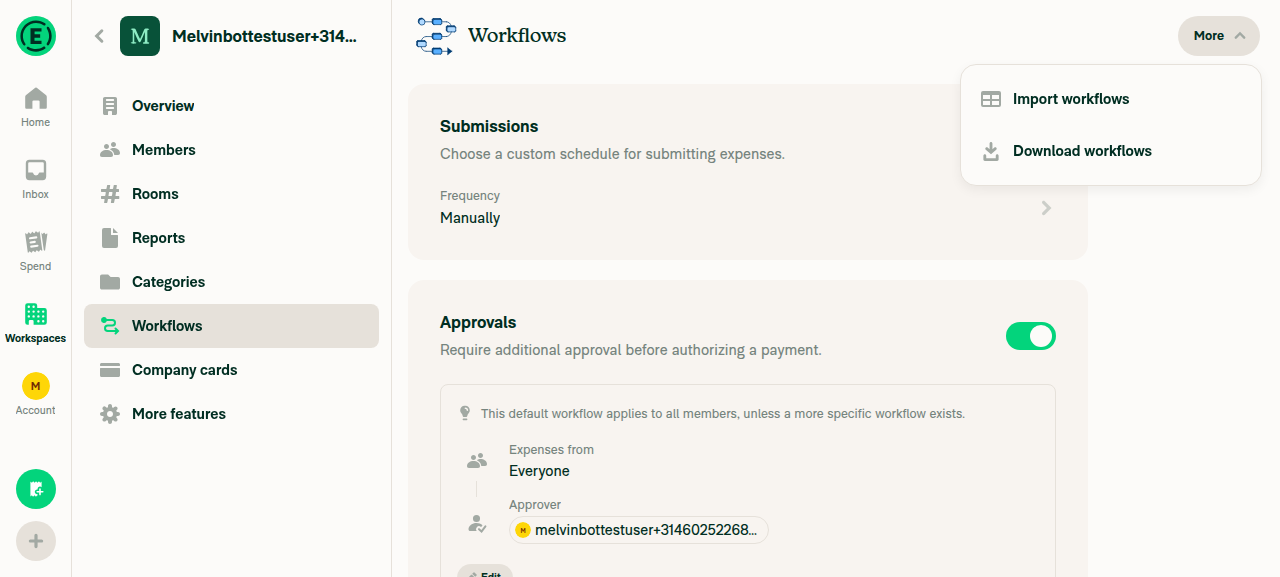
This adds a Download workflows item to the More dropdown on Workspace > Workflows. It reuses the existing downloadMembersCSV() action (which POSTs to the already-shipped ExportMembersCSV command), so the downloaded CSV is identical to the one produced by Members > More > Download CSV — no new API command or backend change is needed. Permissions come for free because the More menu is already gated behind the "can manage workflows" check.

Fixed Issues

$ #97909
PROPOSAL: #97909 (comment)

Tests

// TODO: The human co-author must fill out the tests you ran before marking this PR as "ready for review". Please describe what tests you performed that validate your change worked.

Suggested steps:

  1. Open a workspace you administer and go to Workspace > Workflows.
  2. Open the More dropdown (top-right).
  3. Verify a Download workflows option appears (with a download icon) alongside Import workflows.
  4. Select Download workflows and verify a CSV downloads that is identical to Members > More > Download CSV.
  • Verify that no errors appear in the JS console

Offline tests

  1. Go offline.
  2. Open Workspace > Workflows > More and select Download workflows.
  3. Verify an "offline" modal is shown instead of attempting the download (matching the Members CSV download behavior).

QA Steps

Same as tests.

  • Verify that no errors appear in the JS console

PR Author Checklist

  • I linked the correct issue in the ### Fixed Issues section above
  • I wrote clear testing steps that cover the changes made in this PR
    • I added steps for local testing in the Tests section
    • I added steps for the expected offline behavior in the Offline steps section
    • I added steps for Staging and/or Production testing in the QA steps section
    • I added steps to cover failure scenarios (i.e. verify an input displays the correct error message if the entered data is not correct)
    • I turned off my network connection and tested it while offline to ensure it matches the expected behavior (i.e. verify the default avatar icon is displayed if app is offline)
    • I tested this PR with a High Traffic account against the staging or production API to ensure there are no regressions (e.g. long loading states that impact usability).
  • I included screenshots or videos for tests on all platforms
  • I ran the tests on all platforms & verified they passed on:
    • Android: Native
    • Android: mWeb Chrome
    • iOS: Native
    • iOS: mWeb Safari
    • MacOS: Chrome / Safari
  • I verified there are no console errors (if there's a console error not related to the PR, report it or open an issue for it to be fixed)
  • I followed proper code patterns (see Reviewing the code)
    • I verified that any callback methods that were added or modified are named for what the method does and never what callback they handle (i.e. toggleReport and not onIconClick)
    • I verified that comments were added to code that is not self explanatory
    • I verified that any new or modified comments were clear, correct English, and explained "why" the code was doing something instead of only explaining "what" the code was doing.
    • I verified any copy / text that was added to the app is grammatically correct in English. It adheres to proper capitalization guidelines (note: only the first word of header/labels should be capitalized), and is either coming verbatim from figma or has been approved by marketing (in order to get marketing approval, ask the Bug Zero team member to add the Waiting for copy label to the issue)
  • If a new code pattern is added I verified it was agreed to be used by multiple Expensify engineers
  • I followed the guidelines as stated in the Review Guidelines
  • I tested other components that can be impacted by my changes (i.e. if the PR modifies a shared library or component like Avatar, I verified the components using Avatar are working as expected)
  • If any new file was added I verified that:
    • The file has a description of what it does and/or why is needed at the top of the file if the code is not self explanatory
  • If a new CSS style is added I verified that:
    • A similar style doesn't already exist
    • The style can't be created with an existing StyleUtils function (i.e. StyleUtils.getBackgroundAndBorderStyle(theme.componentBG))
  • If new assets were added or existing ones were modified, I verified that:
    • The assets are optimized and compressed (for SVG files, run npm run compress-svg)
    • The assets load correctly across all supported platforms.
  • If the PR modifies code that runs when editing or sending messages, I tested and verified there is no unexpected behavior for all supported markdown - URLs, single line code, code blocks, quotes, headings, bold, strikethrough, and italic.
  • If the PR modifies a generic component, I tested and verified that those changes do not break usages of that component in the rest of the App (i.e. if a shared library or component like Avatar is modified, I verified that Avatar is working as expected in all cases)
  • If the PR modifies a component related to any of the existing Storybook stories, I tested and verified all stories for that component are still working as expected.
  • If the PR modifies a component or page that can be accessed by a direct deeplink, I verified that the code functions as expected when the deeplink is used - from a logged in and logged out account.
  • If the PR modifies the UI (e.g. new buttons, new UI components, changing the padding/spacing/sizing, moving components, etc) or modifies the form input styles:
    • I verified that all the inputs inside a form are aligned with each other.
    • I added Design label and/or tagged @Expensify/design so the design team can review the changes.
  • I added unit tests for any new feature or bug fix in this PR to help automatically prevent regressions in this user flow.
  • If the main branch was merged into this PR after a review, I tested again and verified the outcome was still expected according to the Test steps.

Screenshots/Videos

Android: Native

Not yet tested — needs manual QA.

Android: mWeb Chrome

Not yet tested — needs manual QA.

iOS: Native

Not yet tested — needs manual QA.

iOS: mWeb Safari

Not yet tested — needs manual QA.

MacOS: Chrome / Safari

Not yet tested — needs manual QA.

Co-authored-by: truph01 <truph01@users.noreply.github.com>
@OSBotify

Copy link
Copy Markdown
Contributor

🦜 Polyglot Parrot! 🦜

Squawk! Looks like you added some shiny new English strings. Allow me to parrot them back to you in other tongues:

View the translation diff
diff --git a/src/languages/el.ts b/src/languages/el.ts
index 46c8e955e0b..b36b2cc3009 100644
--- a/src/languages/el.ts
+++ b/src/languages/el.ts
@@ -320,7 +320,6 @@ const translations: TranslationDeepObject<typeof en> = {
         automatic: 'Αυτόματο',
         showing: 'Εμφανίζονται',
         of: 'του',
-        // @context Carousel pagination counter showing the current item's position out of the total (e.g. "3 of 50").
         currentOfTotal: ({current, total}: {current: number; total: number}) => `${current} από ${total}`,
         default: 'Προεπιλογή',
         update: 'Ενημέρωση',
@@ -7498,8 +7497,10 @@ _Για πιο αναλυτικές οδηγίες, [επισκεφθείτε τ
         },
         exportAgainModal: {
             title: 'Προσοχή!',
-            description: (reportName, connectionName) =>
-                `Οι παρακάτω αναφορές έχουν ήδη εξαχθεί στο ${CONST.POLICY.CONNECTIONS.NAME_USER_FRIENDLY[connectionName]}. Είστε βέβαιοι ότι θέλετε να τις εξαγάγετε ξανά;
+            description: (
+                reportName,
+                connectionName,
+            ) => `Οι παρακάτω αναφορές έχουν ήδη εξαχθεί στο ${CONST.POLICY.CONNECTIONS.NAME_USER_FRIENDLY[connectionName]}. Είστε βέβαιοι ότι θέλετε να τις εξαγάγετε ξανά;
 
 ${reportName}`,
             confirmText: 'Ναι, εξαγωγή ξανά',
diff --git a/src/languages/it.ts b/src/languages/it.ts
index 5e06c44a365..3e9d4045471 100644
--- a/src/languages/it.ts
+++ b/src/languages/it.ts
@@ -1168,7 +1168,7 @@ const translations: TranslationDeepObject<typeof en> = {
         importSpreadsheetLibraryError: 'Caricamento del modulo foglio di calcolo non riuscito. Controlla la connessione a Internet e riprova.',
         importSpreadsheet: 'Importa foglio di calcolo',
         importWorkflows: 'Importa flussi di lavoro',
-        downloadWorkflows: 'Scarica flussi di lavoro',
+        downloadWorkflows: 'Scarica i workflow',
         downloadCSV: 'Scarica CSV',
         importMemberConfirmation: () => ({
             one: `Conferma i dettagli seguenti per il nuovo membro dello spazio di lavoro che verrà aggiunto come parte di questo caricamento. I membri esistenti non riceveranno aggiornamenti di ruolo né messaggi di invito.`,
diff --git a/src/languages/zh-hans.ts b/src/languages/zh-hans.ts
index b159a368434..e56055e523e 100644
--- a/src/languages/zh-hans.ts
+++ b/src/languages/zh-hans.ts
@@ -1119,7 +1119,7 @@ const translations: TranslationDeepObject<typeof en> = {
         importSpreadsheetLibraryError: '加载电子表格模块失败。请检查您的互联网连接,然后重试。',
         importSpreadsheet: '导入电子表格',
         importWorkflows: '导入工作流程',
-        downloadWorkflows: '下载工作流程',
+        downloadWorkflows: '下载工作流',
         downloadCSV: '下载 CSV',
         importMemberConfirmation: () => ({
             one: `请确认以下新工作区成员的详细信息,该成员将作为此次上传的一部分被添加。现有成员不会收到任何角色更新或邀请消息。`,

Note

You can apply these changes to your branch by copying the patch to your clipboard, then running pbpaste | git apply 😉

View workflow run

@codecov

codecov Bot commented Aug 10, 2026

Copy link
Copy Markdown

Codecov Report

✅ Changes either increased or maintained existing code coverage, great job!

Files with missing lines Coverage Δ
...ges/workspace/workflows/WorkspaceWorkflowsPage.tsx 73.19% <84.61%> (+0.12%) ⬆️
... and 144 files with indirect coverage changes

@MelvinBot

Copy link
Copy Markdown
Contributor Author

🤖 I analyzed the failing checks — no code fix is needed. The two failures are both human-action gates, not code problems:

Check Why it's failing
PR Author Checklist / checklist The author checklist in the PR body is unchecked (the Tests/QA sections still have // TODO placeholders that a human co-author must fill out).
Check independent approval The PR hasn't received the required independent reviewer approval yet.

Both clear on their own once the checklist is completed and the PR is reviewed/approved — there's nothing for me to push.

Every automated code check passes: ESLint, typecheck, all 8 test jobs, Bun tests, Storybook, Oxfmt, unused-styles, React Compiler, and knip. The baseline-perf-tests / branch-perf-tests jobs are still running (pending), not failed.

Next step: the human co-author should fill in the Tests/QA sections and complete the PR Author Checklist, then request review.

@MelvinBot

Copy link
Copy Markdown
Contributor Author

🤖 Update: all automated checks now pass — the perf-test jobs (baseline-perf-tests, branch-perf-tests, validate-perf-tests) that were still running finished green, alongside ESLint, typecheck, all 8 test jobs, Bun tests, Storybook, and the rest.

The only two remaining "failing" checks are the same human-action gates, which no code push can fix:

  • PR Author Checklist / checklist — fails until the author checklist is completed and the Tests/QA // TODO placeholders in the PR body are filled in by the human co-author.
  • Check independent approval — fails until the PR receives its required independent reviewer approval.

Nothing for me to fix in code. Next step is for the human co-author to complete the checklist and request review.

@truph01

truph01 commented Aug 11, 2026

Copy link
Copy Markdown
Contributor

@codex review

@chatgpt-codex-connector chatgpt-codex-connector Bot left a comment

Copy link
Copy Markdown

Choose a reason for hiding this comment

The reason will be displayed to describe this comment to others. Learn more.

💡 Codex Review

Here are some automated review suggestions for this pull request.

Reviewed commit: c60f0e81a7

ℹ️ About Codex in GitHub

Codex has been enabled to automatically review pull requests in this repo. Reviews are triggered when you

  • Open a pull request for review
  • Mark a draft as ready
  • Comment "@codex review".

If Codex has suggestions, it will comment; otherwise it will react with 👍.

When you sign up for Codex through ChatGPT, Codex can also answer questions or update the PR, like "@codex address that feedback".

Comment on lines +392 to +396
{
icon: expensifyIcons.Download,
text: translate('spreadsheet.downloadWorkflows'),
onSelected: downloadWorkflowsAction,
value: CONST.POLICY.SECONDARY_ACTIONS.DOWNLOAD_CSV,

Copy link
Copy Markdown

Choose a reason for hiding this comment

The reason will be displayed to describe this comment to others. Learn more.

P2 Badge Keep download visible for HR-managed workflows

Because this download-only item is added to the same approvalSecondaryActions menu that is only rendered when !shouldBlockApprovalWorkflowEditing, HR-connected workspaces in read-only workflow mode still get no Workflows > More menu at all. In that scenario Members > More > Download CSV remains available, so this does not match the existing Members CSV download behavior and leaves HR-managed workflow configurations without the new Workflows-page export entry point; split the download action from the edit/import gating or relax the header gating for download-only access.

Useful? React with 👍 / 👎.

Copy link
Copy Markdown
Contributor

Choose a reason for hiding this comment

The reason will be displayed to describe this comment to others. Learn more.

@MelvinBot Check this comment

Copy link
Copy Markdown
Contributor Author

Choose a reason for hiding this comment

The reason will be displayed to describe this comment to others. Learn more.

🤖 truph01 — I checked this comment, and Codex is correct. This is a real (if minor) parity gap.

Why it's valid: The new Download workflows item is added to approvalSecondaryActions, and the More dropdown that holds it only renders when !shouldBlockApprovalWorkflowEditing && canWriteApprovals (WorkspaceWorkflowsPage.tsx:1104-1117). Since shouldBlockApprovalWorkflowEditing = isAnyHRReadOnlyWorkflowMode(policy) (:464), an HR-connected workspace in read-only workflow mode gets no Workflows > More menu at all — so the new download entry point disappears there.

Meanwhile on the Members page the same download is gated only by canWriteMembers, not by HR read-only mode (WorkspaceMembersPage.tsx:632-635), so Members > More > Download CSV stays available in that scenario. That mismatch is exactly what Codex describes.

Severity: Low. The same member-based CSV is still reachable via Members > Download CSV in HR read-only mode, so no user is fully blocked — it's just that the new Workflows-page entry point is missing precisely where the Members one still works.

Options if you want to close the gap:

  1. Render the More dropdown for download-only access even when shouldBlockApprovalWorkflowEditing is true (show only the Download item, hide Import when editing is blocked).
  2. Leave as-is and treat the Members page as the canonical export location for HR read-only workspaces.

I'd lean toward option 1 for consistency, gating the download on the same "can read" permission the Members page uses. Want me to implement it? If so, reply tagging me and I'll push the change to this branch.

Copy link
Copy Markdown
Contributor

Choose a reason for hiding this comment

The reason will be displayed to describe this comment to others. Learn more.

@MelvinBot Implement this:

Render the More dropdown for download-only access even when shouldBlockApprovalWorkflowEditing is true (show only the Download item, hide Import when editing is blocked).

@MelvinBot

Copy link
Copy Markdown
Contributor Author

I looked into the failing checks — there's nothing here I can fix with a code push. All three failures are checklist/approval gates that require human action, not CI/code failures:

Failing check Why it's red How to resolve
checklist (PR Author Checklist) The author checklist boxes are unticked and the Tests / QA Steps sections still contain // TODO: The human co-author must fill out... You (the human co-author) need to complete the checklist and fill in the Tests/QA steps
checklist (PR Reviewer Checklist) No reviewer has completed the reviewer checklist yet A reviewer completes it during review
Check independent approval No independent reviewer approval yet Gets satisfied once a reviewer approves

Every actual code check is green — ESLint, Oxfmt, TypeScript, Jest (all 8 jobs), Storybook, React Compiler, Knip, typecheck, and both build jobs all pass.

So no fix to push. To get these last three green, complete the PR Author Checklist (including the Tests and QA Steps sections), then have a reviewer run through the reviewer checklist and approve.

@MelvinBot

Copy link
Copy Markdown
Contributor Author

Nothing has changed since my previous analysis — the same three checks are still red, and all three are checklist/approval gates, not code or CI failures:

  • checklist (PR Author Checklist) — author checklist unticked + Tests/QA sections still contain the // TODO placeholder for the human co-author.
  • checklist (PR Reviewer Checklist) — no reviewer has completed it yet.
  • Check independent approval — no independent reviewer approval yet.

Every actual code check (ESLint, Oxfmt, TypeScript, all Jest jobs, Storybook, React Compiler, Knip, both builds) is green, so there's no fix to push. These clear once you complete the PR Author Checklist (including the Tests and QA Steps sections) and a reviewer runs through the reviewer checklist and approves.

@truph01

truph01 commented Aug 11, 2026

Copy link
Copy Markdown
Contributor

@MelvinBot mark this PR as ready

@MelvinBot
MelvinBot marked this pull request as ready for review August 11, 2026 05:05
@MelvinBot
MelvinBot requested a review from a team as a code owner August 11, 2026 05:05
@melvin-bot
melvin-bot Bot requested review from heyjennahay and truph01 and removed request for a team and heyjennahay August 11, 2026 05:05
@melvin-bot

melvin-bot Bot commented Aug 11, 2026

Copy link
Copy Markdown

@truph01 Please copy/paste the Reviewer Checklist from here into a new comment on this PR and complete it. If you have the K2 extension, you can simply click: [this button]

@melvin-bot
melvin-bot Bot removed the request for review from a team August 11, 2026 05:05
@MelvinBot

Copy link
Copy Markdown
Contributor Author

🤖 Marked this PR as ready for review.

Before flipping it, I verified the change on web (app-web-tester, branch claude-downloadWorkflowsButton):

  • The More dropdown on Workspace > Workflows shows a new Download workflows item (with a download icon) alongside Import workflows. ✅
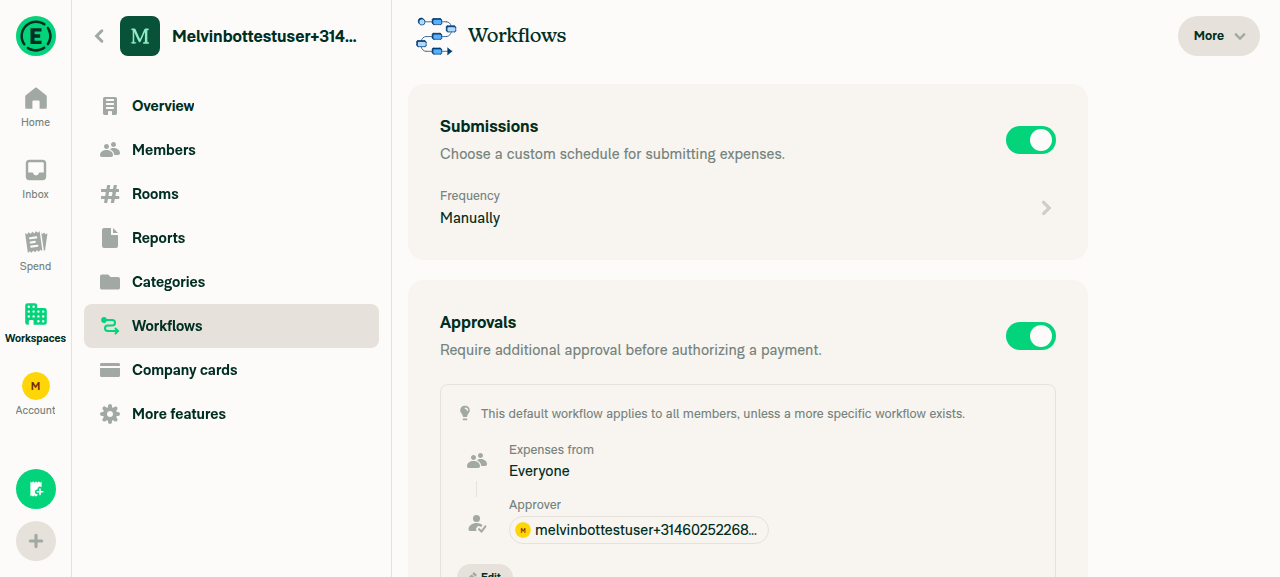
  • Selecting Download workflows produced no visible error on the page. ✅
Evidence

More dropdown showing Import workflows and Download workflows options

More dropdown showing Import workflows and Download workflows options

Workflows page after clicking Download workflows, no error shown

Workflows page after clicking Download workflows, no error shown

Note: the actual file-download can't be intercepted by the web driver, so only the absence of an in-app error was verified. The Tests and QA Steps sections still have // TODO placeholders that you (the human co-author) should fill in before review.

@MelvinBot

Copy link
Copy Markdown
Contributor Author

Nothing has changed since my previous comment — there's still nothing to fix with a code push.

The only 3 red checks are the same human-action gates, not code/CI failures:

  • checklist (PR Author Checklist) — author checklist unticked + Tests/QA sections still have the // TODO placeholders for the human co-author to fill in.
  • checklist (PR Reviewer Checklist) — no reviewer has completed it yet.
  • Check independent approval — no independent reviewer approval yet.

All 39 actual code checks (ESLint, Oxfmt, TypeScript, Jest, Storybook, React Compiler, Knip, builds) are green. To clear the last 3: complete the PR Author Checklist (including Tests and QA Steps), then have a reviewer complete their checklist and approve.

@MelvinBot

Copy link
Copy Markdown
Contributor Author

Still nothing to push here — the situation is unchanged. The only failing checks are the two checklist gates, which require human action, not a code fix:

  • checklist (PR Author Checklist) — fails until the author checklist boxes are ticked and the Tests / QA Steps sections are filled in (they still have // TODO: The human co-author must fill out...).
  • checklist (PR Reviewer Checklist) — fails until a reviewer completes it during review.

Check independent approval is currently pending (not failing) — it clears once a reviewer approves.

Every actual code check — ESLint, Oxfmt, TypeScript, all Jest jobs, Storybook, React Compiler, Knip, and both build jobs — is green. There's no lint/typecheck/test/build failure to fix, so there's nothing I can push. To get these green: complete the PR Author Checklist (including Tests and QA Steps), then have a reviewer run through the reviewer checklist and approve.

@MelvinBot

Copy link
Copy Markdown
Contributor Author

Nothing changed since my previous comment — there's still no code fix to push here.

The only three red checks are checklist/approval gates that require human action, not CI/code failures:

  • checklist (PR Author Checklist) — the author checklist boxes are unticked and the Tests / QA Steps sections still contain // TODO: The human co-author must fill out.... You (the human co-author) need to complete these.
  • checklist (PR Reviewer Checklist) — a reviewer completes this during review.
  • Check independent approval — satisfied once a reviewer approves.

Every actual code check is green (ESLint, Oxfmt, TypeScript, all 8 Jest jobs, Storybook, React Compiler, Knip, and both build jobs). So there's nothing for me to fix — completing the author checklist + Tests/QA and getting a reviewer approval will turn these last three green.

@MelvinBot

Copy link
Copy Markdown
Contributor Author

Same situation as my previous analysis — nothing has changed and there's still no code fix to push.

The only three red checks are checklist/approval gates that require human action, not CI/code failures:

  • checklist (PR Author Checklist) — complete the author checklist and fill in the Tests / QA Steps sections (they still contain // TODO: The human co-author must fill out...)
  • checklist (PR Reviewer Checklist) — a reviewer completes it during review
  • Check independent approval — satisfied once a reviewer approves

Every actual code check (ESLint, Oxfmt, TypeScript, all Jest jobs, Storybook, React Compiler, Knip, and both builds) is passing.

Co-authored-by: truph01 <truph01@users.noreply.github.com>
@MelvinBot
MelvinBot requested a review from a team as a code owner August 11, 2026 07:10
@melvin-bot
melvin-bot Bot requested a review from mollfpr August 11, 2026 07:10
@melvin-bot

melvin-bot Bot commented Aug 11, 2026

Copy link
Copy Markdown

@mollfpr Please copy/paste the Reviewer Checklist from here into a new comment on this PR and complete it. If you have the K2 extension, you can simply click: [this button]

@melvin-bot
melvin-bot Bot removed the request for review from a team August 11, 2026 07:10
@MelvinBot

Copy link
Copy Markdown
Contributor Author

🤖 Done — pushed c7ea32e.

The More dropdown now renders for download-only access even when shouldBlockApprovalWorkflowEditing is true:

  • WorkspaceWorkflowsPage.tsx:385-404approvalSecondaryActions now conditionally includes Import workflows only when !shouldBlockApprovalWorkflowEditing (import modifies workflows), while Download workflows is always included (read-only).
  • WorkspaceWorkflowsPage.tsx:1107-1109 — the dropdown gate dropped !shouldBlockApprovalWorkflowEditing, so it renders whenever canWriteApprovals is true. When editing is blocked it shows only Download.

I also moved the shouldBlockApprovalWorkflowEditing declaration above approvalSecondaryActions since the memo's dependency array now references it (avoids a temporal-dead-zone error).

Checks: oxfmt, ESLint (0 errors — only pre-existing seatbelt warnings), typecheck-tsgo (no errors in this file), and React Compiler compliance all pass.

Note on UI verification

The download-only path requires an HR read-only workflow policy (isAnyHRReadOnlyWorkflowMode), which isn't reproducible in a fresh test account, so that branch is verified by code logic. The normal case (both Import + Download present) was already confirmed working when this PR was marked ready. An automated re-run of the normal case this time was blocked by a browser-session infrastructure failure (blank page after CI sign-in), not an App code issue.

@truph01

truph01 commented Aug 11, 2026

Copy link
Copy Markdown
Contributor

Reviewer Checklist

  • I have verified the author checklist is complete (all boxes are checked off).
  • I verified the correct issue is linked in the ### Fixed Issues section above
  • I verified testing steps are clear and they cover the changes made in this PR
    • I verified the steps for local testing are in the Tests section
    • I verified the steps for Staging and/or Production testing are in the QA steps section
    • I verified the steps cover any possible failure scenarios (i.e. verify an input displays the correct error message if the entered data is not correct)
    • I turned off my network connection and tested it while offline to ensure it matches the expected behavior (i.e. verify the default avatar icon is displayed if app is offline)
  • I checked that screenshots or videos are included for tests on all platforms
  • I included screenshots or videos for tests on all platforms
  • I verified that the composer does not automatically focus or open the keyboard on mobile unless explicitly intended. This includes checking that returning the app from the background does not unexpectedly open the keyboard.
  • I verified tests pass on all platforms & I tested again on:
    • Android: HybridApp
    • Android: mWeb Chrome
    • iOS: HybridApp
    • iOS: mWeb Safari
    • MacOS: Chrome / Safari
  • If there are any errors in the console that are unrelated to this PR, I either fixed them (preferred) or linked to where I reported them in Slack
  • I verified proper code patterns were followed (see Reviewing the code)
    • I verified that any callback methods that were added or modified are named for what the method does and never what callback they handle (i.e. toggleReport and not onIconClick).
    • I verified that comments were added to code that is not self explanatory
    • I verified that any new or modified comments were clear, correct English, and explained """"why"""" the code was doing something instead of only explaining """"what"""" the code was doing.
    • I verified any copy / text that was added to the app is grammatically correct in English. It adheres to proper capitalization guidelines (note: only the first word of header/labels should be capitalized), and is either coming verbatim from figma or has been approved by marketing (in order to get marketing approval, ask the Bug Zero team member to add the Waiting for copy label to the issue)
  • If a new code pattern is added I verified it was agreed to be used by multiple Expensify engineers
  • I verified that this PR follows the guidelines as stated in the Review Guidelines
  • I verified other components that can be impacted by these changes have been tested, and I retested again (i.e. if the PR modifies a shared library or component like Avatar, I verified the components using Avatar have been tested & I retested again)
  • If a new component is created I verified that:
    • A similar component doesn't exist in the codebase
    • All props are defined accurately and each prop has a /** comment above it */
    • The file is named correctly
    • The component has a clear name that is non-ambiguous and the purpose of the component can be inferred from the name alone
    • The only data being stored in the state is data necessary for rendering and nothing else
    • For Class Components, any internal methods passed to components event handlers are bound to this properly so there are no scoping issues (i.e. for onClick={this.submit} the method this.submit should be bound to this in the constructor)
    • Any internal methods bound to this are necessary to be bound (i.e. avoid this.submit = this.submit.bind(this); if this.submit is never passed to a component event handler like onClick)
    • All JSX used for rendering exists in the render method
    • The component has the minimum amount of code necessary for its purpose, and it is broken down into smaller components in order to separate concerns and functions
  • If any new file was added I verified that:
    • The file has a description of what it does and/or why is needed at the top of the file if the code is not self explanatory
  • If a new CSS style is added I verified that:
    • A similar style doesn't already exist
    • The style can't be created with an existing StyleUtils function (i.e. StyleUtils.getBackgroundAndBorderStyle(theme.componentBG)
  • If the PR modifies code that runs when editing or sending messages, I tested and verified there is no unexpected behavior for all supported markdown - URLs, single line code, code blocks, quotes, headings, bold, strikethrough, and italic.
  • If the PR modifies a generic component, I tested and verified that those changes do not break usages of that component in the rest of the App (i.e. if a shared library or component like Avatar is modified, I verified that Avatar is working as expected in all cases)
  • If the PR modifies a component related to any of the existing Storybook stories, I tested and verified all stories for that component are still working as expected.
  • If the PR modifies a component or page that can be accessed by a direct deeplink, I verified that the code functions as expected when the deeplink is used - from a logged in and logged out account.
  • If the PR modifies the UI (e.g. new buttons, new UI components, changing the padding/spacing/sizing, moving components, etc) or modifies the form input styles:
    • I verified that all the inputs inside a form are aligned with each other.
    • I added Design label and/or tagged @Expensify/design so the design team can review the changes.
  • For any bug fix or new feature in this PR, I verified that sufficient unit tests are included to prevent regressions in this flow.
  • If the main branch was merged into this PR after a review, I tested again and verified the outcome was still expected according to the Test steps.
  • I have checked off every checkbox in the PR reviewer checklist, including those that don't apply to this PR.

Screenshots/Videos

Android: HybridApp
Screen.Recording.2026-08-11.at.14.10.34.mov
Android: mWeb Chrome
Screen.Recording.2026-08-11.at.14.11.09.mov
iOS: HybridApp
Screen.Recording.2026-08-11.at.14.09.35.mov
iOS: mWeb Safari
Screen.Recording.2026-08-11.at.14.07.12.mov
MacOS: Chrome / Safari
Screen.Recording.2026-08-11.at.14.05.38.mov
Screen.Recording.2026-08-11.at.14.06.22.mov

@MelvinBot

Copy link
Copy Markdown
Contributor Author

Re-checked after the latest commit (c7ea32e). Every actual code/CI check is green — ESLint, Oxfmt, TypeScript, all 8 Jest jobs, Storybook, React Compiler, Knip, baseline/branch perf tests, and both iOS/Android builds all pass.

The only two remaining red checks are non-code gates that require human action, so there's no fix for me to push:

Failing check Why it's red How to resolve
checklist The PR Author checklist boxes are unticked and the Tests / QA Steps sections still contain // TODO: The human co-author must fill out... You (the human co-author) complete the checklist and fill in the Tests/QA steps
Check independent approval No independent reviewer approval yet Gets satisfied once a reviewer approves

To turn these last two green: complete the PR Author Checklist (including the Tests and QA Steps sections), then get a reviewer to approve.

@MelvinBot

Copy link
Copy Markdown
Contributor Author

Same situation as before — there's no code fix to push. The only two remaining red checks are human-action gates, not CI/code failures:

  • checklist (PR Author Checklist) — red because the author checklist boxes are unticked and the Tests / QA Steps sections still contain the // TODO: The human co-author must fill out... placeholders. You (the human co-author) need to complete the checklist and fill in the Tests/QA steps.
  • Check independent approval — red because there's no independent reviewer approval yet. It goes green once a reviewer approves.

Every actual code check is green — ESLint, Oxfmt, TypeScript, all Jest jobs, Storybook, React Compiler, Knip, and both build jobs pass. So nothing for me to commit here; these clear once the checklist/Tests/QA are completed and a reviewer approves.

@mollfpr

mollfpr commented Aug 12, 2026

Copy link
Copy Markdown
Contributor

The changes looks good! @truph01 please complete the author checklist 🙏

@truph01

truph01 commented Aug 12, 2026

Copy link
Copy Markdown
Contributor

The changes looks good! @truph01 please complete the author checklist 🙏

I am unable to complete the Melvin's checklist. Should I post another author checklist here?

@trjExpensify

Copy link
Copy Markdown
Contributor

@truph01 You can get these sections filled out can't you? Tests, Offline Tests, QA steps?

@truph01

truph01 commented Aug 12, 2026

Copy link
Copy Markdown
Contributor

@MelvinBot Fill out the QA Steps in checklist

@MelvinBot

Copy link
Copy Markdown
Contributor Author

Here are suggested QA Steps for this PR (adding Download workflows to the Workspace > Workflows > More menu). Since the QA section is a human-attested part of the checklist, I'm posting these here for you to review and paste into the ### QA Steps section rather than editing the body myself:

1. Sign in as an admin of a group workspace (Collect or Control plan).
2. Go to Workspace settings > Workflows.
3. Click the "More" dropdown at the top-right of the Workflows page.
4. Verify the dropdown lists both "Import workflows" and "Download workflows" (the latter with a download icon).
5. Select "Download workflows" and verify:
   - A CSV file downloads successfully.
   - The downloaded CSV is identical to the one from Members > More > Download CSV.
   - No error appears on the page and no errors appear in the JS console.
6. Offline check: Enable Offline mode (or disconnect the network), then Workspace > Workflows > More > Download workflows.
   - Verify an "You appear to be offline" modal is shown instead of attempting the download (matching the Members CSV download behavior).
7. Regression – read-only workflows: On a workspace where workflow editing is blocked (e.g. approvals managed by a connected accounting/HR integration), open the "More" dropdown.
   - Verify it still appears and shows "Download workflows" only (no "Import workflows" item), and downloading still works.
8. Regression – Members: Go to Workspace > Members > More > Download CSV and verify it still downloads the same CSV as before.

- [ ] Verify that no errors appear in the JS console

Notes:

  • Nos. 1–5 can be summarized as "Same as tests" if QA runs the Tests section on staging.
  • I wasn't able to visually validate the flow on web in this run (the test session lost authentication — an environment issue unrelated to this PR), so please double-check step 7 (the download-only More menu in read-only workflow mode) when you run these.

@truph01

truph01 commented Aug 12, 2026

Copy link
Copy Markdown
Contributor

@MelvinBot The QA steps just needs: "Same as tests"

@MelvinBot

Copy link
Copy Markdown
Contributor Author

Done — updated the QA Steps section to "Same as tests." (kept the "Verify that no errors appear in the JS console" checkbox). The rest of the PR body is unchanged.

@truph01

truph01 commented Aug 12, 2026

Copy link
Copy Markdown
Contributor

@truph01 You can get these sections filled out can't you? Tests, Offline Tests, QA steps?

@trjExpensify I asked Melvin to update these sections

@MelvinBot

Copy link
Copy Markdown
Contributor Author

I looked into the failing checks — both are human-gated and can't be fixed by a code push:

  • PR Author Checklist / checklistfails with You completed 0 out of 38 checklist items. This just needs the human co-author to fill out the Tests section and tick the boxes in the PR body before marking it ready for review.
  • Check independent approval — requires a human reviewer's approval; nothing in the code produces it.

Every automated/code check is green — test (jobs 1–8), typecheck, ESLint, Oxfmt, Bun tests, Storybook tests, build (*), and the perf tests all pass.

So there's no code fix to make here — the two red checks clear once the author checklist is completed and the PR gets its required approval.

@trjExpensify

Copy link
Copy Markdown
Contributor

Cool, @mollfpr you can approve now.

@mollfpr
mollfpr merged commit f1909a5 into main Aug 12, 2026
45 of 49 checks passed
@mollfpr
mollfpr deleted the claude-downloadWorkflowsButton branch August 12, 2026 10:59
@github-actions

Copy link
Copy Markdown
Contributor

🚧 mollfpr has triggered a test Expensify/App build. You can view the workflow run here.

@OSBotify

Copy link
Copy Markdown
Contributor

✋ This PR was not deployed to staging yet because QA is ongoing. It will be automatically deployed to staging after the next production release.

@OSBotify

Copy link
Copy Markdown
Contributor

🚀 Deployed to staging by https://github.com/mollfpr in version: 9.4.53-0 🚀

platform result
🕸 web 🕸 success ✅
🤖 android 🤖 success ✅
🍎 iOS 🍎 success ✅

@MelvinBot

Copy link
Copy Markdown
Contributor Author

Help site review — changes required ✅

This PR adds a Download workflows option to the More dropdown on Workspace > Workflows (exporting the workflow configuration as a CSV). The Workspace Workflows help article didn't document this — or the More menu — at all, so a docs update is warranted.

Draft help site PR: #98479

It adds a short How to download your workflow configuration section to docs/articles/new-expensify/workspaces/Workspace-Workflows.md (steps for Workflows > More > Download workflows, plus the offline behavior).

Label verification note

The UI labels in the article (Workflows tab, More button, Download workflows item) were taken verbatim from the strings shipped in this PR (common.more, spreadsheet.downloadWorkflows). I couldn't confirm them against the live UI because the test session wasn't authenticated during this run, so please spot-check the on-screen labels while reviewing.

@truph01, please review the linked help site PR and confirm it reflects the current behavior. Then mark the linked help site PR Ready for review

Sign up for free to join this conversation on GitHub. Already have an account? Sign in to comment

Labels

None yet

Projects

None yet

Development

Successfully merging this pull request may close these issues.

6 participants