
The open-source super app — AI chat, personal finance, TV & music, games, and reading in one local-first Flutter codebase.
🌐 developerscoffee.github.io/airo — live showcase, guides, and roadmap




Download · Modules · Quick Start · Contributing · Docs
Airo is the home. A modular super app built with Flutter — Airo TV is its first focused product, available now. Every module is local-first: your data, playlists, and conversations stay on your device by default. On-device AI drives the experience — model routing, offline fallback, and privacy-forward interactions in a real shipping app, not a demo.
| Module | What it does | Status |
|---|---|---|
| 📺 Aika Stream | Bring-your-own-playlist player for Android TV / Google TV | Available on Google Play — Get on Google Play |
| ⭐ Airo TV Pro | Import intelligence, resilient playback, guide intelligence | In testing |
| 🤖 Airo AI | On-device AI chat (Gemini Nano), model management, agent skills | In development |
| 💰 AiroMoney | Personal finance tracking and money workflows | In development |
| 🪙 Airo Coins | Standalone money home and secure vault | Available — v0.0.6 (preview; see #1240) |
| 🎵 Airo Music | Music playback surfaces | In development |
| ♟️ Airo Games | Chess and casual games (Stockfish engine) | In development |
| 📖 Airo Reader | Reading surfaces with OCR | In development |
All modules live in one monorepo with strict package boundaries — see the Repository Map.


| macOS (desktop) | Pixel 9 (mobile) |
|---|---|
 |
 |

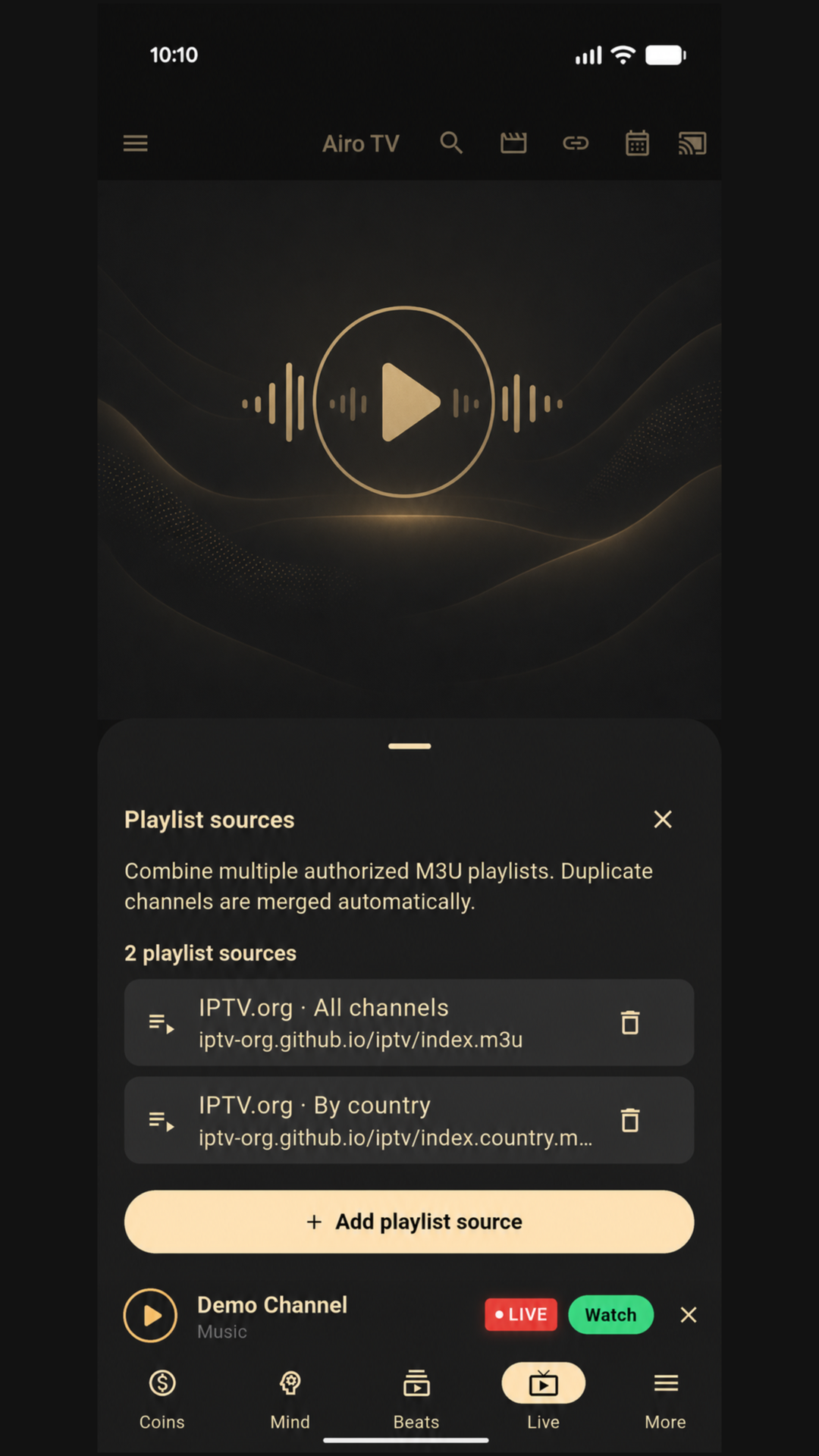
Physical Pixel 9 evidence confirms the add, persist, and remove journey for multiple authorized playlist sources on current mainline builds. This remains under qualification and is not included in the latest published preview. The image uses public IPTV.org examples and owned Airo artwork; it contains no private provider data or bundled content.
View the product story · Download the 1080×1920 store PNG
Airo TV is the focused Android TV build of Airo's media module. The product
is available on Google Play as Aika Stream
(com.developerscoffee.tv.midas). GitHub v0.0.6 APKs remain io.airo.app.tv.
TV-first channel grid, search, and playback for your own M3U/M3U8 playlists.
- Bring your own playlist — Aika Stream ships no IPTV content and no bundled channels.
- Google Cast support — requires
_googlecast._tcpdiscovery and port8009on the local network. - Verifiable releases — APK, Play Store AAB, macOS preview, and SHA256 checksums on every release.
- Honest device support — Android TV available, Fire TV experimental, mobile partial, macOS preview, iPad verified; see device paths.
- Documented — architecture, threat model, release docs.
Current release: v0.0.6 — one release carrying every product line.
| Product | Package | Download |
|---|---|---|
| 📺 Aika Stream (Google Play Store) | com.developerscoffee.tv.midas |
Get on Google Play |
| 📺 Airo TV (GitHub v0.0.6) | io.airo.app.tv |
Airo-TV-0.0.6.apk · arm64-v8a · armeabi-v7a · x86_64 |
| 🤖 Airo (phone / tablet) | io.airo.app |
Airo-0.0.6-10-arm64.apk |
| 🪙 Airo Coins | io.airo.app.coins |
AiroCoins-0.0.6-10-arm64.apk |
| 🖥️ Airo TV for macOS | — | DMG · ZIP |
| 📦 All releases | — | Releases |
Not published: iOS/iPadOS (no Apple developer account) and web (CI validation only). Aika Stream is available live on Google Play.
Android builds are signed with a stable dogfood keystore. They upgrade cleanly over other dogfood-signed Airo builds but not over a future production-signed release — that transition will need an uninstall.
Before installing a direct-download APK, verify it against
SHA256SUMS.
macOS builds are unsigned and not notarized; Gatekeeper will require an explicit override.
- Open-source codebase with public issue tracking and a transparent roadmap.
- Local-first: playlists and data stay on the device unless you load a remote URL directly.
- No bundled IPTV channels or copyrighted content.
- SHA256 checksums published for every release APK and AAB.
- Public security policy, privacy policy, threat model, and trust report.
- No hidden subscriptions and no mandatory accounts for the Airo TV player flow.
git clone git@github.com:DevelopersCoffee/airo.git
cd airo
make setup        # or: make setup-android / setup-ios / setup-web
Run the app:
make run-android # or: run-ios / run-web / run-chromeVerify changes:
make format && make analyze && make testrun-android, run-ios, and run-firetv target connected physical devices.
Run make local-test-plan for the device workflow and make help for the full
command list. For the Airo TV Edge Intelligence runtime
(Rust FFI, media packs), see
docs/features.
- Android: API 26+ (Android 8.0), compiled and targeting API 36 · iOS: 12.0+ · Web: modern browsers (Chrome preferred for development).
Android release builds require private signing material. Never commit
app/android/key.properties, keystores, tokens, API keys, or local credentials.
.
├── app/                  # Flutter host application
├── packages/
│   ├── airo/             # AI-oriented package surface
│   ├── feature_coin/     # Personal finance package surface
│   ├── core_ai/          # AI contracts, registries, skills, model metadata
│   ├── core_auth/        # Authentication package
│   ├── core_data/        # Data and networking utilities
│   ├── core_domain/      # Domain primitives
│   └── core_ui/          # Shared UI package
├── docs/                 # Architecture, agent policy, wiki source, runbooks
├── e2e/                  # End-to-end assets and checks
├── scripts/              # Local automation
└── .github/              # CI, issue templates, PR template
Airo is an open-source playground for developers who care about on-device AI, agent-driven engineering, and cross-platform Flutter architecture. Star the repo to follow the work; fork it to experiment or send a PR.
💬 Join the DevelopersCoffee Discord — share ideas, ask questions, and grow the community with us.
Good entry points:
- Docs fixes, onboarding polish, and troubleshooting guides.
- Host-only tests, bug reproduction, and accessibility improvements.
good first issue·help wanted
Workflow:
- Read
CONTRIBUTING.md. - Pick or create a GitHub issue.
- Follow the agent gate and Feature Packet flow in
docs/agents/AGENT_POLICY.md. - Branch from
origin/main, keep the PR scoped, run the relevant checks.
- Architecture · Features · Security · Release · Troubleshooting · Wiki source
- Release engineering: V2 orchestrator · release workflow · publishing human setup · release checklist · repository health
Contributing · Code of Conduct · Security Policy · Trust · Privacy · Roadmap · Changelog · Download Verification

Airo is licensed under the MIT License.
Release profiles include third-party dependencies with their own licenses. See Third-Party Notices and the License Review before public redistribution.