AutoDeploy Gitbook Preview
All of the Bandwidth docs site are setup to auto-deploy on each merge to the master branch. Note for bandwidth.github.io Repo that the master branch is gitbook and the github-pages site is served from master (as well as being sent to s3://old.dev.bandwidth.com). stop-gap-v2 also builds seperately, and is deployed to s3://stop-gap
- AWS Account
- Gitbook source files
- Github account
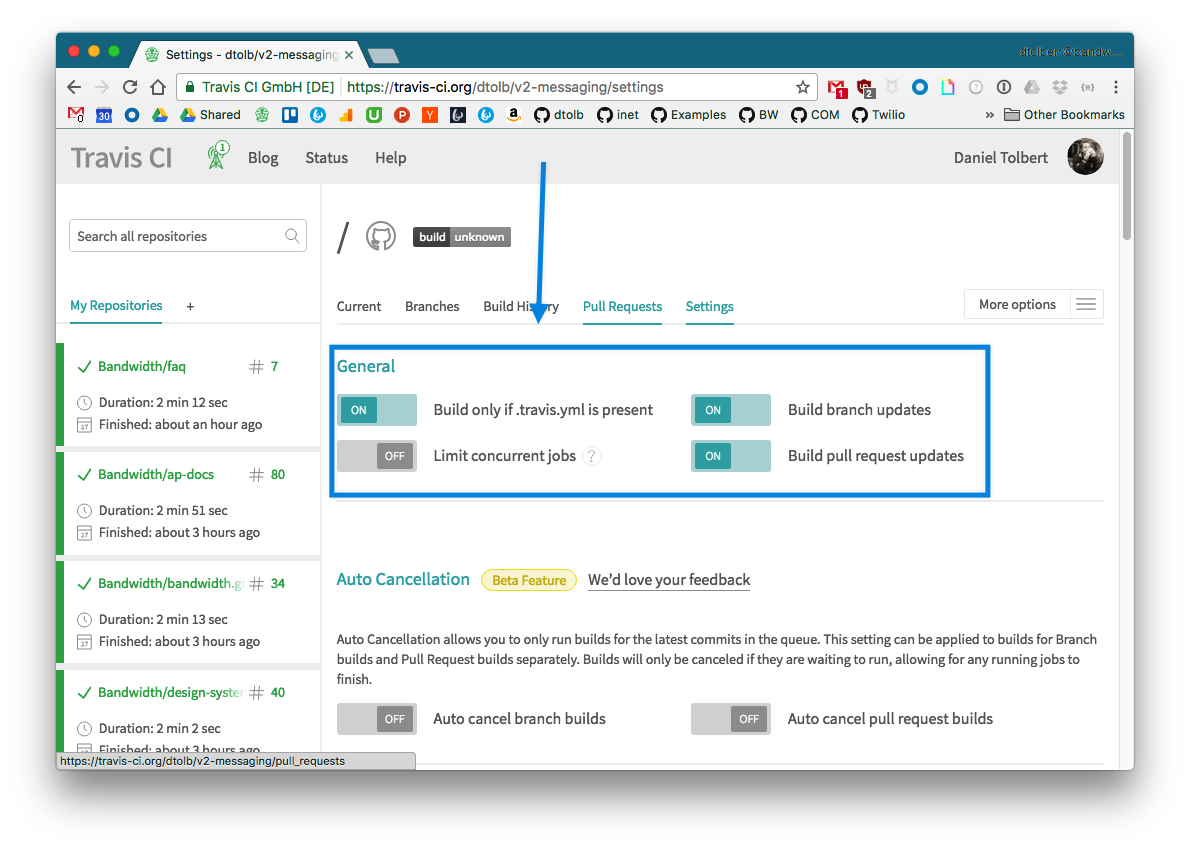
- Travis configured for repo
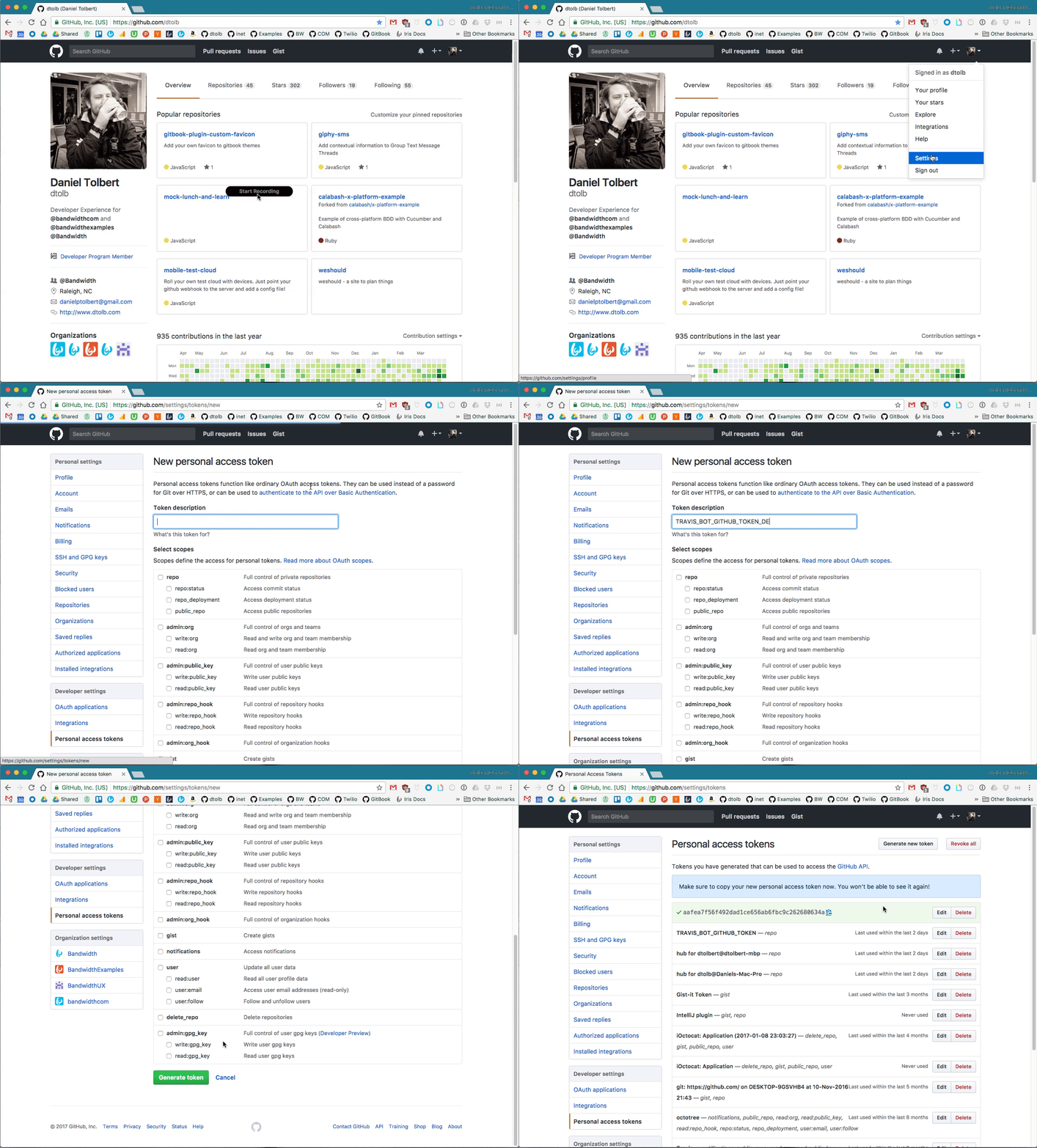
Create a new token to use to make a comment on the pull request.
Only provide
repoaccess
# Easier to work with system python than node
language: node_js
# Just grab stable, we're not picky
node_js:
- stable
before_install:
# download virtual env to manage permissions
- sudo pip install virtualenv
# create virtualenv `my_project`
- virtualenv my_project
# activate the virtualenv
- source my_project/bin/activate
before_script:
# Install the gitbook cli tools
- npm install -g gitbook-cli
# Run deploy script
script: bash ./deploy.sh
after_success:
  # Remove the virtualenv files from the generated gitbook
- rm -rf _book/my_project
# Install the s3 deploy tool
- pip install git+https://github.com/dtolb/s3-deploy-website.git
# Run the tool and specifiy the project name.
# The project name is used to generate the static s3 site
- s3-deploy-website "v2-messaging"
env:
  global:
  - ENCRYPTION_LABEL: 76c23508d8e4
  - COMMIT_AUTHOR_EMAIL: dtolbert@bandwidth.com
  - secure: key1
  - secure: key2
- secure: key3travis encrypt AWS_SECRET_ACCESS_KEY={{YOUR AWS SECRET ACCESS KEY}} --add
travis encrypt AWS_ACCESS_KEY_ID={{YOUR AWS ACCESS KEY ID}} --add
travis encrypt TRAVIS_BOT_GITHUB_TOKEN={{YOUR GITHUB TOKEN}} --add
Save this at the root directory as Makefile no extension
# default action `make`
default: compile

# install the gitbook directroy
gitbook_install:
  gitbook install

# build the gitbook files
gitbook_build:
  gitbook build

# build and serve with live reload
gitbook_serve:
  gitbook serve

# one step make to build: `make`
compile: gitbook_install gitbook_build

# one step make to serve: `make serve`
serve: gitbook_install gitbook_serveMakes the gitbook and deploys to gh-pages only on master updates
Generate key named deploy_key
$ ssh-keygen -t rsa -b 4096 -C "you@domain.com"Encrypt the key with travis
travis encrypt-file deploy_key
openssl aes-256-cbc -K $encrypted_76c23508d8e4_key -iv $encrypted_76c23508d8e4_iv -in deploy_key.enc -out deploy_key -d

Grab the key 76c23508d8e4 and add it to your travis.yml file.
ENCRYPTION_LABEL: 76c23508d8e4COMMIT_AUTHOR_EMAIL: you@domain.com
env:
  global:
  - ENCRYPTION_LABEL: 76c23508d8e4
  - COMMIT_AUTHOR_EMAIL: dtolbert@bandwidth.com
  - secure: key1
  - secure: key2
- secure: key3Use the pbcopy command to copy the file to your clipboard
pbcopy < deploy_key.pubCopy the public key to your clip board and add it to the repo's only key with write permissions.
https://github.com/{user}/{repo}/settings/keys

Download and save deploy.sh to the directory.
This is the file that calls the make command and deploys files to github pages.
Be sure to give it +x so it can run locally (if needed) and on travis
chmod +x ./bash.shchmod +x ./deploy.sh
ls -la | grep deploy.sh
-rwxr-xr-x@ 1 dtolb staff 1997 Apr 12 19:32 deploy.shBe sure to add the deploy keys and the virtualenv files to gitignore. Gitbook could pull those in and serve!
## Deploy files
deploy_key.pub
deploy_key
my_project
git checkout -b update-to-auto-deploy
git add --all
git commit -m 'add auto deploy'
git push
git pull-request -m 'add auto deploy to gitbook!!!'Preview Changes at:
http://v2-messaging-update-to-auto-deploy.s3-website-us-east-1.amazonaws.com/

Click the link and view the live changes

Once you merge everything into master, the travis build will deploy the gitbook site to gh-pages branch.
Ensure your github repo is set to use the gh-pages branch for github pages and NOT /docs folder or master branch
