
MetaMover is a C++/Qt application designed to organize and manage photo files. It helps users move their photos from a source directory, such as a DCIM folder on an SD card or mobile phone, to a target directory, like an external drive or a cloud folder. MetaMover can handle duplicates, invalid metadata, and supports various output folder structures based on EXIF data.

MetaMover is a tool that addresses the common issue of cluttered photo directories. By scanning specified source directories, it identifies photo files, processes EXIF data, handles duplicates, and organizes photos into structured folders. This tool is perfect for users looking to transfer photos to organized directories efficiently.
To get started with MetaMover, follow these steps:
-
Download and Extract:
- Download the MetaMover zip file from the GitHub repository.
- Extract the zip file to your preferred location.
-
Run the Application:
- Navigate to the extracted directory and find the executable file.
- Double-click the executable to launch MetaMover. If you encounter a Windows Defender warning, click "Run anyway" to proceed.
-
Specify Directories:
- Source Directory: Select the directory containing your photos.
- Include Sub-Directories: Opt to include sub-directories in the scan.
- Invalid Meta Folder: Specify a folder for files with invalid EXIF data.
-
Set Output Options:
- Output Directory: Choose the destination directory for organized photos.
- Duplicate Handling: Decide how to handle duplicates (e.g., move to a folder, overwrite, or append a copy number).
-
Scan and Transfer:
- Click "Scan for Files" to initiate the scan.
- Select an output folder structure (e.g., by camera model, year, month, and day).
- Choose the EXIF data matching option.
- Click "Copy" to transfer the photos to the organized directory.
-
View Results:
- After the transfer, navigate to the output directory to see your organized photos.
- Check the duplicates and invalid meta folders if applicable.
For a visual demonstration, watch the MetaMover Demo Video.
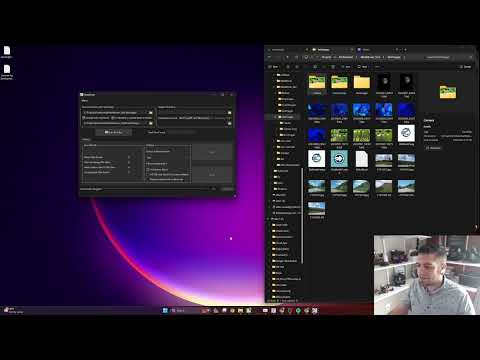
To set up the development environment for MetaMover, follow these steps:
- Qt 6.7.1 (or compatible version)
- LLVM-MinGW toolchain
- CMake 3.5 or higher
-
Install Qt:
- Download the Qt Online Installer from the Qt website.
- Run the installer and select the components to install.
- Ensure you select Qt 6.7.1 and include LLVM-MinGW, etc.
-
Install CMake:
- Download CMake from the CMake website.
- Run the installer and follow the on-screen instructions to complete the installation.
Create a script to set up the environment variables for Qt and CMake.
Create setup_env.bat:
@echo off
setlocal

:: Set the Qt installation directory
set QT_DIR=C:\Qt\6.7.1\mingw_64
set PATH=%QT_DIR%\bin;%PATH%

:: Set CMake prefix path
set CMAKE_PREFIX_PATH=%QT_DIR%

:: Optionally set the LLVM-MinGW toolchain path
set LLVM_MINGW_DIR=C:\path\to\llvm-mingw
set PATH=%LLVM_MINGW_DIR%\bin;%PATH%

:: Launch a new command prompt with these settings
cmdCreate setup_env.sh:
#!/bin/bash

# Set the Qt installation directory
export QT_DIR=/path/to/Qt/6.7.1/gcc_64
export PATH=$QT_DIR/bin:$PATH

# Set CMake prefix path
export CMAKE_PREFIX_PATH=$QT_DIR

# Optionally set the LLVM-MinGW toolchain path
export LLVM_MINGW_DIR=/path/to/llvm-mingw
export PATH=$LLVM_MINGW_DIR/bin:$PATH

# Launch a new shell with these settings
$SHELL-
Clone the Repository:
git clone https://github.com/your-repo/MetaMover.git cd MetaMover -
Set up the environment:
- Run
setup_env.baton Windows - Run
./setup_env.shon Unix-based systems
- Run
-
Build the Project:
cmake.exe -S . -B build
cmake --build build
- After building, navigate to the build directory and run the executable:
./MetaMover