📦 Marketplace status: Live on the GitLab CI/CD Catalog.
Darkmoon is open-source — a star really helps us grow.

🌐 Website: dark-moon.org · 📚 Docs: docs.dark-moon.org · ⭐ Star the core: github.com/ASCIT31/Dark-Moon
Install the integrations, right where you work:
| Platform | Get it |
|---|---|
| VS Code | VS Code Marketplace |
| JetBrains | JetBrains Marketplace |
| GitHub Actions | GitHub Marketplace |
| GitLab CI/CD | CI/CD Catalog |
| Jenkins | Download the .hpi |
| Client & CLI | npm: @darkmoon_ai/client |
Produced by running the real component job on a genuine gitlab-runner
(test/run_runner_e2e.sh flow) against the synthetic Demo Shop campaign
(demo-shop.local). The reports are the actual gl-code-quality-report.json /
gl-sast-report.json artifacts (schema-validated in CI).
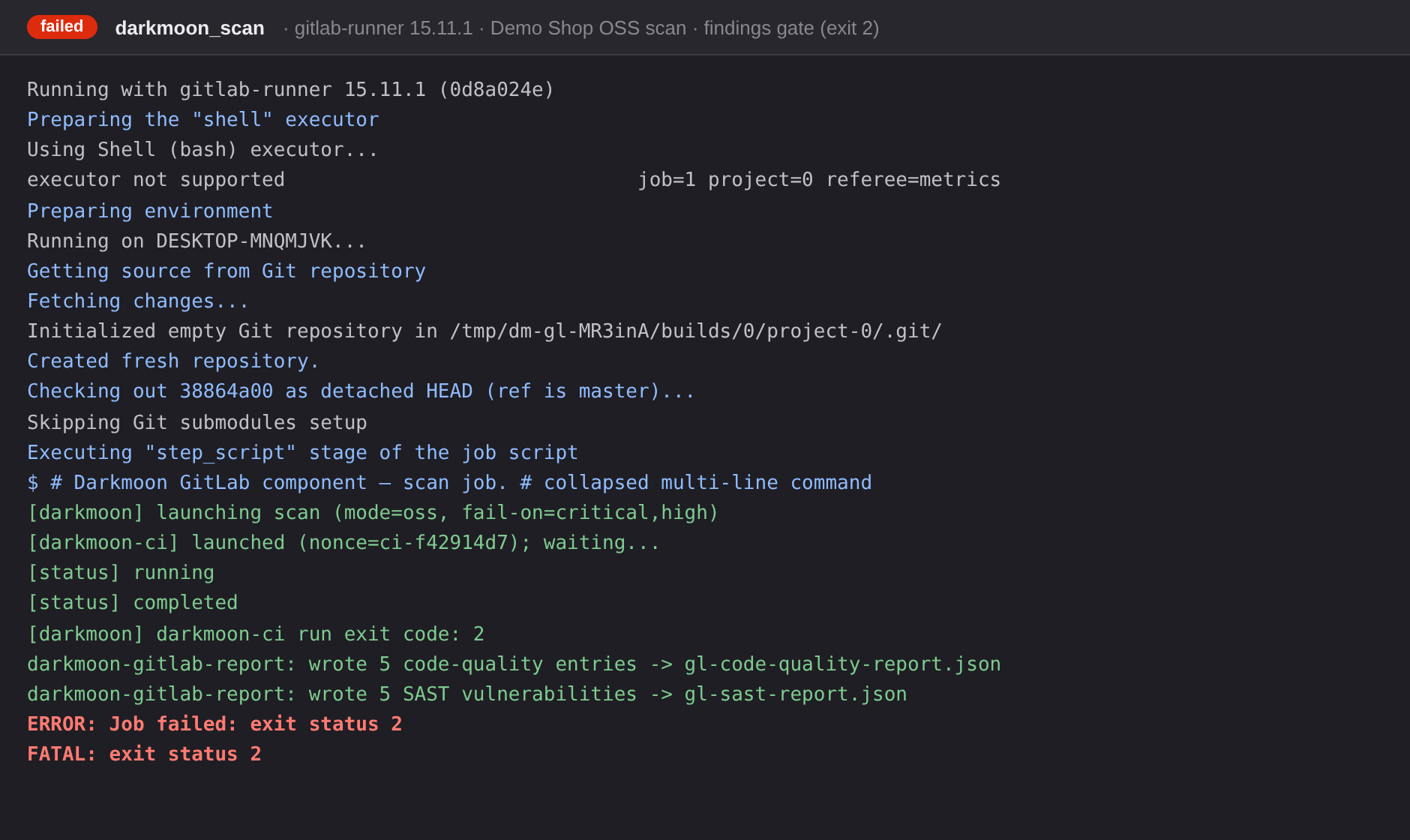
CI job log — real gitlab-runner 15.11.1 output: the CLI launches → waits →
completes, the mapper emits both reports, and the findings gate fails the job
(exit 2):
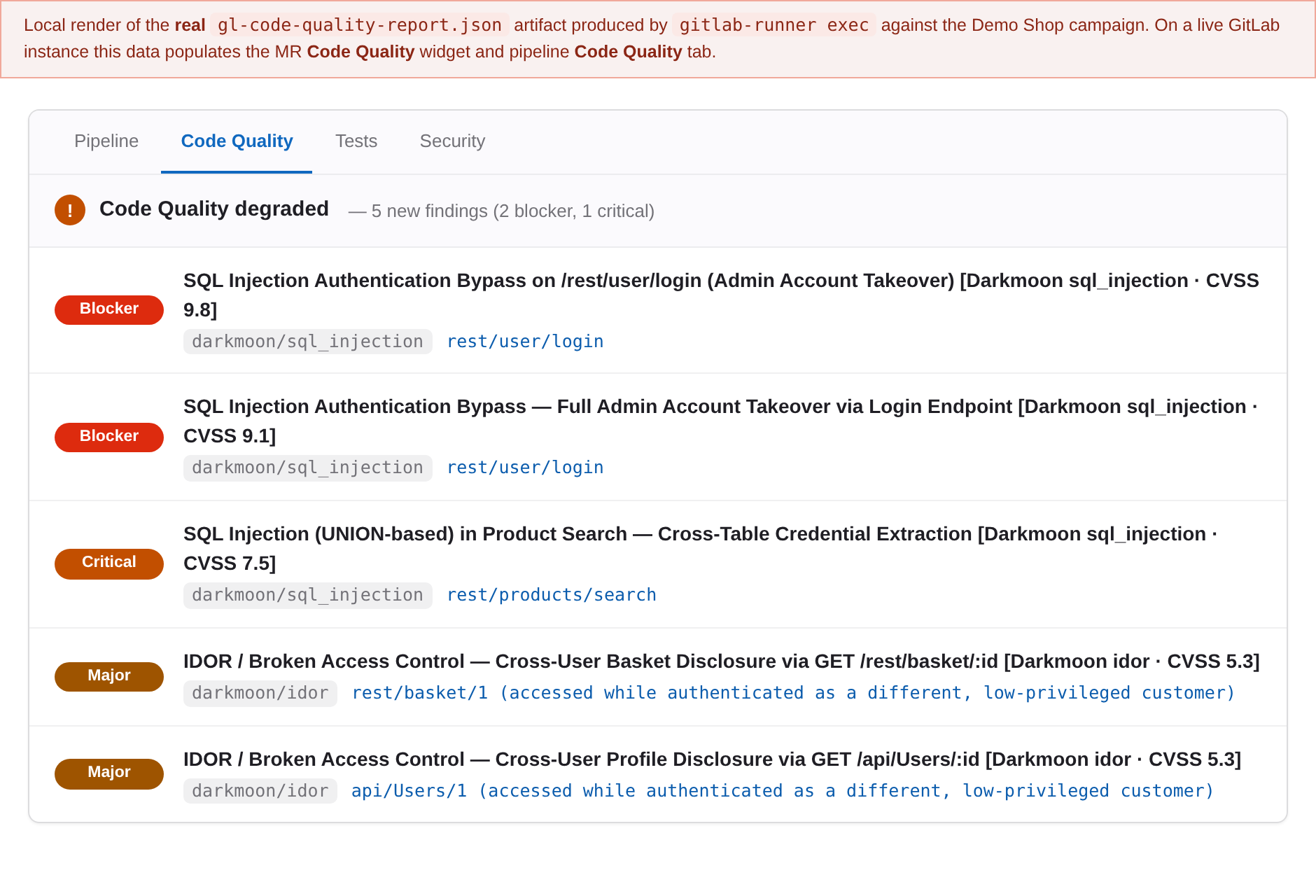
Code Quality — a local render of the real gl-code-quality-report.json
artifact, shown the way it populates the merge-request Code Quality widget
and the pipeline Code Quality tab (the live MR widget needs a GitLab
instance):
The component wraps the portable
darkmoon-ciCLI. It does not embed the scanning engine. SeeCONTRACT.mdfor the exact CLI + JSON interface it consumes.
include:
  - component: $CI_SERVER_FQDN/<your-namespace>/darkmoon/scan@1.0.0
    inputs:
      target: "https://staging.example.com"
      fail-on: high        # fail the job on a High+ finding
Replace <your-namespace> with the group/subgroup that hosts this project on
your GitLab instance (the component path is <namespace>/darkmoon/scan, i.e.
<project-path>/<component-name>). Pin @<version> to a released tag.
Set these as masked + protected CI/CD variables (Settings → CI/CD → Variables). They are read from the environment; the component never places them on the command line and never prints them.
| Mode | Required variables |
|---|---|
| OSS | DARKMOON_LICENSE_KEY, OPENROUTER_PROVIDER, OPENCODE_MODEL, OPENROUTER_API_KEY |
| Pro | DARKMOON_PRO_TOKEN (or DARKMOON_PRO_USER + DARKMOON_PRO_PASS) + the pro-url input (or DARKMOON_PRO_URL) |
include:
  - component: $CI_SERVER_FQDN/<your-namespace>/darkmoon/scan@1.0.0
    inputs:
      target: "https://staging.example.com"
      fail-on: "critical,high"
      allow_failure_exit_codes: [2]   # tolerate the findings gate; real errors still fail
The findings gate is CLI exit code 2. The default allow_failure_exit_codes
([250], a code the CLI never emits) makes the job block. Listing 2 makes
the gate non-blocking while genuine tool/usage errors (exit 1) still fail the
pipeline.
| Input | Default | Description |
|---|---|---|
target |
(required) | Target URL/host. focus/severity are folded in as FOCUS=/SEVERITY=. |
mode |
auto |
auto (Pro if URL/token present, else OSS), oss, or pro. |
pro-url |
"" |
Darkmoon Pro REST API base URL (--pro-url; env DARKMOON_PRO_URL). |
focus |
"" |
Comma-separated attack focus, folded into the target as FOCUS=. |
severity |
"" |
Max severity cap, folded into the target as SEVERITY=. |
fail-on |
critical,high |
Comma-separated set of severities that fail the build. Empty = never fail on findings. |
timeout |
"" |
Hard timeout (seconds) for the run (--timeout). |
oss-data-dir |
"" |
OSS data dir with campaigns/ + vulnerabilities/ (--oss-data-dir). |
oss-reports-dir |
"" |
OSS reports dir (--oss-reports-dir). |
oss-script |
"" |
Path to darkmoon.sh (--oss-script). |
sast-report |
true |
Also emit gl-sast-report.json. |
expose-full-report |
false |
Attach the full (redacted) report + normalized findings JSON as internal artifacts. |
artifacts-expire-in |
1 week |
Artifact expiry. |
allow_failure_exit_codes |
[250] |
Exit codes tolerated by the job. [2] = non-blocking gate. |
bootstrap-url |
"" |
If darkmoon-ci is absent, download & run this installer first. |
image |
node:20-slim |
Image for docker-executor runners (shell runners ignore it). |
stage |
test |
Stage for the job (must exist in the pipeline). |
job-name |
darkmoon_scan |
Name of the generated job. |
- Code Quality —
gl-code-quality-report.json(artifacts:reports:codequality). One entry per finding, mapped to the CodeClimate fields GitLab requires (description,check_name,fingerprint,severity,location.path,location.lines.begin). - SAST —
gl-sast-report.json(artifacts:reports:sast), conforming to the GitLabsecurity-report-schemasSAST schema (validated in CI against the live schema; seetest/). The MR SAST widget requires Ultimate. - Internal artifacts (only when
expose-full-report: true) — the full markdown report and native findings JSON, underoutput-dir/.
Only a redaction-safe summary of each finding is placed on shared surfaces
(the MR/pipeline widgets). Full detail and raw evidence stay in the internal
report artifact, which is off by default. See CONTRACT.md §4.
darkmoon-ci is a Node CLI (Node ≥ 18); python3 (≥ 3.8) is used for the report
mapping. The job image must provide both. node:20-slim (the default) ships
Node but not python3 — add it (apt-get install -y python3) or use a custom
image that bundles darkmoon-ci + python3. The job fails fast with a clear
message if either is missing.
- Pro mode: a runner with the CLI +
python3and network access to the Pro REST API. - OSS mode:
darkmoon-cidrives the local Darkmoon Docker engine, so use a runner with Docker access (a shell executor on a Docker host, or Docker-in-Docker), and pointoss-data-dir/oss-reports-dir/oss-scriptat the engine's mounted data.
OSS concurrency (important). OSS runs share one on-disk data directory and the client correlates the new campaign by snapshot-diff + session-id + mtime. Run one Darkmoon container / compose-project per CI job (do not fan out parallel OSS jobs against the same data dir) or campaigns can be mis-attributed. The client emits a collision warning when it detects this; Pro mode is not affected. See
CONTRACT.md§3.
# from the published package (recommended):
npm i -g @darkmoon_ai/client         # provides the `darkmoon-ci` bin
# or a pinned tarball built from source:
#   cd darkmoon-client && npm run build && npm pack
# npm i -g darkmoon-client-<version>.tgz| Darkmoon | Code Quality | SAST |
|---|---|---|
| critical | blocker |
Critical |
| high | critical |
High |
| medium | major |
Medium |
| low | minor |
Low |
| info | info |
Info |
python3 build/render_template.py      # regenerate templates/scan/template.yml from src/
python3 test/unit_tests.py            # redaction (§4) + degradation (§2.4) + severity maps
python3 test/check_schema_pin.py      # guard against SAST schema drift
bash    test/run_runner_e2e.sh        # REAL gitlab-runner (15.11) end-to-end, live-schema validation
templates/scan/template.yml is generated: it embeds src/darkmoon_gitlab_report.py
(base64) so the component is self-contained YAML. Edit src/ and the .yml.in
skeleton, then re-render.
- Make this a public project on your GitLab instance and set a project description.
- Enable it as a catalog project (Settings → General → Visibility → CI/CD Catalog project).
- Tag a semantic version and create a release with the
releasekeyword (see this repo's own.gitlab-ci.yml). The pipeline for the tag publishes the component version to the catalog.
MIT — see LICENSE.