Github Repo
- textbook repo: https://github.com/databricks/Spark-The-Definitive-Guide
Introduction
- Apache Spark is a unified computing engine and a set of libraries for parallel data processing on computer clusters.
- Spark supports SQL, Python, Scala, R, and Java

Apache Spark's Philosophy
- Unified
- Offer a unified platform for writing big data applications.
- Consistent API for wide range of data analytics tasks.
- Computer Engine
- Spark handles loading data from storage systems and performing computation on it, not permanent storage as the end itself.
- Spark does not store data long term
- Libraries
- Unified API for common data analysis tasks
- SparkSQL: SQL and structured data
- MLlib: Machine Learning
- Spark Streaming: Streaming data
- GraphX: Graph analysis
- Unified API for common data analysis tasks
History of Spark
- Research project at UC Berkley in 2009
- Alternative to MapReduce
- In-memory instead of on disk
- Spurred creation of Databricks
Spark's Basic Architecture
- A cluster is a group of computers that pools the resources of many machines together, giving the user the ability to use all of the cumulative resources as if they were a single computer.
- Spark is a framework to coordinate work across a cluster.
- The cluster of machines that Spark will use to execute tasks is managed by a cluster manager like Spark's standalone cluster manager, YARN.
- We submit Spark applications to these cluster managers, which will grant resources to our application so that we can complete our work.
Spark Applications
- Spark applications consist of a driver process and a set of executor processes.
- The driver process is responsible for three things:
- Maintaining information about the spark application
- Responding to a user's program or input
- Analyzing, distributing, and scheduling work across the executors
- The executors are responsible for actually carrying out the work that the driver assigns them.
- The driver process is responsible for three things:
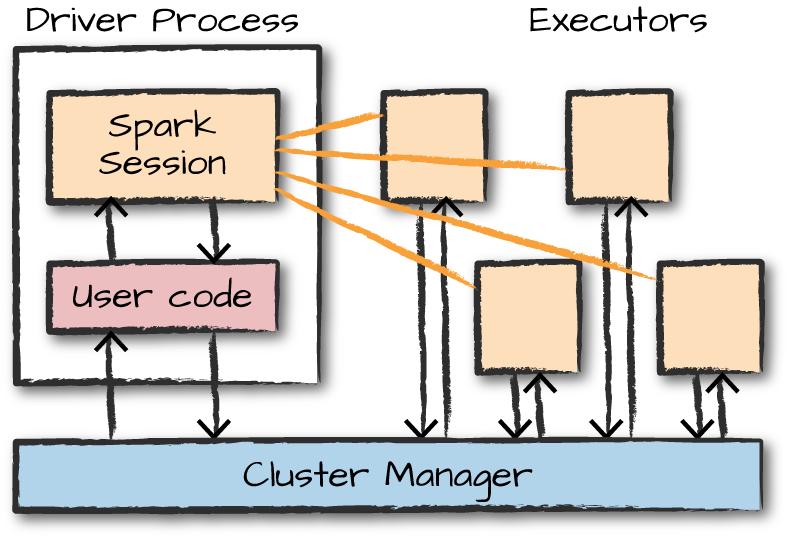
Major Points
- Spark employs a cluster manager that keeps track of the resources available.
- The driver process is responsible for executing the driver program's commands across the executors to complete a given task.
Spark's Language APIs
- Spark is primarily written in Scala, making it Spark's 'default' language.
- When using Spark from Python or R, you don't write explicit JVM instructions; instead, you write Python and R code that Spark translates into code that it then can run on the executor JVMs.
The SparkSession
- You control your Spark Application through a driver process called the SparkSession.
- The SparkSession instance is the way Spark executes user-defined manipulations across the cluster.
DataFrames
- A DataFrame is the most common Structured API and simply represents a table of data with rows and columns.
- The list that defines the columns and the types within those columns is called the schema.
Partitions
- To allow every executor to perform work in parallel, Spark breaks up the data into chunks called partitions.
- A partition is a collection of rows that sit on one physical machine in your cluster.
Transformations
- In Spark, the core data structures are immutable.
- To change a DataFrame you must perform a transformation.
- Transformations are the core of how you express your business logic using Spark.
- There are two types of transformations:
- Those that specify narrow dependencies
- Those for which each input partition will contribute to only one output partition.
- Performed in memory.
- Those that specify wide dependencies
- Those that will have input partitions contributing to many output partitions.
- AKA: shuffle (where Spark will exchange partitions across the cluster).
- Not performed in memory (writes to disk).
- Those that specify narrow dependencies
Lazy Evaluation
- Spark will wait until the very last moment to execute the graph of computation instructions.
Actions
- An action instructs Spark to compute a result from a series of transformations.
- Examples of actions:
- Actions to view data in the console.
- Actions to collect data to native objects in their respective language.
- Actions to write to output data sources
Spark UI
- If you are running in local mode, you can monitor the progress of a job via http://localhost:4040
Data Input Example
- To start spark locally:
$ spark-shell
- To start pyspark:
pyspark
- Data input example:
flightData2015 = spark.read.option("inferSchema", "true").option("header", "true").csv("/Users/chrisfeller/Desktop/Spark-The-Definitive-Guide/data/flight-data/csv/2015-summary.csv")
- To view the first few records:
flightData2015.take(3)
- To sort by the 'count' field:
flightData2015.sort('count').explain()
flightData2015.sort('count').take(3)
DataFrames and SQL
- With SparkSQL you can register any DataFrame as a table or view (a temporary table) and query it using pure SQL.
- There is no performance difference between writing SQL queries or writing DataFrame code, they both 'compile' to the same underlying plan that we specify in DataFrame code.
- To make any DataFrame into a table or view:
flightData2015.createOrReplaceTempView('flightData2015')
- You can then query that table view SQL syntax:
sqlWay = spark.sql("""
    SELECT DEST_COUNTRY_NAME, count(1)
    FROM flightData2015
    GROUP BY DEST_COUNTRY_NAME
    """)
- You could do the same view python:
dataFrameWay = flightData2015.groupBy('DEST_COUNTRY_NAME').count()
- Similar comparison between query in SQL and python:
spark.sql("SELECT max(count) FROM flightData2015").take(1)
flightData2015.select(max('count')).take(1)
- The execution plan is a directed acyclic graph (DAG) of transformations, each resulting in a new immutable DataFrame, on which we can call an action to generate a result.
Datasets: Type-Safe Structured APIs
- Not available in Python and R (only Java and Scala) because those languages are dynamically typed.
Structured Streaming
- Structured Streaming is a high-level API for stream processing that became production-ready in Spark 2.2.
- With Structured Streaming, you can take the same operations that you perform in batch mode using Spark's structured APIs and run them in a streaming fashion.
Machine Learning and Advanced Analytics
- Spark is able to perform large-scale machine learning with it's built-in library of machine learning algorithms called MLlib.
- MLlib allows for preprocessing, munging, training, and making predictions at scale on data.
Lower-Level APIs
- Virtually everything in Spark is built on top of Resilient Distributed Datasets (RDDs).
- There are basically no instances in modern Spark, for which you should be using RDDs instead of structured APIs beyond manipulating some very raw unprocessed and unstructured data.
DataFrames and Datasets
- DataFrames and Datasets are (distributed) table-like collections with well-defined rows and columns.
- Tables and views are basically the same thing as DataFrames. We just execute SQL against them instead of DataFrame code.
Schemas
- A schema defines the column names and types of a DataFrame.
DataFrames vs. Datasets
- Datasets are only available to Java Virtual Machine (JVM)-based languages (Scala and Java).
Spark Types
- Import Types:
from pyspark.sql.types import *
| Data Type | Value type in Python | API to access or create a data type |
|---|---|---|
| ByteType | int or long | ByteType() |
| ShortType | int or long | ShortType() |
| IntegerType | int or long | IntegerType() |
| LongType | long | LongType() |
| FloatType | float | FloatType() |
| DoubleType | float | DoubleType() |
| DecimalType | decimal.Decimal | DecimalType() |
| StringType | string | StringType() |
| BinaryType | bytearray | BinaryType() |
| BooleanType | bool | BooleanType() |
| TimestampType | datetime.datetime | TimestampType() |
| DateType | datetime.date | DateType() |
| ArrayType | list, tuple, or array | ArrayType(elementType) |
| MapType | dict | MapType(keyType, valueType) |
| StructType | list or tuple | StructType(fields) |
| StructField | The value type in Python of the data type of this field | StructField(name, dataType) |
Overview of Structured API Execution
- Write DataFrame/Dataset/SQL Code
- If valid code, Spark converts this to a Logical Plan
- Spark transforms this Logical Plan to a Physical Plan, checking for optimizations along the way
- Spark then executes this Physical Plan (RDD manipulations) on the cluster.
Schemas
- A schema defines the column names and types of a DataFrame.
- To print the schema of a DataFrame:
df.printSchema()
- When using Spark for production Extract, Transform, Load (ETL), it is often a good idea to define your schemas manually, especially when working with untyped data sources like CSV and JSON.
- An example of how to enforce a specific schema on a DataFrame:
from pyspark.sql.types import StructField, StructType, StringType, LongType

myManualSchema = StructType([
    StructField('DEST_COUNTRY_NAME', StringType(), True),
    StructField('ORIGIN_COUNTRY_NAME', StringType(), True),
    StructField('count', LongType(), False, metadata={'hello':'world'})
    ])

df = spark.read.format('json').schema(myManualSchema).load('data/flight-data/json/2015-summary.json')
Columns
- To refer to a specific DataFrame's column:
from pyspark.sql.functions import col
df.col('column_name')
- To access a DataFrame's columns:
df.columns
select and selectExpr
selectandselectExprallow you to do the DataFrame equivalent of SQL queries on a table of data.- In the simplest possible terms, you can use them to manipulate columns in your DataFrames.
- To select a column:
df.select('col_name').show()
- To select multiple columns:
df.select('col_name1', 'col_name2').show()
- To select a column and rename it:
df.select(expr('col_name AS col_rename')).show()

# OR

df.select('col_names').alias('col_rename').show()

# OR

df.selectExpr('col_name AS col_rename').show()
- We can treat
selectExpras a simple way to build up complex expressions that create new DataFrames similar to SQL:
df.selectExpr('avg(col_name)', 'count(distinct(col_name))'').show()
Adding Columns
- To add a column:
df.withColumn('new_column', 'old_column' * 2).show()
.withColumn()takes two arguments: the column name and the expression that will create the value for that given row in the DataFrame.- You can also rename a column this way.
Renaming Columns
- To rename a column:
df.withColumnRenamed('new_name', 'old_name')
Case Sensitivity
- By default, Spark is case insensitive
Removing Columns
- To remove a column:
df.drop('col_name')
- To drop multiple columns:
df.drop('col_name1', 'col_name2')
Changing a Column's Type (Cast)
- To change a column from string to int:
df.withColumn('col_name', col('col_name').cast('int'))
Filtering Rows
.filter()and.where()each work for filtering rows- Example:
df.filter(col('col_name') < 2)
df.where('col_name < 2')
- To perform multiple filters, chain them together:
df.where(col('col_name') < 2).where(col('col_name') > 5)
Getting Unique Rows
- To get the unique values in a row:
df.select('col_name').distinct()
Random Samples
- To randomly sample some records from your DataFrame:
withReplacement = True
fraction=0.5
seed=42
df.sample(withReplacement, fraction, seed).show()
Concatenating and Appending Rows (Union)
- To append to a DataFrame, you must union the original DataFrame along with the new DataFrame
- This just concatenates the two DataFrames
- To union two DataFrames, you must be sure that they have the same schema and number of columns; otherwise, the union will fail.
- Unions are currently performed based on location, not on schema. This means that columns will not automatically line up the way you think they might.
df.union(newdf)
Sorting Rows
- Can be done with either
.sort()or.orderBy() - They accept both column expressions and strings as well as multiple columns.
- The default is to sort in ascending order
df.sort('col_name')
df.orderBy('col_name1', 'col_name2')

# OR
df.sort(col('col_name'))
df.orderBy(col('col_name1'), col('col_name2'))
- To specify sort direction:
from pyspark.sql.functions import desc, asc
df.orderBy('col_name').desc()
Limit
- To restrict what you extract from a DataFrame use
.limit():
df.limit(10)
- Similar to
.head()in pandas.
Repartition and Coalesce
- To get the number of partitions:
df.rdd.getNumPartitions()
- You should typically only repartition when the future number of partitions is greater than your current number of partitions or when you are looking to partition by a set of columns
- To repartition:
df.repartition(5)
- To repartition by a certain column:
df.repartition(col('col_name'))
Collecting Rows to the Driver
.collect()gets all data from the entire DataFrame,.take()selects the first N rows, and.show()prints out a number of rows nicely.- Any collection of data to the driver can be a very expensive operation! If you have a large dataset and call
.collect()you can crash the driver.
Rounding Numbers
- By default, the
roundfunction rounds up if you're exactly in between two numbers.- If instead you want to round down, use
bround
- If instead you want to round down, use
Calculating Correlation
- Two ways to calculate correlation:
from pyspark.sql.functions import corr
df.stat.corr('column1', 'column2')
df.select(corr('column1', 'column2'))
Calculating Descriptive Statistics
- To show descriptive statistics of a dataframe:
df.describe().show() - To show descriptive statistics for one column:
df.select('column').describe() - You can also use functions from the StatFunctions Package. For example to calculate the median:
df.stat.approxQuantile('column', [0.5], 0) - To display a cross-tabulation or frequent item pairs:
df.stat.crosstab('column1', 'column2') df.stat.freqItems([]'column1', 'column2'])) - If you need to generate an
idcolumn for a DataFrame:df.withColumn('id', monotonically_increasing_id())
Working With Strings
- To capitalize every word in a given string when that word is separated from another by a space:
from spark.sql.functions import initcap df.select(initcap(col('column'))) - To cast strings in uppercase or lowercase:
from pyspark.sql.functions import upper, lower df.select(col('column'), upper(col('column')), lower(col('column'))) - To add or remove spaces around a string:
from pyspark.sql.functions import lit, ltrim, rtrim, rpad, lpad, trim
df.select(ltrim(lit('    HELLO    ')).as('ltrim'),
        rtrim(lit('    HELLO    ')).as('rtrim'),
        trim(lit('    HELLO    ')).as('trim'),
        lpad(lit('HELLO')).as('lp'),
        rpad(lit('HELLO')).as('rp'))
Regular Expressions
- There are two key functions in Spark that you'll need in order to perform regular expression tasks:
regexp_extractandregexp_replace. - To
SParkML vs. Spark MLlib
- MLlib consists of two packages that leverage different core data structures.
spark.mlincludes an interface for use with DataFrames and a high-level interface for building machine learning pipelines.spark.mllibincludes an interface for Spark's low-level RDD APIs.
High-Level MLlib Concepts
- In MLlib there are several fundamental 'structural' types: transformers, estimators, evaluators, and pipelines.
- Transformers are functions that convert raw data in some way.
- Primarily used in preprocessing and feature engineering.
- Take a DataFrame as an input and produce a new DataFrame as an output.
- Ex: Create a new variable, normalize a variable, or change the datatype of a variable.
- Estimators are transformers that are initialized with data (think
.fit())- In Spark's nomenclature, algorithms that allow users to train a model from data are referred to as estimators.
- Evaluators allow us to see how a given model performs according to a criteria.
- Pipelines are an easy way to specify stages made up of various transformers, estimators, and evaluators.
- Similar to scikit-learn's pipeline concept. Tutorial Here.
- Transformers are functions that convert raw data in some way.
Low-Level MLlib Concepts
- There are several lower-level data types you may need to work with in MLlib:
Vector: Whenever we pass a set of features into a machine learning model, we must do it as a vector that consists ofDoubles- Most common lower-level data type
- Vectors can be either sparse (most elements are zero) or dense (where there are many unique values)
- To create a dense vector, specify an array of all the values.
from pyspark.ml.linalg import Vectors denseVec = Vectors.dense(1.0, 2.0, 3.0) - To Create a sparse vector, specify the total size, indices, and values of the non-zero elements.
from pyspark.ml.linalg import Vectors size = 3 idx = [1, 2] # locations of non-zero elements in vector values = [1.0, 2.0] sparseVec = Vectors.sparse(size, idx, values) - Sparse vectors are the best format, when the majority of values are zero as this is a more compressed representation.
- To create a dense vector, specify an array of all the values.
Feature Engineering with Transformers
- Transformers help us manipulate our current columns in one way or another.
- In MLlib, all inputs to machine learning algorithms in Spark must consist of type
Double(for lables) andVector[Double](for features). - Examples:
VectorAssembler,StringIndexer,OneHotEncoder,Tokenizer
Estimators
- To instantiate or fit any model, Spark MLlib uses the default labels
labelandfeatures. - Example:
from pyspark.ml.classification import LogisticRegression lr = LogisticRegression(labelCol='label', featuresCol='features') - To fit a model:
lr_fitted = lr.fit(train) - Unlike transformers, fitting a machine learning model is eager and performed immediately in Spark.
- To predict on a model:
lr_fitted.transform(train).select('label', 'prediction')
Pipelining Our Workflow (Pipeing it Up)
- Pipelines allow you to specify your workload as a declarative set of stages (pipeline) that includes all of your transformations as well as tuning your hyperparameters.
- Put another way, Pipelines allow you to set up a dataflow of the relevant transformations that ends with an estimator that is automatically tuned according to your specifications, resulting in a tuned model ready for use.
- It is essential that instances of transformers or models are not reused across different pipelines.
- Always create a new instance of a model before creating another pipeline.
- Simple example:
from pyspark.ml.feature import RFormula
from pyspark.ml.classification import LogisticRegression
from pyspark.ml import Pipeline

df = spark.read.json('/data/simple-ml')
train, test = df.randomSplit([0.7, 0.3])

rForm = RFormula()
lr = LogisticRegression(labelCol='label', featuresCol='features')

stages = [rForm, lr]
pipeline = Pipeline().setStages(stages)
Training and Evaluation
- We can test different hyperparameters in the entire pipeline:
from pyspark.ml.tuning import ParamGridBuilder params = ParamGridBuilder().addGrid(rForm.formula, [ 'lab ~. + color:value1', 'lab ~. + color:value1 + color:value2'])\ .addGrid(lr.elasticNetParam, [0.0, 0.5, 1.0])\ .addGrid(lr.regParam, [1.0, 2.0])\ .buiild() - In the above example, we're tuning two different versions of
RFormula, which includes simple variable interactions, three different options for theElasticNetparameter, and two different options for the regularization parameter. - Now that the param grid is built, we must specify our evaluation process.
- The
evaluatorallows us to automatically and objectively compare multiple models to the same evaluation metric. - There are multiple evaluators for regression and classification.
- The
- Example:
from pyspark.ml.evaluation import BinaryClassificationEvaluator evaluator = BinaryClassificationEvaluator()\ .setMetricName('areaUnderROC')\ .setRawPredictionCol('prediction')\ .setLabelCol('label') - We can not cross validate to select the best params:
from pyspark.ml.tuning import CrossValidator crossval = CrossValidator()\ .setEstimatorParamMaps(params)\ .setEstimator(pipeline)\ .setEvaluator(evaluator) - To then evaluate the model :
crossval_fitted = crossval.fit(train) evaluator.evaluate(crossval_fitted.transform(test)) # Rreturns test metric - To then save the model:
crossval_fitted.write.overwrite().save('tmp/modelLocation') - To then load the model in another Spark program:
model = CrossValidationModel.load('/tmp/modelLocation')
prediction = model.transform(new_data)
Formatting Model Inputs
- In the case of most classification and regression algorithms, you want to get your data into a column of type
Doubleto represent the label and a column of typeVector(either dense or sparse) to represent the features. - In the case of unsupervised learning, a column of type
Vector(either dense or sparse) is needed to represent the features. - The best way to get your data in these formats is through transformers.
- Transformers are functions that accept a DataFrame as an argument and returns a new DataFrame as a response.
- Transformers are imported from
pyspark.ml.featurewith docs located here
Example Datasets
sales = spark.read.format('csv')\
             .option('header', 'true')\
             .option('inferSchema', 'true')\
             .load('/data/retail-data/by-day/*.csv')\
             .coalesce(5)\
             .where('Description IS NOT NULL')

fakeIntDF = spark.read.parquet('/data/simple-ml-integers')
simpleDF = spark.read.json('/data/simple-ml')
scaleDF = spark.read.parquet('/data/simple-ml-scaling')
- Note: MLlib does not play nicely with null values at this point in time (thus they're filtered out above). Improvements are being made with each Spark release to improve algorithm handling of null values.
Transformers
- Transformers are functions that convert raw data in some way.
- Spark's transformer only includes a transform method.
- It doesn't 'learn' from the data, thus there is no fit method.
Estimators for Preprocessing
- An estimator is necessary when a transformation you would like to perform must be initialized with data or information about the input column (often derived by doing a pass over the input column itself).
- In effect, an estimator can be a transformer configured according to your particular input data.
Transformer Properties
- All transformers require you to specify, at a minimum, the
inputColand theoutputCol, which represent the column name of the input and output, respectively.- There are defaults associated with these but it is best practice to manually specify them for clarity.
- Estimators require you to
fitthe transformer to your particular dataset and then calltransformon the resulting object.
High-Level Transformers
- In general, you should try to use the highest-level transformers you can, in order to minimize the risk of error.
RFormulais an example of a high-level transformer.
RFormula
RFormulais the easiest transformer to use when dealing with 'conventional' formatted data.- Spark borrows this transformer from the R language to make it simple to declaratively specify a set of transformations for your data.
RFormulacan handle either numerical or categorical inputs as it will automatically strings (categoricals) via one-hot encoding.- If the label is type string, it will use
StringIndexerto convert it to typeDouble
- If the label is type string, it will use
RFormulaallows you to specify your transformations in declarative syntax with basic operators:~Separate target and terms+Concatenate terms;+ 0means removing the intercept (this means the y-intercept of the line that we will fit will be 0)-Remove a term;- 1means removing intercept (this means the y-intercept of the line that we will fit will be 0):Interaction (multiplication for numeric values, or binarized categorical values).All columns except the target/dependent variable
- Example in which we want to use all available variables (the
.) and then specify an interaction betweenvalue1andcolorandvalue2andcoloras additional features:from pyspark.ml.feature import RFormula supervised = RFormula(formula='lab ~ . + color:value1 + color:value2') supervised.fit(simpleDF).transform(simpleDF)
SQL Transformers
- A SQL Transformer allows you to leverage Spark's vast library of SQL-related manipulations just as you would a MLlib transformation.
- The only think you need to change is that instead of using a table name, you should use the keyword
THIS
- The only think you need to change is that instead of using a table name, you should use the keyword
- SQL Transformers are most useful in formally codifying some DataFrame manipulations as a preprocessing step or to try different SQL expressions for features during hyperparameter tuning.
- Example:
from pyspark.ml.feature import SQLTransformer

basicTransformation = SQLTransformer()\
                      .setStatement("""
                        SELECT sum(Quantity), count(*), CustomerID
                        FROM __THIS__
                        GROUP BY CustomerID
                        """)

basicTransformation.transform(sales)
VectorAssembler
- The
VectorAssembleris a tool you'll use in nearly every single pipeline you generate. VectorAssemblerconcatenates all of your features into one big vector that you can pass into an estimator.- Typically used in the last step of a machine learning pipeline.
- Can take as input a number of columns of type
Boolean,Double, orVector. - Particularly useful if you're performing a number of manipulations using a variety of transformers and need to gather all of those results together.
- Example:
from pyspark.ml.feature import VectorAssembler
va.VectorAssembler().setInputCols(['int1', 'int2', 'int3'])
va.transform(fakeIntDF)
Working with Continuous Features
- There are two common transformers for continuous features.
- Convert continuous features into categorical features via a process called bucketing
- Scale and normalize your features
- These transformers will only work on
Doubletypes so make sure you've turned all any numerical values toDoublecontDF = spark.range(20).selectExpr('cast(id as double)')
Bucketing
- The most straightforward approach to bucketing or binning is using the
Bucketizertransformer. - This will split a given continuous feature into the buckets of your designation.
- You specify how buckets should be created via an array or list of
Doublevalues.- The minimum value in your splits array must be less than the minimum value in your DataFrame.
- The maximum value in you rsplits array must be greater than the maximum value in your DataFrame.
- You need to specify at a minimum three values in the splits array, which creates two buckets.
- To specify all possible ranges:
float('inf')andfloat('-inf')
- Example:
from pyspark.ml.feature import Bucketizer bucketBorders = [-1.0, 5.0, 10.0, 250.0, 600.0] bucketer = Bucketizer().setSplits(bucketBorders).setInputCol('id') bucketer.transform(contDF) - Another option is to split based on percentiles in the data via
QuantileDiscretizer. - Example:
from pyspark.ml.feature import QuantileDiscretizer
bucketer = QuantileDiscretizer().setNumBuckets(5).setInputCol('id')
fittedBucketer = bucketer.fit(contDF)
fittedBucketer.transform(contDF)
StandardScaler
StandardScalerstandardizes a set of features to have zero mean and standard deviation of 1.- Centering can be very expensive on sparse vectors because it generally turns them into dense vectors, so be careful before centering your data.
- Example:
sScaler = StandardScaler().setInputCol('features')
sScaler.fit(scaleDF).transform(scaleDF)
MinMaxScaler
MinMaxScalerwill scale the values in a vector (component wise) to the proportional values on a scale from a given min value to a max value.- If you specify the minimum value to be 0 and the maximum value to be 1, then all the values will fall between 0 and 1.
- Example:
from pyspark.ml.feature import MinMaxScaler
minMax = MinMaxScaler().setMin(5).SetMax(10).setInputCol('features')
fittedminMax = minMax.fit(scaleDF)
fittedminMax.transform(scaleDF)
MaxAbsScaler
MaxAbsScalerscales the data by dividing each value by the maximum absolute value in the feature.- All values therefore end up between -1 and 1.
- This transformer does not shift or center the data at all in this process.
- Example:
from pyspark.ml.feature import MaxAbsScaler
maScaler = MaxAbsScaler().setInputCol('features')
fittedmaScaler = maScaler.fit(scaleDF)
fittedmaScaler.transform(scaleDF)
ElementwiseProduct
ElementwiseProductscales each value in a vector by an arbitrary value.- Example:
from pyspark.ml.feature import ElementwiseProduct
from pyspark.ml.linalg import Vectors
scaleUpVec = Vectors.dense(10.0, 15.0, 20.0)
scalingUp = ElementwiseProduct()\
            .setScalingVec(scaleUpVec)\
            .setInputCol('features')
scalingUp.transform(scaleDF)
Normalizer
Normalizerscales multidimensional vectors using one of several power norms, set through the parameterp.- For example, Manhattan norm is
p=1and Euclidean norm isp=2
- For example, Manhattan norm is
- Example:
from pyspark.ml.features import Normalizer
manhattanDistance = Normalizer().setP(1).setInputCol('features')
manhattanDistance.transform(scaleDF)
Working with Categorical Features
- The most common task for categorical features is indexing.
- Indexing converts a categorical variable in a column to a numerical one that you can plug into machine learning algorithms.
- It is recommended that you re-index every categorical variable when pre-processing for consistency's sake.
StringIndexer
- The simplest way to index is via
StringIndexer, which maps strings to different numerical IDs. StringIndexeralso creates metadata attached to the DataFrame that specify what inputs correspond to what outputs.- This allows us to later get inputs back from their respective index values.
- Example:
from pyspark.ml.feature import StringIndexer
lblIndxr = StringIndexer().setInputCol('lab').setOutputCol('labelInd')
idxRes = lblIndxr.fit(simpleDF).transform(simpleDF)
IndexToString
IndexToStringconverts indexed values back to the original categories.- Example:
from pyspark.ml.features import IndexToString
labelReverse = IndexToString().setInputCol('labelInd')
labelReverse.transform(idxRes) # idxRes comes from output of StringIndexer in previous section
Indexing in Vectors
VectorIndexeris a helpful tool for working with categorical variables that are already found inside of vectors in your dataset.VectorIndexerwill automatically find categorical features inside of your input vectors and convert them to categorical features with zero-based category indices.
One-Hot Encoding
- Example:
from pyspark.ml.feature import OneHotEncoder, StringIndexer
lblIndxr = StringIndexer().setInputCol('color').setOutputCol('colorInd')
colorLab = lblIndxr.fit(simpleDF).transform(simpleDF.select('color'))
ohe = OneHotEncoder().setInputCol('colorInd')
one.transform(colorLab)
Text Data Transformers
- There are generally two kinds of text forms; free-form text and string categorical variables. The previous section covered transformers to deal with string categorical variables. The following are transformers to deal with free-form text.
Tokenizing Text
- Tokenization is the process of converting free-form text into a list of 'tokens' or individual words.
- By taking a string of words, separated by whitespace, and converting them into an array of words.
- Example:
from pyspark.ml.feature import Tokenizer
tnk = Tokenizer().setInputCol('Description').setOutputCol('DescOut')
tokenized = tnk.transform(sales.select('Description'))