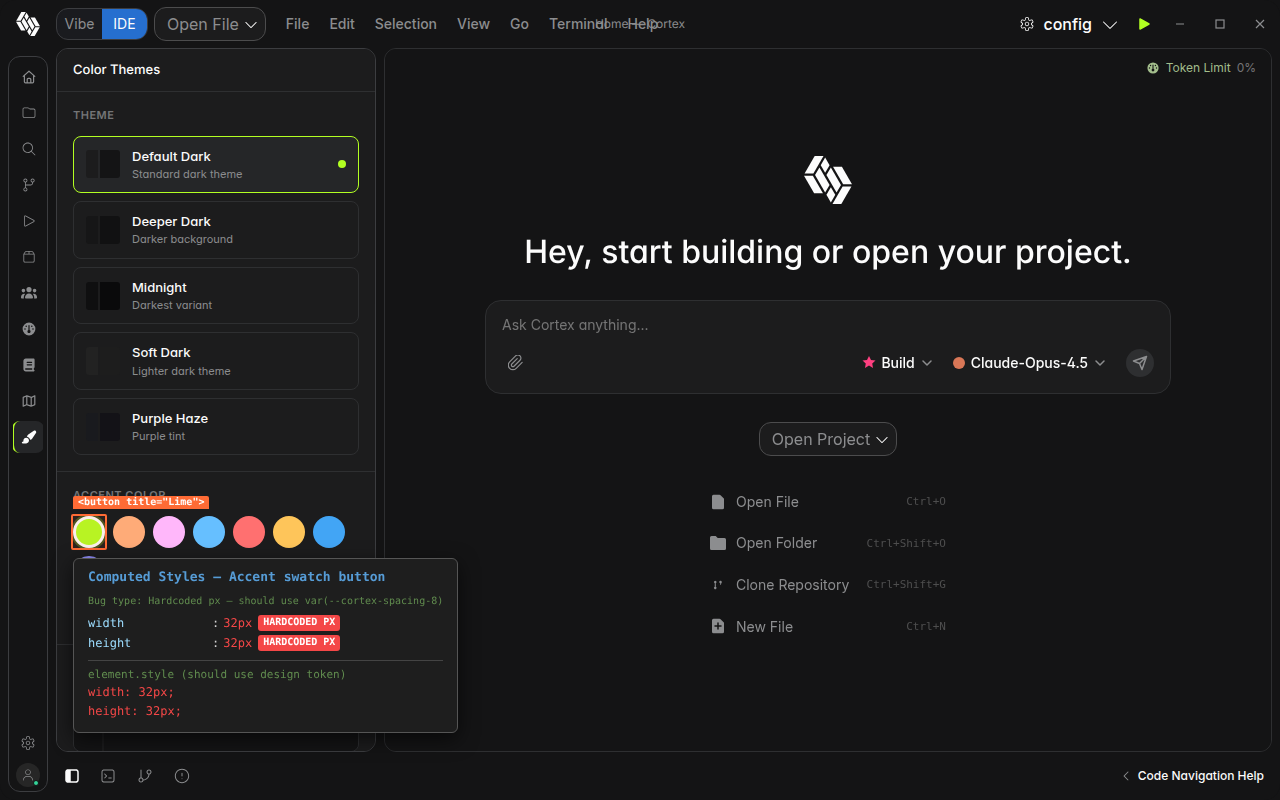
[BUG] [alpha] CortexThemePicker accent color swatch buttons use hardcoded 32px dimensions instead of spacing token #67

Description

Description
In CortexThemePicker.tsx line 57, the accent color swatch buttons use hardcoded inline width: "32px" and height: "32px" instead of the design system spacing token var(--cortex-space-8) (which equals 32px in cortex-tokens.css).
// Line 57
style={{
  width: "32px", height: "32px", "border-radius": "50%",
  background: s.color, padding: "0", cursor: "pointer",
  transition: "all 150ms ease",
  ...
}}
Hardcoded pixel values bypass the design token system, preventing consistent scaling if the spacing scale is updated globally. The custom color input on line 67 uses a different hardcoded size (28px), creating a visual inconsistency between two adjacent color selection controls.
Expected: Use var(--cortex-space-8) for the swatch dimensions, or reference the token via the tokens object.
Steps to Reproduce
- Open Cortex IDE
- Click the Themes icon in the sidebar (paintbrush icon)
- Inspect the accent color swatch buttons in the "Accent Color" section
- Observe
width: 32px; height: 32pxare set as inline styles, not via design tokens
System Information
- Cortex IDE alpha (latest)
- OS: Linux x86_64
- Browser engine: Chromium