Describe the bug
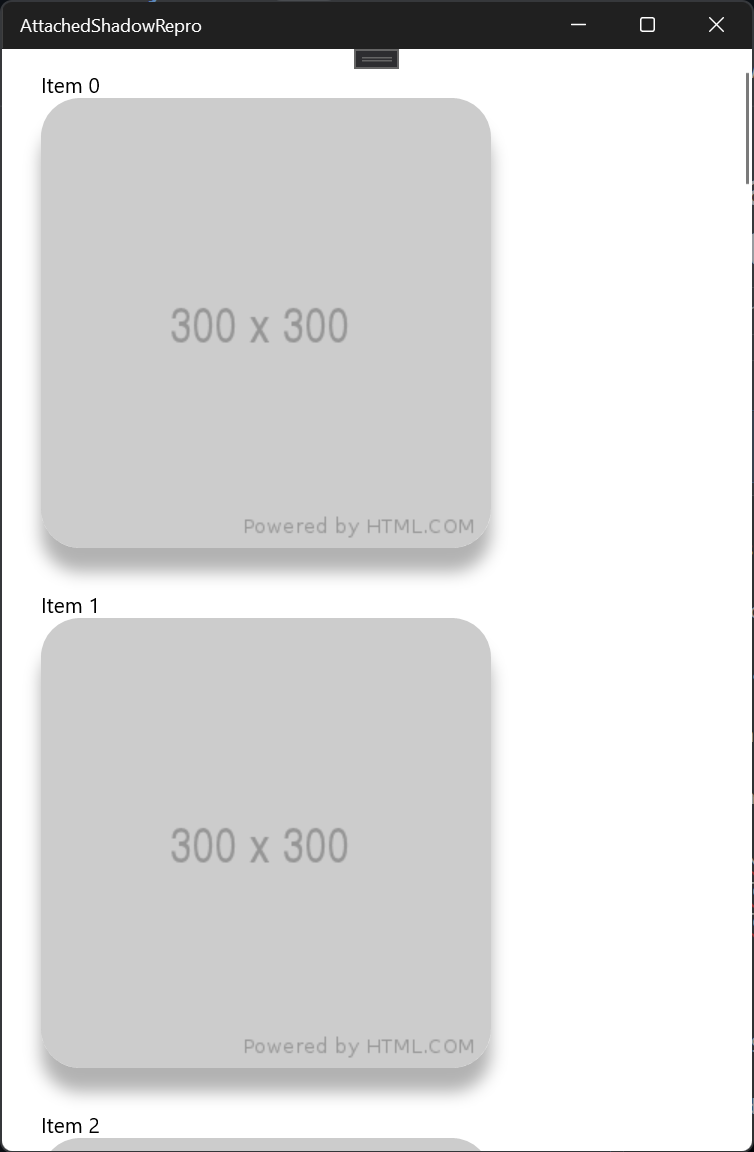
I'm trying to add a shadow to an image with rounded corners. This works as expected on Windows 11, but on Windows 10 the shadow does not appear.
<Border
    Width="300"
    Height="300"
    ui:Effects.Shadow="{StaticResource ItemShadow}"
    CornerRadius="26">
    <Border.Background>
        <ImageBrush ImageSource="{x:Bind ImageLink}" Stretch="Uniform" />
    </Border.Background>
</Border>
If I remove the CornerRadius from the Border element, the shadow will appear (but the image is no longer clipped as expected).
Steps to Reproduce
Steps to reproduce the behavior:
See https://github.com/DominicMaas/AttachedShadowsRepro. Of concern is MainPage.xaml.
Expected behavior
The image is clipped with a clipped shadow on both Windows 10 and Windows 11.
Screenshots
Windows 11
Windows 10

Environment
NuGet Package(s):
- Microsoft.NETCore.UniversalWindowsPlatform 6.2.13
- Microsoft.Toolkit.Mvvm 7.1.1
- Microsoft.Toolkit.Uwp.UI.Media 7.1.1
Windows 10 Build Number:
App min and target version:
Device form factor:
Visual Studio version:

Describe the bug
I'm trying to add a shadow to an image with rounded corners. This works as expected on Windows 11, but on Windows 10 the shadow does not appear.
If I remove the
CornerRadiusfrom the Border element, the shadow will appear (but the image is no longer clipped as expected).Steps to Reproduce
Steps to reproduce the behavior:
See https://github.com/DominicMaas/AttachedShadowsRepro. Of concern is
MainPage.xaml.Expected behavior
The image is clipped with a clipped shadow on both Windows 10 and Windows 11.
Screenshots
Windows 11
Windows 10
Environment
NuGet Package(s):
Windows 10 Build Number:
App min and target version:
Device form factor:
Visual Studio version: